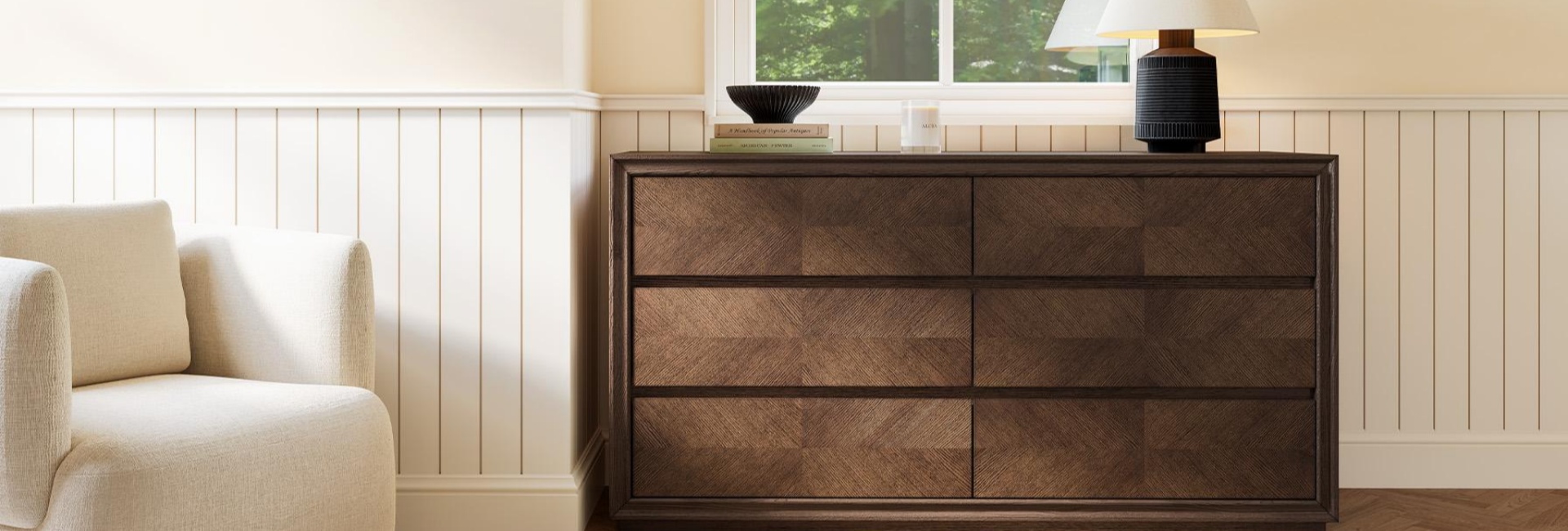
The right TV stand for a small living room should accommodate your television, provide enough storage, and leave room to move around comfortably. Floating consoles, corner stands, slim media cabinets, and low-profile designs can all help make a compact space more functional. Your choice will depend on the room's layout, available wall space, and the equipment you need to store. Below are 10 TV stand ideas for small living rooms, followed by practical advice on choosing dimensions, arranging furniture, and keeping your entertainment area organized.
Table of Contents
- 1. Floating TV Stands for an Open, Airy Look
- 2. Corner TV Stands for Unused Spaces
- 3. Slim TV Consoles for Narrow Living Rooms
- 4. Low-Profile TV Stands to Keep the Room Visually Open
- 5. Multi-Functional TV Stands With Storage
- 6. TV Stands With Vertical Storage and Built-In Shelving
- 7. Open-Shelf TV Stands for a Lightweight Look
- 8. Light-Colored and Minimalist TV Stands
- 9. Mobile TV Stands for Flexible Living Room Layouts
- 10. TV Stands With Wall-Mounted Storage
- How to Choose the Right TV Stand Dimensions for a Small Living Room
- How to Arrange and Style a TV Stand in a Small Living Room
- FAQs
- What Type of TV Stand Is Best for a Small Living Room?
- What Are the Benefits of a Floating TV Stand?
- How Deep Should a TV Stand Be in a Small Living Room?
- Should a TV Stand Be Wider Than the TV?
- Is a Corner TV Stand a Good Idea for a Small Living Room?
- How High Should a TV Stand Be in a Small Living Room?
- Are Open-Shelf or Closed-Cabinet TV Stands Better for Small Spaces?
1. Floating TV Stands for an Open, Airy Look
A floating TV stand can be a practical option when floor space is limited. Mounted directly to the wall, it keeps the area underneath clear, making the room easier to clean and reducing the visual weight of the entertainment area. This arrangement can work particularly well in apartments where a freestanding cabinet would interfere with the main walkway.
Pair the console with a wall-mounted TV to keep the screen and storage area separate. Choose a unit with enough interior space for streaming devices, remotes, and other everyday accessories. A model with one or two drawers can provide concealed storage without taking up much room.
Before installation, check these details:
-
Wall support: Identify the wall construction and use appropriate mounting hardware secured to suitable structural support. Follow the manufacturer's installation instructions and weight limits.
-
Storage capacity: Shallow floating consoles may have less interior space than freestanding cabinets. Measure your media devices before choosing one.
-
Cable access: Look for rear openings that allow power cords and HDMI cables to pass through neatly.
-
Mounting height: Position the console where you can comfortably reach its compartments while keeping the TV at a suitable viewing height.
Floating designs suit minimalist interiors, studio apartments, and living rooms where keeping the floor visible is a priority.
However, floating TV stands may offer less storage than freestanding consoles, particularly when the design has a shallow profile. They also require secure wall mounting, which may involve additional installation work depending on the wall construction. If you need to store several large media devices or prefer furniture that can be moved easily, a freestanding console may be a more practical choice.
2. Corner TV Stands for Unused Spaces
When windows, doors, or other furniture occupy the main walls, a corner TV stand can provide another location for the entertainment area. It makes use of a space that might otherwise remain empty and leaves more uninterrupted wall space for seating, shelving, or artwork.
Triangular and angled TV stands are designed to sit against two adjoining walls, allowing the screen to face diagonally into the room. This arrangement can work in a narrow living room where a conventional console would interfere with furniture placement.
For example, in a rectangular living room with a sofa along one long wall and a window opposite it, a corner TV stand near the shorter wall may create a workable viewing position without forcing the sofa into an awkward location.
Measure the stand's full footprint, including the space it occupies diagonally. Also check the viewing angle from your main seating position. A television placed too far into the corner may require viewers to turn their heads, particularly when the sofa faces another wall.
Corner placement is useful when it improves the overall layout. However, corner TV stands can limit your furniture arrangement if the available corner is too close to the main seating area or does not provide a comfortable viewing angle. Their angled shape may also offer less usable surface space than a conventional rectangular console of similar width. If you need a larger display area or more flexible furniture placement, a straight-wall TV stand may be a better option.
3. Slim TV Consoles for Narrow Living Rooms
In a small living room, the depth of a TV console can matter just as much as its width. A deep cabinet projects farther into the room, potentially reducing the space between the television and sofa or making a nearby walkway difficult to use.
A narrow TV console with a shallow profile can help preserve floor space without requiring you to mount the television on the wall. Look for a cabinet with enough surface depth to support the TV's feet or base, along with suitable room for any equipment you plan to store inside.
Slim consoles with tapered legs are another option. The visible space underneath makes the furniture appear less solid, while the raised design allows more of the floor to remain visible.
A narrow console table may also work as a TV stand, provided it has a stable top, sufficient depth, and an appropriate weight capacity. Decorative tables are not automatically designed to support televisions.
For example, the Stavn 72-Inch MCM Fluted Media Console measures 72 inches wide, 15.7 inches deep, and 23.8 inches high. Its relatively shallow depth can be useful when you have a wide enough wall but want to limit how far the furniture extends into the room.
The console features tapered legs, an American walnut finish, and fluted wood detailing. Its central drop-down cabinet has decorative Moru glass, while five rear cable cutouts provide access for connected devices. It is designed for TVs up to 75 inches.
Although its 72-inch width requires a fairly long wall, its 15.7-inch depth makes it worth considering when floor space is limited. Measure your available wall space and TV base before selecting it.
A shallow console can help preserve walkway space, but make sure its top and interior are deep enough for your TV base, soundbar, and media equipment.
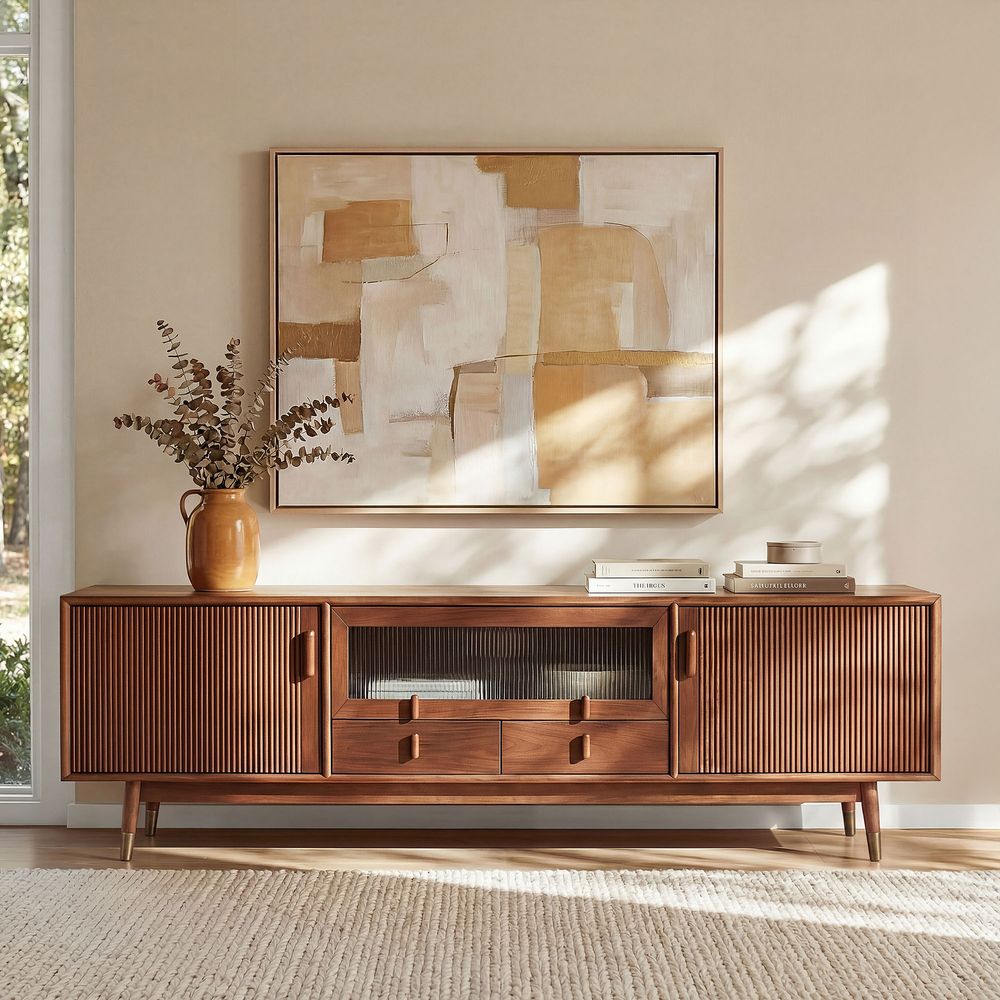
Stavn 72-Inch MCM Fluted Media Console
View Product
4. Low-Profile TV Stands to Keep the Room Visually Open
A low-profile TV stand typically has a shorter cabinet height and a horizontal silhouette. Rather than drawing attention upward with a tall entertainment center, it creates a lower visual anchor beneath the television.
This design can work well in a small living room with a low sofa, limited wall height, or minimalist furniture arrangement. A long, low console also provides a surface for a soundbar, remote controls, and a few decorative objects without introducing another tall piece of furniture.
Pairing a low TV stand with a wall-mounted television can create a streamlined arrangement. However, the screen should remain at a comfortable viewing height rather than being mounted too high to make room for decorations underneath.
To estimate a suitable height, sit on your sofa in your usual viewing position and measure your seated eye level. Consider where the center of the television screen will sit once the TV is placed on the console. The screen's dimensions and your seating arrangement will both affect the final position.
Also consider the proportions of the furniture. A very low cabinet beneath a large television may look unbalanced, while a slightly taller design may provide more useful storage. Choose a height that works for both viewing comfort and the overall layout.
5. Multi-Functional TV Stands With Storage
When a small living room needs to accommodate more than entertainment equipment, multi-functional furniture can reduce the number of separate pieces you need. A TV stand with storage may replace an additional cabinet or chest, provided its dimensions and layout suit your room.
TV Stands With Drawers and Cabinets
A media console with drawers or enclosed cabinets provides space for remotes, charging accessories, board games, and other household essentials. Open compartments can hold devices that need regular access, while closed storage keeps smaller items out of sight.
Choose a layout that separates frequently used equipment from items you rarely need. This helps you make better use of the available storage without adding another cabinet to the room.
Fireplace TV Stands
An electric fireplace TV stand combines an entertainment surface with a decorative fireplace feature. It may suit a living room where you already want a fireplace-style focal point but do not have room for a separate unit.
Check the overall dimensions, weight capacity, and the manufacturer's clearance and installation requirements. Fireplace consoles can have deeper or bulkier structures than standard media cabinets, so the additional function does not necessarily mean a smaller footprint.
Dressers and Storage Chests as TV Stands
A compact dresser or accent chest can also serve as a television base. This option is worth considering when you need enclosed storage but prefer a different furniture style.
Before placing a TV on a dresser or chest, check its top dimensions, weight capacity, stability, and height. Not every storage cabinet is designed to support electronic equipment.
For a storage-focused option, consider the Thursen 72-Inch Chevron Media Console. Measuring 72 inches wide, 18 inches deep, and 25 inches high, it provides an interior storage area with adjustable shelves. These allow you to arrange the space around items of different heights, such as media players, gaming accessories, and household essentials.
The console combines American solid oak and engineered wood with oak veneers. Its chevron-patterned front adds a geometric detail to the natural wood finish. Four rear cable cutouts provide access for connected devices, and the console is designed for TVs up to 75 inches.
Its 72-inch width and 18-inch depth require enough wall and floor space, so measure the intended area before choosing this console for a compact living room.
The main consideration with multi-functional furniture is to prioritize the features you actually use. A cabinet with numerous compartments is not necessarily a better choice if it takes up too much room or leaves storage areas unused.
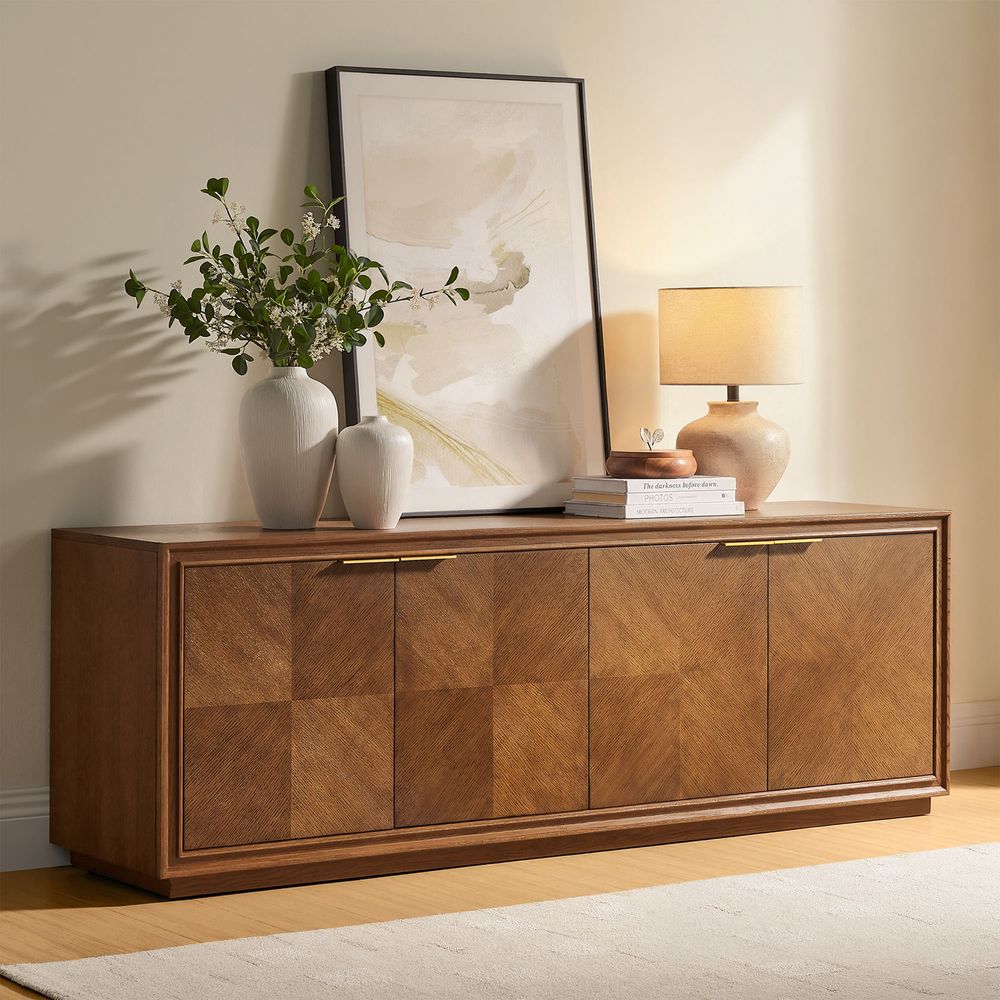
Thursen 72-Inch Chevron Media Console
View Product
6. TV Stands With Vertical Storage and Built-In Shelving
When a small living room lacks floor space for additional cabinets, using the wall's vertical space can provide more storage without extending furniture farther into the room.
A tall, narrow TV cabinet is one option. It combines a television surface with additional shelves or enclosed compartments above or beside the main console. This arrangement can work well when the available wall is relatively narrow but has enough height for additional storage.
Bookcase-style TV stands offer another approach. A central area accommodates the television, while shelves on either side provide space for books, speakers, decorative objects, and media accessories. Ladder-style shelving, with progressively narrower shelves toward the top, can provide a less bulky alternative.
You can also combine a separate TV console with wall-mounted shelves. This gives you more control over the placement of each component and avoids committing to one large entertainment center.
To keep vertical storage from overwhelming the room:
-
Choose narrow side shelves rather than deep bookcases that project too far into the seating area.
-
Keep frequently used electronics within easy reach.
-
Use closed compartments for items that would otherwise clutter open shelves.
-
Secure tall, freestanding furniture to the wall using appropriate anti-tip hardware.
Keep the lower part of the entertainment area relatively simple. Too many shelves and decorative objects can make the wall feel crowded, even when the furniture has a small footprint.
7. Open-Shelf TV Stands for a Lightweight Look
An open-shelf TV stand can make a small living room feel less visually crowded than a solid cabinet with large enclosed sections. Its exposed compartments allow more of the surrounding wall and floor to remain visible.
This style also provides convenient access to media equipment. Gaming consoles, streaming boxes, speakers, and routers can be placed on accessible shelves without opening cabinet doors whenever you need them.
Common designs include:
Open-Shelf Consoles: These have exposed shelves beneath the TV surface. They provide straightforward access to devices and accessories but require regular organization.
Glass-Shelf TV Stands: Glass shelves can create a visually lighter appearance, particularly when combined with slim metal or wood frames. Check the manufacturer's weight limits and cleaning recommendations before placing heavy equipment on them.
Mixed Open and Closed Storage: A console with open compartments and enclosed side cabinets provides a place for frequently used devices while keeping smaller accessories out of sight.
Ventilation is another factor to check, especially when storing gaming consoles, receivers, or other electronics. Follow the equipment manufacturer's recommendations for clearance and airflow. Do not assume that every device can be placed inside an enclosed cabinet without additional space.
Open shelving requires a little more attention to organization. A few neatly arranged objects can make the TV area feel intentional, while too many visible accessories may make it look cluttered. If you prefer a cleaner appearance, a combination of open shelves and concealed cabinets can be a practical choice.
8. Light-Colored and Minimalist TV Stands
The color and visual design of a TV stand can influence how spacious a small living room feels. Large, dark, heavily detailed furniture can become a strong focal point, while lighter finishes and simpler shapes often blend more easily into compact interiors.
White TV stands are a common choice for bright, contemporary living rooms. When paired with white or warm-neutral walls, they can create a continuous visual effect rather than introducing another strong block of color.
Light wood TV stands offer a different approach. Oak, ash, and other pale wood finishes show natural grain while keeping the overall look relatively understated. They work well with neutral upholstery, light-colored rugs, and simple decorative accessories.
Glass and mirrored finishes are also worth considering. Their reflective surfaces interact with natural and artificial light, although they may require more frequent cleaning to remove fingerprints and dust.
Choose a finish that works with the materials already present in your room. For example:
-
A white console can complement white walls, light upholstery, and simple black accents.
-
A light oak media cabinet can balance a neutral sofa and warm wood flooring.
-
A black or dark walnut console can work well against a darker TV wall, visually connecting the screen and furniture.
Minimalist styling is just as important as color. Clean lines, subtle hardware, and uncomplicated cabinet fronts can help a media console fit naturally into a compact interior.
9. Mobile TV Stands for Flexible Living Room Layouts
Some small living rooms serve several purposes. They may function as an entertainment area in the evening, a workspace during the day, and an open play area at other times. In these situations, a mobile TV stand can provide more flexibility than a fixed console.
Rolling TV stands with wheels allow you to reposition the television when the furniture arrangement changes. You might move the screen closer to the seating area for movie nights or shift it toward another wall when you need to open up the main living space.
When choosing a mobile design, pay attention to more than the wheels themselves.
-
Check the Base and Weight Capacity: The stand needs to support the television and any additional equipment securely. Compare its rated capacity with the combined weight of everything it will hold.
-
Look for Locking Wheels: Lockable casters help prevent the stand from moving during use. Check that the wheels can be secured properly.
-
Consider Cable Length: A mobile TV setup needs sufficient cable length for the intended movement. Avoid pulling power or HDMI cables tight when repositioning the stand.
-
Check the Screen Mount: If the stand includes an adjustable TV mount, confirm that its supported screen sizes, weight limits, and mounting pattern match your television.
A mobile TV stand may not be necessary when the television always faces the same sofa. A conventional console may offer more enclosed storage and a furniture-like appearance in that situation. Choose mobility when you will genuinely use it.
10. TV Stands With Wall-Mounted Storage
If your living room needs both a TV stand and additional display space, combining a lower console with wall storage can create a more organized entertainment area.
Instead of placing a large entertainment center against the wall, start with a TV console and add a few floating shelves above or beside it. This arrangement uses vertical space while allowing you to control how much furniture occupies the room.
One approach is to install matching shelves on either side of the television. Books, framed photographs, small plants, and decorative objects can be displayed without requiring another freestanding cabinet.
Another option is to create a gallery wall around the television. Framed artwork can help connect the screen with the rest of the room's decor, while a simple media console underneath provides a visual anchor.
For a more customized appearance, consider built-in shelving around the TV area. Plan the design around the available wall dimensions, electrical outlets, and television size. Floor-to-ceiling cabinetry can provide considerable storage, but a heavily enclosed design may make a small room feel crowded.
A balanced arrangement might include:
-
A low media console beneath the television for everyday storage.
-
One or two floating shelves for books and decorative objects.
-
A limited number of decorative accents to keep the wall from feeling overcrowded.
You do not need to fill every available section of wall with another shelf. Leave enough open space for the television and surrounding furniture to remain visually distinct.
How to Choose the Right TV Stand Dimensions for a Small Living Room
Even a well-designed TV stand can make a small living room feel cramped if its dimensions do not suit the available space. Before choosing a style or finish, measure the television, the wall, and the surrounding floor area.
Measure the Available Wall Width
Start by measuring the uninterrupted wall section where you intend to place the TV stand. Account for windows, door frames, radiators, electrical outlets, and nearby furniture.
The console should be proportionate to both the television and the wall. A stand that extends almost from one end of the wall to the other may leave the room looking crowded.
Usually, a console slightly wider than the actual TV screen often creates a balanced appearance. Some furniture sizing guides suggest leaving approximately 2–3 inches of extra width on each side, but this is a design guideline rather than a universal requirement. The television's feet or base may determine the minimum usable surface width.
Remember that TV sizes are measured diagonally, not horizontally. A 55-inch television is not 55 inches wide. Check the manufacturer's actual product dimensions before purchasing a console.
Compare TV Stand Width and Depth
Width determines how much wall space the furniture occupies, while depth determines how far it projects into the room. In a narrow living room, depth can be particularly important because a deeper console may reduce the space between the cabinet, coffee table, and sofa.
A shallow console is not always the best option if the TV base or media equipment cannot fit properly. Prioritize enough functional depth over a narrow cabinet that creates everyday inconvenience.
Choose a Comfortable TV Stand Height
TV stand height affects the overall viewing position. A cabinet that is too tall can place the screen above a comfortable viewing angle, particularly when you are sitting close to the television in a compact room.
To estimate a suitable height, measure from the floor to your eyes while sitting naturally on the main sofa. Then consider where the center of the television screen will sit once the TV is placed on the console.
For wall-mounted televisions, positioning the screen's center near seated eye level can be a useful starting point. Adjust the position according to your seating arrangement, screen dimensions, and viewing preferences.
Consider the height of the console, TV feet, and screen together rather than selecting a cabinet based on its height alone.
Check Storage and Equipment Dimensions
Before purchasing, list the items you intend to keep inside or on top of the console. These might include:
-
A gaming console or streaming device.
-
A soundbar or speaker system.
-
A router or cable box.
-
Remotes, controllers, and charging accessories.
Measure the largest devices, including the space needed for plugs and cables. Compare those dimensions with the internal width, depth, and height of the TV stand's compartments.
Also check the manufacturer's weight capacity and any ventilation requirements for electronic devices.
For more detailed measurements and fitting considerations, see Hernest's guide on how to choose a small TV stand that fits your living room.
How to Arrange and Style a TV Stand in a Small Living Room
Choosing the right TV stand is only part of creating a functional entertainment area. Its position, surrounding furniture, and decorative details also influence how much usable space remains.
Position the TV Stand Along a Suitable Wall
For a conventional rectangular living room, placing the TV stand against a suitable wall is often the simplest arrangement. It creates a clear focal point and allows the sofa to face the television without requiring an unusual furniture layout.
Consider windows, doors, electrical outlets, and natural light before deciding where the screen should go. A television positioned directly opposite a bright window may experience distracting reflections during daytime viewing.
If the main wall is unavailable, consider a corner arrangement or a wall-mounted television with a slim console underneath.
Keep TV Stand Decorations Simple
In a small living room, decorating every available surface can quickly create visual clutter. Choose a few accessories that complement the furniture without competing with the television.
For example, arrange two or three hardcover books beside a small ceramic vase, or place a compact plant at one end of the console. If the TV stand has open shelving, use matching baskets to organize smaller accessories.
Leave enough clear surface space for practical items such as a soundbar or remote controls. Decorations should complement the entertainment setup rather than make it harder to use.
Organize Cables and Media Accessories
Visible cables can make an otherwise organized TV area look messy. Use the rear cable cutouts provided by the furniture and group cords together with reusable cable ties or sleeves.
For wall-mounted televisions, consider a suitable cable-management channel to conceal wiring between the screen and the console. Make sure any installation method complies with applicable electrical requirements.
Keep power strips and electronic devices accessible, and avoid overcrowding enclosed compartments. Ventilation openings should remain clear, and device manufacturers' airflow recommendations should be followed.
FAQs
What Type of TV Stand Is Best for a Small Living Room?
The right type depends on your room layout and storage requirements. Floating TV stands work well when floor space is limited, while slim consoles are useful for narrow layouts. Corner stands can make use of otherwise unused space, and models with drawers or cabinets provide additional storage without requiring separate furniture.
What Are the Benefits of a Floating TV Stand?
Floating TV stands leave the floor underneath the console clear, which can make a small room feel less crowded and simplify cleaning. They also provide a place for media devices and everyday accessories. However, they require secure wall installation and may offer less storage than a freestanding cabinet.
How Deep Should a TV Stand Be in a Small Living Room?
A depth of approximately 12–16 inches can be a useful starting point for many compact living rooms. The right measurement depends on the TV base, soundbar, media devices, and cable connections. Check the usable interior dimensions rather than choosing a console based on its external depth alone.
Should a TV Stand Be Wider Than the TV?
Generally, a TV stand that is slightly wider than the television creates a balanced appearance. More importantly, the surface must fully support the TV's feet or base. Check the actual TV dimensions and foot placement instead of relying only on the advertised screen size.
Is a Corner TV Stand a Good Idea for a Small Living Room?
Yes, particularly when the main walls are occupied by windows, doors, or other furniture. A corner stand can turn unused space into a functional entertainment area. Check the viewing angle from the sofa and make sure the angled cabinet does not interfere with nearby walkways.
How High Should a TV Stand Be in a Small Living Room?
The appropriate height depends on the television's dimensions and your seated eye level. Positioning the center of the screen near eye level when sitting on your main sofa can be a useful starting point. Consider the height of the console, TV feet, and screen together rather than choosing a cabinet based on its height alone.
Are Open-Shelf or Closed-Cabinet TV Stands Better for Small Spaces?
Open shelves provide easy access to media equipment and create a less enclosed appearance, but they expose devices and accessories to view. Closed cabinets hide clutter, although electronic equipment may need additional ventilation. A combination of open and closed storage can offer a practical balance.