
A TV wall can look tidy when the screen is mounted, but add a soundbar, streaming box, game console, remotes, and a handful of cables, and the setup can get messy fast. A tv stand with storage gives all of those pieces a place while creating a finished base for the screen.
The right choice comes down to a few practical details: the stand should be wider than your TV, deep enough for your equipment, and organized around what you actually need to store. You also need to decide whether cabinets, drawers, open shelves, or a combination works best for your room.
Table of Contents
- Quick Answer: What Makes a Good TV Stand With Storage?
- Why Choose a TV Stand With Storage?
- TV Stand With Cabinets vs. Open Shelves: Which Is Better?
- TV Stand With Drawers: When Are They Worth It?
- What Size TV Stand With Storage Do You Need?
- How Deep Should a TV Stand With Storage Be?
- How Tall Should a Storage TV Stand Be?
- Which Material Is Best for a TV Stand With Storage?
- Living Room TV Stand With Storage: Style and Placement
- Cable Management and Ventilation
- How Much Does a TV Stand With Storage Cost?
- Bottom Line
- FAQs
- What are the best TV stands with storage?
- Are TV stands with storage expensive?
- What are the best materials for a durable TV stand with drawers?
- Are drawers or cabinets better for a TV stand?
- How do I choose the right size TV stand with storage?
- Can a TV stand with storage hold a 65-inch TV?
- How deep should a TV stand with storage be?
- How do I hide cables with a TV stand that has cabinets and drawers?
- What's the difference between a TV console with storage and a regular TV stand?
Quick Answer: What Makes a Good TV Stand With Storage?
A good tv stand with storage should do three things well: support the TV, hide everyday clutter, and give your electronics enough space for cables and ventilation.
For most living rooms:
Choose a stand that is at least 3–6 inches wider than the TV on each side for balanced proportions.
A 65-inch TV is roughly 57 inches wide, so a stand around 63–70 inches wide is a practical starting point.
A 75-inch TV is roughly 65 inches wide, so look for a stand around 70–78 inches wide.
Choose cabinets for clutter and bulky equipment, drawers for smaller accessories, and open or slatted sections for devices that need easy access or airflow.
Check the stand's depth, weight capacity, shelf dimensions, and cable openings before ordering.
Solid oak offers long-term durability, while well-made engineered wood can be a practical choice when budget or weight matters.
The best TV stand is not simply the one with the most storage. It is the one that gives each part of your entertainment setup a logical place without making the room feel overloaded.
Why Choose a TV Stand With Storage?
A basic TV stand only needs to support the screen. A storage console has a bigger job: it organizes the equipment and everyday items that gather around the TV.
Think about what normally ends up around a television:
Streaming devices and game consoles
Remotes and controllers
HDMI and charging cables
DVDs or game cases
Books and magazines
Board games and small electronics
Speakers or a soundbar
Decor that helps the TV wall feel less bare
Without storage, these items tend to collect on the floor, coffee table, or top of the console. Cabinets and drawers give them a designated place.
Storage also lets you separate things by how often you use them. Keep frequently used remotes and controllers in a drawer, larger equipment behind cabinet doors, and decorative pieces on an open shelf.
That is why a tv stand with storage can work as more than a TV base. It becomes the organizing piece for the entire entertainment area.
TV Stand With Cabinets vs. Open Shelves: Which Is Better?
The biggest storage decision is whether you want your belongings hidden or visible.
Neither option is automatically better. It depends on what you store, how often you access it, and how much visual clutter you want in the room.
When Closed Cabinets Make Sense
A tv stand with cabinets is the better choice when most of what you need to store is something you would rather not see.
Cabinet doors can hide:
Game consoles and accessories
Streaming equipment
Remotes and controllers
Board games
Cables and power strips
Books and other everyday clutter
Closed storage also creates a cleaner visual line across the TV wall. Instead of seeing several small objects, you see a continuous furniture surface.
Cabinets are especially useful in homes with children or pets because they can keep small accessories and electronics out of easy reach.
Before choosing a fully enclosed console, however, check how the doors and back panel are designed. Electronics need airflow, and devices that rely on infrared remotes may work better behind slatted, mesh, or other signal-friendly fronts.
When Open Shelves Work Better
Open shelving makes sense when you want quick access or enjoy displaying what you own.
It works well for:
Soundbars
Turntables
Books
Speakers
Decor
Gaming equipment you use frequently
Open shelves also make electronics easier to access and can provide better airflow around warm-running devices.
The trade-off is simple: everything stays visible. That means cables need to be organized, and the shelves need regular dusting.
Cabinets vs. Open Shelves at a Glance
If you want the advantages of both, look for a hybrid layout. Cabinets can handle the visual clutter, while a few open niches keep frequently used equipment accessible.
TV Stand With Drawers: When Are They Worth It?
Drawers are particularly useful for the small items that are easy to lose.
Remotes, controllers, batteries, charging cables, game cases, and other accessories do not need a large cabinet. A shallow drawer gives each category a place without making you dig through a deep compartment.
Drawers vs. Cabinets for Everyday Items
Cabinets are better for larger objects. Drawers are better for smaller ones.
For example:
Cabinets: game consoles, routers, board games, books, larger accessories
Drawers: remotes, controllers, batteries, charging cables, small accessories
A combination of the two is often the most practical arrangement for a living room.
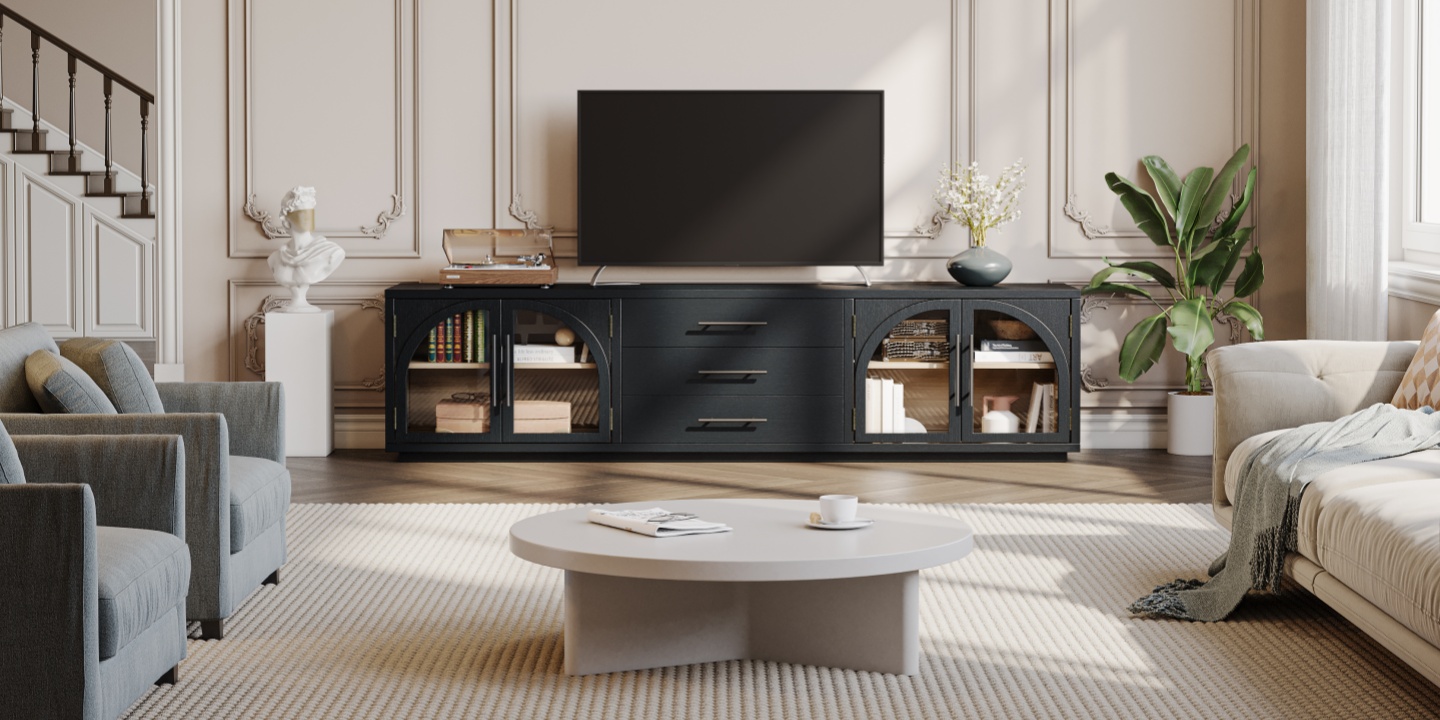
The Valborg 80" Black Oak TV Stand is one example. It combines two cabinets with three drawers, giving larger equipment an enclosed space while keeping smaller accessories organized.
What to Look for in TV Stand Drawers
Construction matters when drawers will be opened every day.
Look for:
Dovetail joints
Smooth drawer slides
Soft-close hardware
Adequate drawer depth
A drawer box that feels solid rather than flimsy
Dovetail joinery is particularly useful for drawers because the interlocking corners provide a strong mechanical connection. Soft-close hardware is less about appearance and more about everyday use: drawers close quietly and with less impact on the furniture.
What Size TV Stand With Storage Do You Need?
Size is one of the easiest places to make a mistake.
The number used to describe a TV—55, 65, 75, or 85 inches—is its diagonal screen measurement, not its actual width. Your TV stand needs to be sized according to the TV's physical width and the placement of its feet.
TV Size and Recommended Stand Width
As a general starting point:
These ranges are guidelines rather than hard rules. Always measure the actual width of your TV and check the distance between its feet before choosing a stand.
A wider console usually creates a more balanced composition because the furniture extends beyond the screen on both sides. It also gives you room for a soundbar, speakers, books, or decor.
How Wide Should a TV Stand Be for a 65-Inch TV?
A typical 65-inch TV is about 57 inches wide. A stand around 63–70 inches wide gives you several inches of furniture extending beyond each side of the screen.
If your TV has wide-set legs, measure the distance between them as well. The stand top needs to support both feet securely rather than simply being wider than the screen.
How Wide Should a TV Stand Be for a 75-Inch TV?
A typical 75-inch TV is about 65 inches wide. A 70–78 inch TV stand is a practical range for many setups.
If you plan to place a soundbar or speakers beside the TV, choosing a slightly wider console can give you more usable surface area.
How Deep Should a TV Stand With Storage Be?
Depth matters just as much as width, especially when the console will hold electronics.
A storage TV stand needs enough depth for the equipment inside, but excessive depth can make a small room feel crowded.
Before buying, measure:
The depth of your game console, receiver, or other equipment.
The depth of the TV stand's shelves or cabinet compartments.
The space needed for cables behind the equipment.
The clearance required for doors or drawers to open fully.
For a living room with limited floor space, a shallower console can help maintain clear walking paths. For a larger entertainment setup, a deeper console may provide more usable storage.
Do not assume that the outside depth of the furniture equals the usable interior depth. Back panels, doors, and cable space can reduce the room available for equipment.
How Tall Should a Storage TV Stand Be?
TV stand height is mostly about viewing comfort and room proportions.
Many modern TV consoles are around 24–30 inches tall, but the right height depends on your TV and seating position.
For comfortable viewing, the center of the screen should be close to your seated eye level. If the console is too tall, you may end up looking upward. If it is too low, the screen can feel disconnected from the furniture.
Low, wide consoles generally work well with modern flat-screen TVs because they keep the screen as the visual focus while giving the TV wall a longer horizontal line.
Which Material Is Best for a TV Stand With Storage?
Material affects durability, appearance, weight, and maintenance.
The two broad categories you'll encounter most often are solid wood and engineered wood.
Solid Oak
Solid oak is a strong choice for a TV stand you expect to keep for years.
It has a natural grain, handles everyday wear well, and can be refinished if the surface is damaged over time. Oak also works across several interior styles, including mid-century modern, Scandinavian, transitional, and contemporary rooms.
The main trade-off is weight. Solid oak furniture can be substantially heavier than engineered-wood alternatives, which is worth considering if you move frequently.
For a large living room, the weight can also be an advantage because a substantial console feels stable under a large TV.
Engineered Wood and MDF
Engineered wood and MDF can offer a more accessible alternative.
A well-made engineered-wood console with a durable veneer can provide a clean appearance while keeping weight and cost lower than a comparable solid-wood piece.
The main consideration is moisture. Exposed or poorly protected edges can be more vulnerable to swelling if water gets into the core.
For a primary living room where you want furniture to last through several TV upgrades, solid wood may be worth prioritizing. For a guest room, apartment, or budget-conscious setup, well-constructed engineered wood can make sense.
What About Veneer?
A veneer is a thin layer of real wood applied over another material. Quality veneer can provide genuine wood grain while using less solid lumber.
The important thing is to look at the complete construction, not just whether a product description says "wood." Check what the frame, doors, shelves, and drawer boxes are actually made from.
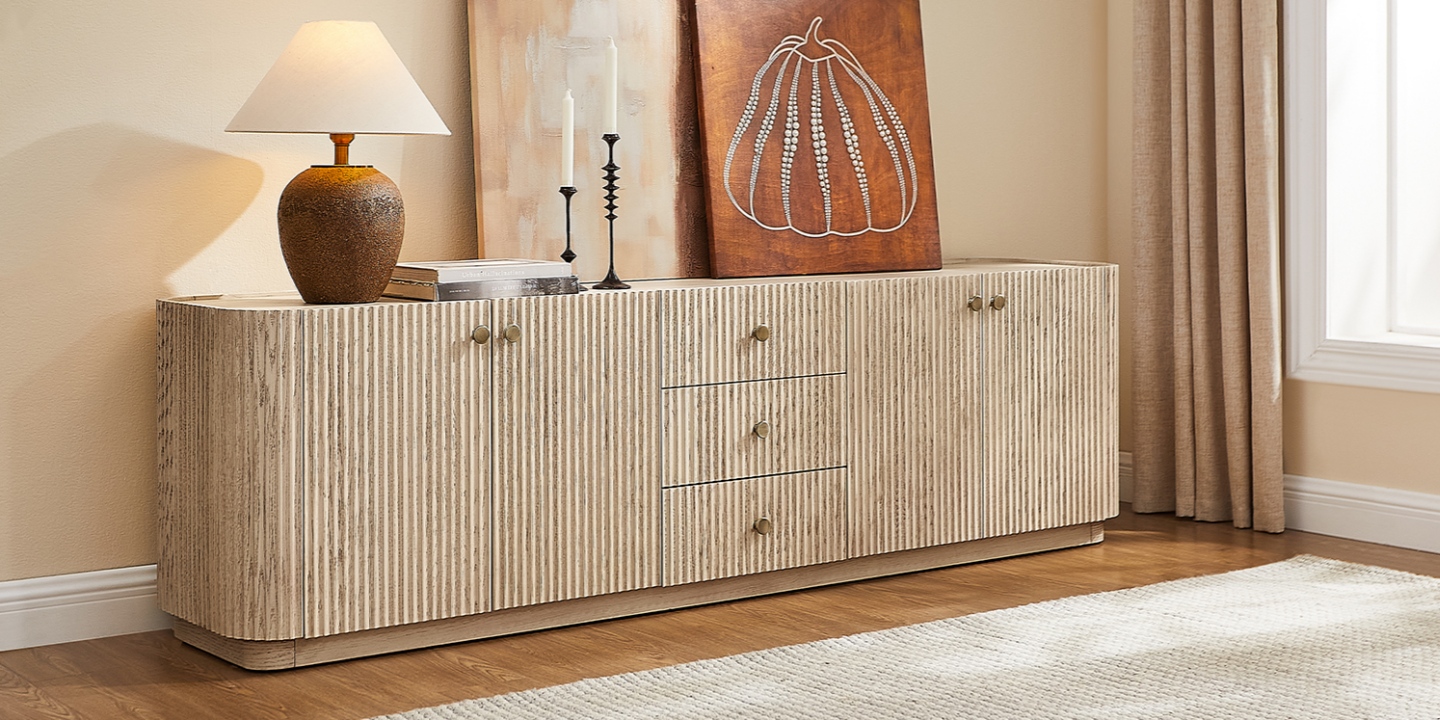
The Skimra 84" Oak Media Console, for example, combines American solid oak and engineered wood with oak veneers. Its design includes three drawers, adjustable shelves, and four cord cutouts for a large entertainment setup.
Living Room TV Stand With Storage: Style and Placement
A storage console should solve a practical problem without making the room feel overly functional.
Matching a Mid-Century Modern Room
Mid-century modern interiors usually work well with:
Low profiles
Warm wood tones
Tapered or raised legs
Simple hardware
Clean horizontal lines
An arched cabinet front can add some visual character without overwhelming the TV.
Keep the top relatively restrained. A small plant, a stack of books, or one decorative object can be enough. The storage underneath should handle the rest.
Making a Small Room Feel More Open
Storage furniture can look bulky in a small room, but several details can help.
Choose:
A low profile
A lighter wood finish
Raised legs
A shallower depth
A clean front with limited visual clutter
Raised legs allow more of the floor to remain visible, which can make the furniture feel lighter.
If floor space is especially limited, a narrower or floating-style media console can also reduce the visual weight of the TV wall.
Narrow TV Stands for Smaller Spaces
A narrow TV stand with storage can work particularly well in apartments, bedrooms, and compact living rooms.
The key is to distinguish between narrow width and shallow depth. A console can be long enough for a large TV while remaining relatively shallow from front to back.
If your room has limited walking space, measure the distance from the front edge of the console to the main traffic path before ordering.
Cable Management and Ventilation
Storage does not automatically mean an organized media setup. Cable management is what makes the difference.
Look for Rear Cable Cutouts
Rear cord cutouts let you route HDMI, power, and other cables through the back of the console instead of leaving them hanging over the furniture.
For a media console, check where the openings are located. Ideally, the cutouts should align with the storage sections where you plan to keep electronics.
A good cable setup usually follows a simple path:
TV → cable opening → device → power source
Keeping the route short makes it easier to troubleshoot or replace equipment later.
Consider Remote Signals
If a streaming box or other device uses an infrared remote, a completely solid cabinet door can interfere with the signal.
In that situation, consider:
Open shelving
Slatted doors
Louvered doors
Mesh fronts
Keeping the device near the front of the cabinet
A slatted TV stand can be a useful middle ground because it keeps much of the equipment visually contained while allowing more airflow and easier signal access.
Leave Room for Heat
Electronics generate heat, and enclosed storage can restrict airflow.
Do not pack a cabinet tightly around a receiver, game console, or other heat-producing device. Leave the clearance recommended by the equipment manufacturer and use cable openings to keep the back of the compartment from becoming completely sealed.
Adjustable shelves can help you create more useful space around larger components.
How Much Does a TV Stand With Storage Cost?
The price of a storage TV stand depends primarily on its size, construction, material, and hardware.
As a broad guide:
Budget: Smaller MDF or particleboard units with basic shelving
Value: Engineered wood with drawers, cabinets, and cable openings
Mid-range: Larger consoles with enclosed storage, adjustable shelving, and better hardware
Premium: Solid hardwood, larger dimensions, refined joinery, and more detailed construction
Instead of choosing solely by price, compare what you are getting for the money.
For a long-term purchase, pay particular attention to:
Material
Drawer construction
Hardware
Shelf adjustability
Cable management
Weight capacity
Overall dimensions
A cheaper console can make sense if your setup is simple. If the piece will hold a large TV, multiple electronics, and years of everyday use, construction quality becomes more important.
Bottom Line
The best tv stand with storage is wide enough for your TV, deep enough for your equipment, and organized around how you actually use the room.
Choose cabinets when you want to hide clutter, drawers when you need quick access to small items, and open or slatted sections for equipment that needs airflow or remote access. Before buying, measure the TV itself, the foot placement, your equipment depth, and the available wall space.
A well-chosen storage console should make the entertainment area easier to use every day—not simply give the TV somewhere to sit.
FAQs
What are the best TV stands with storage?
The best TV stands with storage match the size of your TV, provide enough space for your electronics and accessories, and offer practical cable management. For many living rooms, a console wider than the TV with a combination of cabinets and drawers provides a good balance of hidden and accessible storage.
Are TV stands with storage expensive?
They do not have to be. Smaller engineered-wood units can be relatively affordable, while larger consoles made from solid hardwood typically cost more. Compare material, construction, hardware, storage capacity, and dimensions rather than choosing based on price alone.
What are the best materials for a durable TV stand with drawers?
Solid hardwood, including oak, is a strong choice for long-term durability. Well-made engineered wood can also perform well when properly constructed and protected from moisture. For drawers, look for sturdy drawer boxes, dovetail joints, and reliable slides.
Are drawers or cabinets better for a TV stand?
Cabinets are better for larger equipment and items you want completely hidden. Drawers work better for smaller accessories such as remotes, controllers, batteries, and cables. A combination of drawers and cabinets is often the most flexible arrangement.
How do I choose the right size TV stand with storage?
Start by measuring your TV's actual width rather than using its diagonal screen size. A good starting point is to choose a console that extends about 3–6 inches beyond each side of the TV. Then check the TV feet, console depth, storage dimensions, and available wall space.
Can a TV stand with storage hold a 65-inch TV?
Yes, provided the stand is designed to support the TV's weight and is wide enough for its feet. A typical 65-inch TV is about 57 inches wide, so a stand around 63–70 inches wide is a practical starting range. Always check the manufacturer's weight capacity before placing the TV on the console.
How deep should a TV stand with storage be?
The right depth depends on your equipment and room layout. Measure your deepest device, then allow additional space for cables and ventilation. A shallower console can work well in a small room, while deeper storage may be useful for larger receivers and gaming equipment.
How do I hide cables with a TV stand that has cabinets and drawers?
Look for rear cable cutouts positioned near the storage sections where you will keep your electronics. Route power and HDMI cables through the openings instead of over the back or side of the console. If an enclosed cabinet contains an infrared-controlled device, consider a slatted, mesh, or open front.
What's the difference between a TV console with storage and a regular TV stand?
A regular TV stand mainly provides a surface for the television. A TV console with storage is designed to organize the wider entertainment area with cabinets, drawers, shelves, or a combination of them. Consoles are often longer and lower, making them useful for anchoring a TV wall.