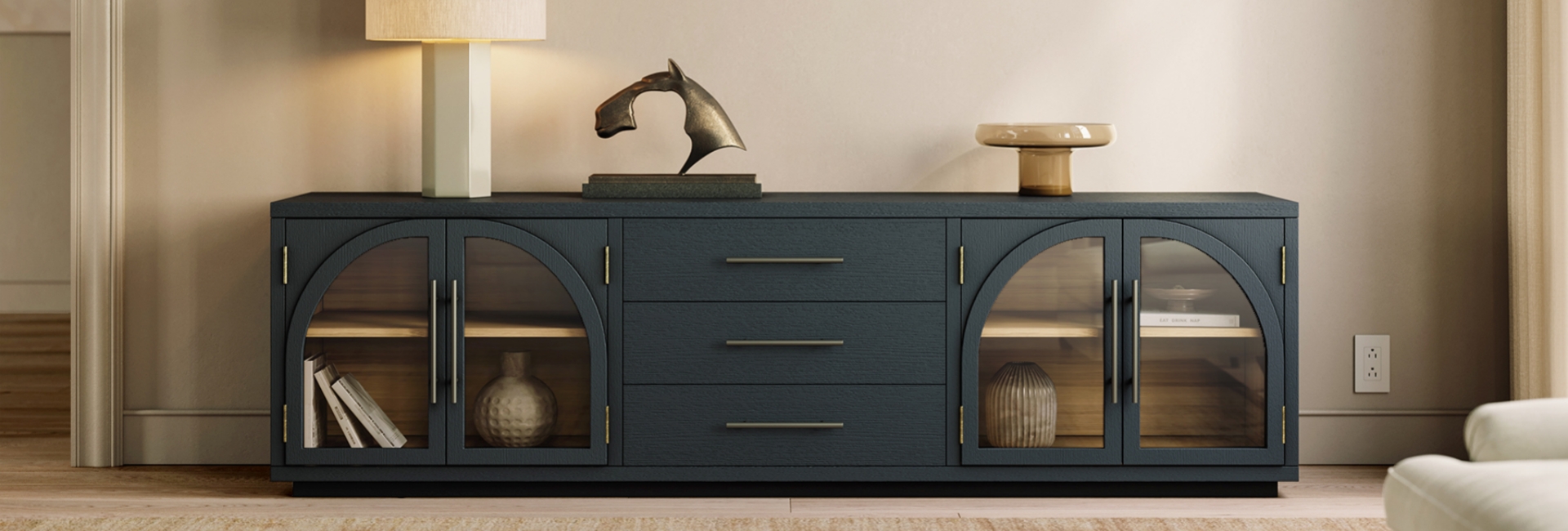
A large TV stand does more than hold a big screen. It also has to fit the wall, support the TV and other equipment, manage cables, and provide enough storage without making the room feel crowded.
For an 85-inch TV, those details become especially important. The screen is roughly 74 to 75 inches wide, but that does not mean a 75-inch console is automatically the right choice. You also need to consider the TV's foot placement, the console's depth and weight capacity, viewing height, and how much equipment you plan to store.
This guide breaks down the measurements that matter, the main types and materials, cable-management options, and ways to match a large TV stand to your room. We'll also look at a few examples from the Hernest media console collection.
Table of Contents
- Quick Answer: What Size Large TV Stand Do You Need?
- How Wide Should a Large TV Stand Be for an 85-Inch TV?
- How Tall Should a Large TV Stand Be?
- How Much Weight Should a Large TV Stand Hold?
- The Main Types of Large TV Stands
- What Materials Are Large TV Stands Made Of?
- How to Manage Cables on a Large TV Stand
- How to Match a Large TV Stand to Your Room
- Style: Mid-Century Modern, Modern, and Beyond
- A Simple Large TV Stand Buying Checklist
- Where to Start
- FAQs
- How big does a TV stand need to be for an 85-inch TV?
- How do I choose the right large TV stand?
- What are the different types of large TV stands?
- What materials are large TV stands made of?
- How should I organize cables on a large TV stand?
- How tall should a large TV stand be?
- How much weight can a large TV stand hold?
- Should a TV stand be wider than the TV?
- Can a large TV stand work as a buffet or room divider?
Quick Answer: What Size Large TV Stand Do You Need?
For an 85-inch TV, a TV stand around 80 to 90 inches wide is a practical starting range. An 84-inch console can provide a balanced fit, but the right size depends on the TV's actual width and the spacing of its feet or base.
For height, don't rely on one universal number. Instead, aim to position the center of the screen close to your seated eye level. Your sofa height and TV dimensions determine the final console height.
For weight capacity, check the manufacturer's stated rating and make sure it comfortably exceeds the combined weight of the TV and equipment you plan to place on or inside the stand.
Before buying, measure four things:
Your TV's actual width and foot spacing
The available wall width
The viewing height from your sofa
The space needed for walking around the console
How Wide Should a Large TV Stand Be for an 85-Inch TV?
An 85-inch TV is measured diagonally, not from side to side. A typical 16:9 screen is about 74 inches wide, while the complete TV can be slightly wider depending on the bezel and design.
That means an 80- to 90-inch TV stand gives you some visual breathing room on either side. An 84-inch console sits comfortably in the middle of that range and is a useful size for many 85-inch TV setups.
The important point is that the stand does not have to be exactly the same width as the TV. A slightly wider console usually creates a more grounded look and leaves room for a soundbar, speakers, or decor.
Large TV Stand Size Chart
Use these numbers as practical starting points rather than fixed industry standards. Always check your TV manufacturer's dimensions and foot placement before choosing a stand.
The wider the TV, the more important the relationship between the screen, stand, and surrounding wall becomes.
For an 85-inch TV, a stand that is noticeably narrower than the screen may look visually top-heavy. It can also create a practical problem if the TV's feet sit close to the edges. Before buying, measure the distance between the outside edges of the TV feet and make sure the console can accommodate them.
Is an 84-Inch TV Stand Good for an 85-Inch TV?
Yes, an 84-inch stand can be a practical match for an 85-inch TV.
The console is wider than the screen in many cases, while still leaving enough room around the television for a soundbar or a small amount of decor. It also works well on walls where a much longer 90-inch-plus console would feel oversized.
An extra-long TV stand can make more sense when the wall itself is wide or when you need additional storage. In that situation, the goal is not simply to match the TV. It is to balance the entire wall.
How Tall Should a Large TV Stand Be?
TV stand height affects viewing comfort more than many shoppers expect.
The simplest approach is to position the center of the TV near your seated eye level. Instead of choosing a console based only on a standard height range, sit on your sofa and measure from the floor to your eyes.
Then use the TV's height to estimate where the bottom of the screen will land.
A Simple TV Stand Height Formula
You can use this starting formula:
Target console height ≈ seated eye height − half of the TV height
For example, if your seated eye level is 42 inches from the floor and the TV is about 42 inches tall:
42 − 21 = 21 inches
That gives you a starting console height of about 21 inches.
Many living-room setups work well with a relatively low console, often somewhere around 17 to 24 inches, but that is a guideline rather than a universal requirement. A tall sofa, low sofa, wall-mounted TV, or unusually large screen can change the calculation.
The best measurement is the one based on your own seating position.
How Much Weight Should a Large TV Stand Hold?
There is no single weight-capacity requirement for every 85-inch TV setup.
TV weight varies by model, screen technology, manufacturer, and whether the listed weight includes the stand. Your total load can also include a soundbar, game console, AV receiver, speakers, streaming devices, and other equipment.
Instead of choosing a fixed number, calculate the total load:
TV weight + equipment weight = minimum load to support
Then choose a console with a stated weight capacity that provides comfortable headroom above that total.
Check More Than the Weight Rating
A strong weight rating is useful, but it is not the only stability consideration.
Before placing a large TV on a console, check:
The TV's actual weight
The manufacturer's recommended support method
The spacing of the TV's feet
The depth of the console
Whether the console has adjustable leveling feet
Whether the top surface is designed to support the TV
The Main Types of Large TV Stands
"Large TV stand" describes a size category, not one specific furniture design.
The best type depends on how much equipment you have, how much storage you need, and how much visual weight your room can handle.
Media Consoles vs. Large Entertainment Centers
A media console is usually a long, low cabinet designed to sit beneath a TV. It can combine drawers, cabinets, open shelving, and cable cutouts while keeping the overall profile relatively low.
A large entertainment center is typically more substantial. Some include tall shelving or cabinets around the television, creating a built-in look with considerably more storage.
For an 85-inch TV, a large media console is often the simpler option. It keeps the screen as the focal point while providing storage underneath.
Entertainment centers make more sense when you need extensive shelving for books, games, speakers, collectibles, or other media equipment.
Open Shelving, Closed Cabinets, and Drawers
Storage configuration can matter just as much as overall size.
Open shelving makes devices easy to access and gives equipment plenty of visibility. The downside is that cables and dust are also easier to see.
Closed cabinets hide electronics and everyday clutter. If you store equipment that generates heat, look for ventilation rather than completely enclosed spaces.
Drawers are useful for remotes, controllers, batteries, manuals, and other smaller items.
A combination of the three can be particularly useful for a large setup. Adjustable shelves can also make it easier to accommodate equipment that changes over time.
Other Large TV Stand Options
Depending on your room, you may also come across:
Corner TV stands for rooms where a long wall is unavailable
Floating TV consoles that keep the floor visually open
Armoires or hutches that conceal the television and equipment
Fireplace TV stands that combine the console with an electric fireplace
Extra-long TV consoles designed for particularly wide walls
Choose based on your room and equipment rather than choosing the largest piece available.
What Materials Are Large TV Stands Made Of?
The material affects durability, appearance, weight, maintenance, and price.
At a large size, construction matters as much as the material name on the product listing. Look at the frame, top panel, joints, legs, doors, drawers, and overall support structure.
Solid Hardwood
Solid hardwood options such as oak and walnut offer a substantial feel and can develop character over time. Depending on the finish, some solid-wood surfaces can also be repaired or refinished if they become scratched.
The trade-off is weight. An 84- or 90-inch solid-wood console can be difficult to move, especially in apartments, upstairs rooms, or homes with narrow doorways.
Engineered Wood With Wood Veneer
Engineered wood can provide a stable core while a real wood veneer supplies the appearance and texture of natural wood.
This construction can make a large console easier to manage than an equivalent piece made entirely from solid wood. What matters most is the quality of the construction, the thickness of the panels, and how the frame distributes weight.
Metal and Glass
Metal frames can provide a strong structural base and work well in contemporary or industrial designs.
Glass can make a large piece feel visually lighter, but it requires more frequent cleaning and may not be the best choice for every household.
Many large TV stands combine materials to balance appearance and construction.
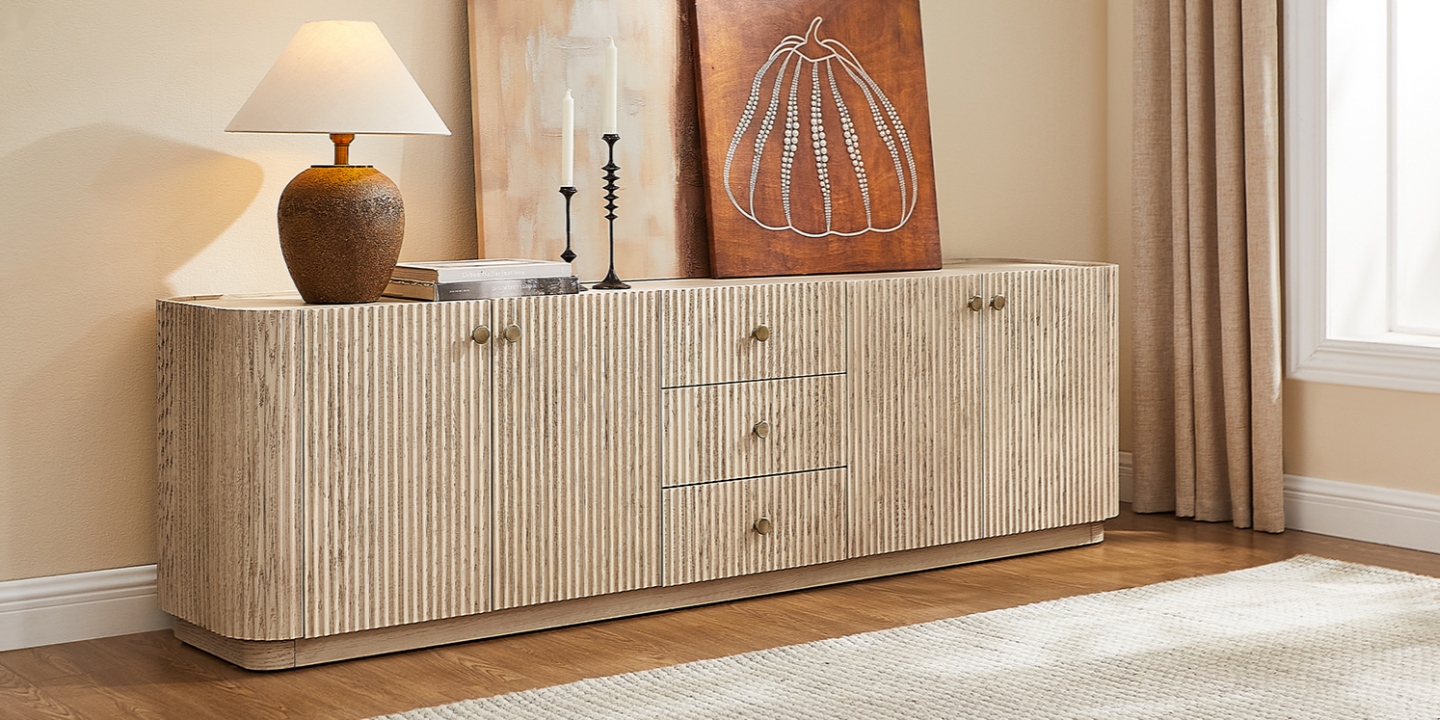
A Hernest Example: Skimra 84" Oak Media Console
The Skimra 84" Oak Media Console combines American solid oak and engineered wood with oak veneers. Its front features solid oak fluting, while the three drawers use dovetail joints.
At 84 inches wide, it is a useful example of the size to consider for an 85-inch TV while still providing substantial storage.
How to Manage Cables on a Large TV Stand
A large TV setup can involve more cables than expected.
You may have connections for the television, soundbar, game console, streaming device, receiver, speakers, power strip, and other accessories. Without a plan, those cables quickly become the most noticeable part of the console.
Built-In Cable Cutouts Make a Difference
Look for rear cutouts or grommets that let cables pass directly through the back of the console.
Four rear cutouts can be useful for a larger setup, but the exact number you need depends on your equipment.
A good cable-management layout should:
Keep power and signal cables organized
Leave enough slack to move equipment when necessary
Keep cables away from ventilation openings
Avoid pinching cables behind the console
Keep excess cable off the floor where possible
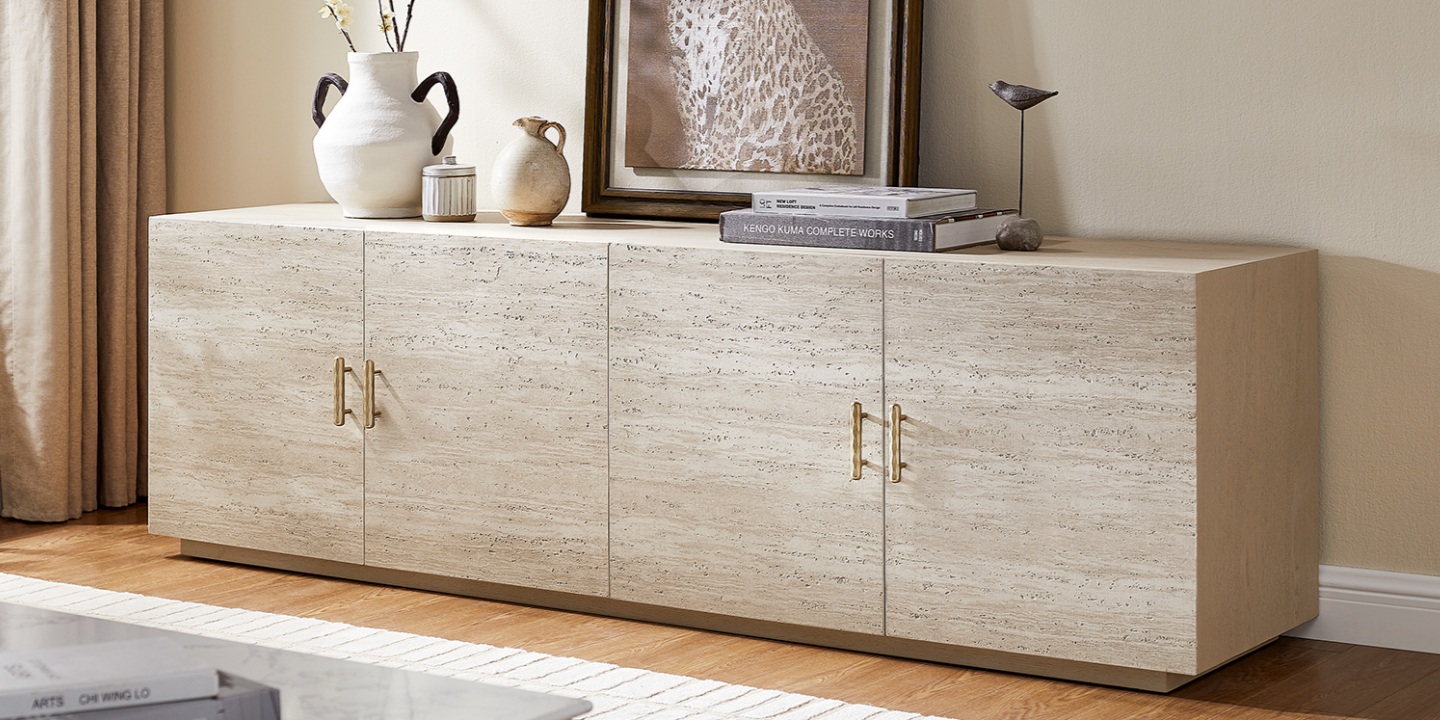
A Hernest Example: Renata 84" Media Console
The Renata 84" Travertine-Textured Media Console has four rear cord cutouts and adjustable shelves.
That combination allows equipment to sit inside the console while cables pass through the back rather than hanging over the sides. Its travertine-textured veneer and brass-toned hammered hardware also give the piece a more decorative presence, which can be useful when a large console occupies a prominent wall.
Simple Cable-Management Habits
You do not need complicated accessories to keep a TV stand organized.
Use reusable hook-and-loop ties to bundle cables.
Label both ends of important cables.
Route cables toward the nearest outlet rather than crossing the floor.
Leave enough slack for future equipment changes.
Keep power strips positioned where they remain accessible.
Plan the cable path before loading every shelf.
A few minutes of planning can make future upgrades much easier.
How to Match a Large TV Stand to Your Room
An 84- or 90-inch console becomes a major piece of furniture. Before buying one, measure more than the wall.
Check:
Wall width — Make sure the console has enough visual breathing room.
Walkway clearance — Account for the space people need to move around the furniture.
TV viewing distance — Make sure the screen size works with your seating arrangement.
Outlet locations — Check where power and cable connections are located.
Doorways and stairs — A large console must physically fit into the room.
Furniture scale — Compare the console with your sofa, coffee table, and other major pieces.
When Does an Extra-Long TV Stand Make Sense?
An extra-long TV stand can work particularly well when you have a wide, relatively empty wall.
In an open-concept home, a long, low console can also help define the living area without blocking sight lines. If positioned appropriately, the same piece may provide storage for a dining or entertaining area.
The key is proportion. A long console should support the scale of the room rather than simply fill as much wall space as possible.
Can a Large TV Stand Work as a Room Divider?
Yes, in the right layout.
A long, low console can subtly separate a living area from a dining or open workspace while keeping the space visually connected. It works best when the furniture is low enough to preserve sight lines and deep enough to provide useful storage without creating a major obstruction.
You can also use the top surface for lamps, books, plants, or artwork, as long as those items do not interfere with the TV or create a safety issue.
Style: Mid-Century Modern, Modern, and Beyond
Once the measurements and construction are right, style becomes the next consideration.
A large console occupies a lot of visual space, so its finish and proportions should work with furniture you already own.
Walnut
Walnut tones bring a deeper, richer appearance and work well with brass, leather, and darker accent colors.
Oak
Oak tends to create a lighter appearance and can work well in rooms with natural light, neutral upholstery, or other light wood furniture.
Stone and Travertine Textures
Stone-inspired surfaces can introduce more texture without making the console visually busy. They can work particularly well in relaxed, contemporary interiors.
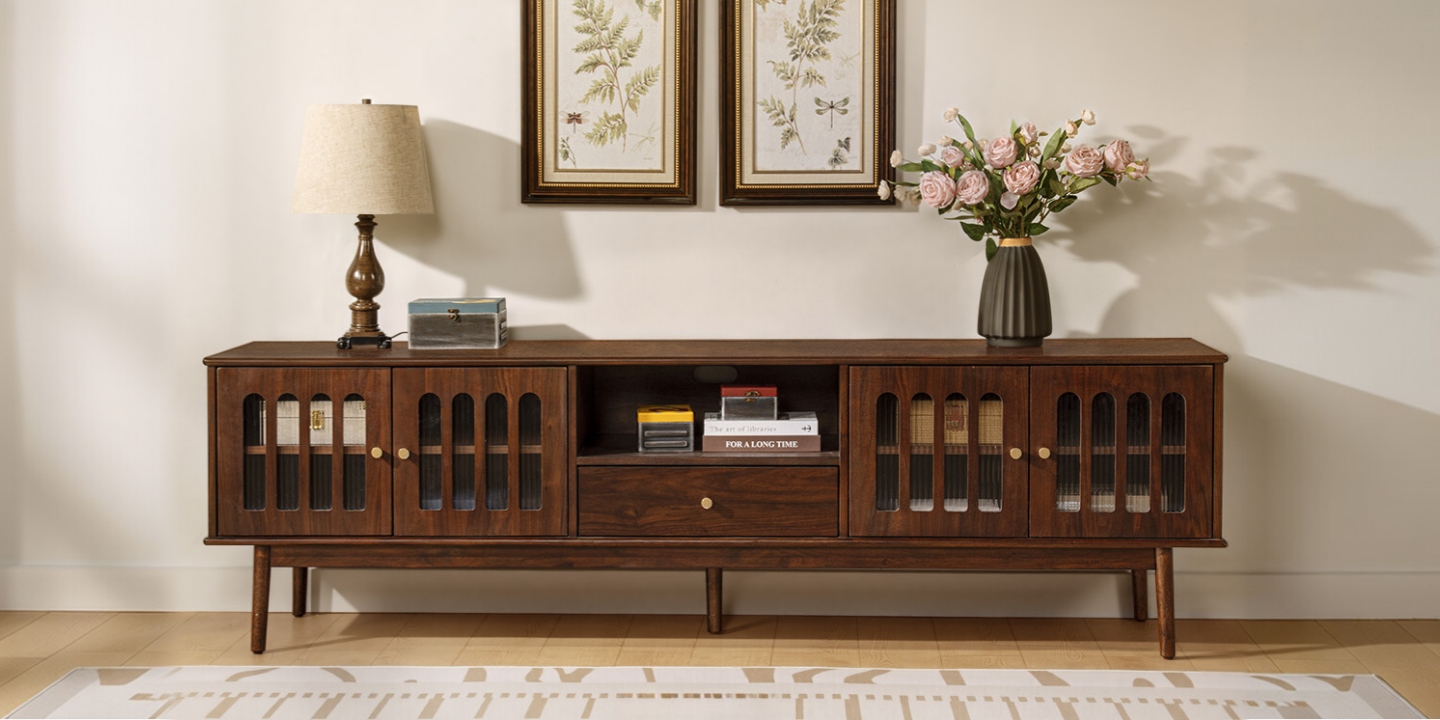
A Hernest Example: Aldric 84" Media Console
The Aldric 84" Media Console combines brown walnut veneer, rainbow glass, solid wood legs, and dovetail-jointed drawers.
Its proportions and materials suit a mid-century modern-inspired room, while the combination of enclosed and drawer storage keeps the large footprint practical.
The goal is not to make the console match every other piece exactly. Matching the general wood tone, leg profile, and visual weight is usually enough to make a large piece feel intentional.
A Simple Large TV Stand Buying Checklist
Before purchasing a large TV stand, work through this checklist:
1. Measure the TV
Record the TV's actual width, height, depth, and weight. Do not rely only on the advertised screen size.
2. Measure the TV Feet
If the TV will sit directly on the console, measure the distance between the feet and confirm that the stand can support them.
3. Choose the Console Width
For an 85-inch TV, 80–90 inches is a practical starting range, with 84 inches being a useful middle ground for many rooms.
4. Calculate the Viewing Height
Measure your seated eye level and use the TV's height to estimate the console height. Adjust based on your actual seating position.
5. Check Weight Capacity
Add the TV and equipment weights together. Then compare that total with the manufacturer's stated capacity.
6. Plan Storage
Decide whether you need open shelving, cabinets, drawers, adjustable shelves, or a combination.
7. Check Cable Management
Look for rear cutouts, grommets, ventilation, and enough room to route cables without pinching them.
8. Measure the Room
Check wall width, walkway clearance, outlets, doorways, and the path the furniture will take during delivery.
Where to Start
If you're choosing a large TV stand for an 85-inch TV, start with the measurements rather than the style.
An 80- to 90-inch-wide console is a practical starting point for many 85-inch setups. From there, check the TV's foot spacing, calculate a comfortable viewing height, verify the manufacturer's weight capacity, and make sure the console provides enough storage and cable access for your equipment.
An 84-inch console can be a particularly versatile choice because it provides enough width for a large screen without automatically dominating the entire wall.
When you're ready to compare finished pieces, explore the Hernest media console collection. Options such as the Renata, Skimra, and Aldric show how the same general console size can take very different approaches to materials, storage, and design.
FAQs
How big does a TV stand need to be for an 85-inch TV?
An 85-inch TV is typically around 74 to 75 inches wide across the screen. A TV stand around 80 to 90 inches wide is a practical starting range, although the TV's actual dimensions and foot spacing should determine the final choice.
How do I choose the right large TV stand?
Start with the TV's actual width, height, weight, and foot spacing. Then consider viewing height, stand depth, storage, cable management, room dimensions, and the manufacturer's weight rating. Measure the wall and walking space before buying.
What are the different types of large TV stands?
Common options include low media consoles, large entertainment centers, open-shelving stands, corner stands, floating consoles, armoires or hutches, fireplace TV stands, and extra-long consoles. Choose based on your equipment, storage needs, room layout, and preferred look.
What materials are large TV stands made of?
Large TV stands are commonly made from solid hardwood, engineered wood with wood veneer, metal, glass, or combinations of these materials. Construction quality matters as much as the material itself, particularly for a wide console supporting a heavy television.
How should I organize cables on a large TV stand?
Choose a console with rear cord cutouts or grommets, route cables directly toward the nearest outlet, and bundle them with reusable hook-and-loop ties. Label important cables and leave enough slack for future equipment changes. Keep ventilation areas clear.
How tall should a large TV stand be?
The ideal height depends on your sofa and TV. A useful starting point is to position the center of the screen close to your seated eye level. For many living-room setups, a console around 17 to 24 inches tall can work well, but measure your own seating position before choosing.
How much weight can a large TV stand hold?
Check the manufacturer's stated weight capacity rather than relying on a universal number. Add the weight of your TV and other equipment, then choose a console with capacity comfortably above that combined load.
Should a TV stand be wider than the TV?
Usually, yes. A slightly wider console can create a more balanced appearance and provide room for a soundbar or decor. For an 85-inch TV, an 80- to 90-inch console is a practical range, but the TV's actual width and foot placement should come first.
Can a large TV stand work as a buffet or room divider?
Yes. A long, low console can provide storage in an open-concept living or dining area and can help define separate zones without blocking the room completely. Make sure the console is positioned securely and does not interfere with walkways.