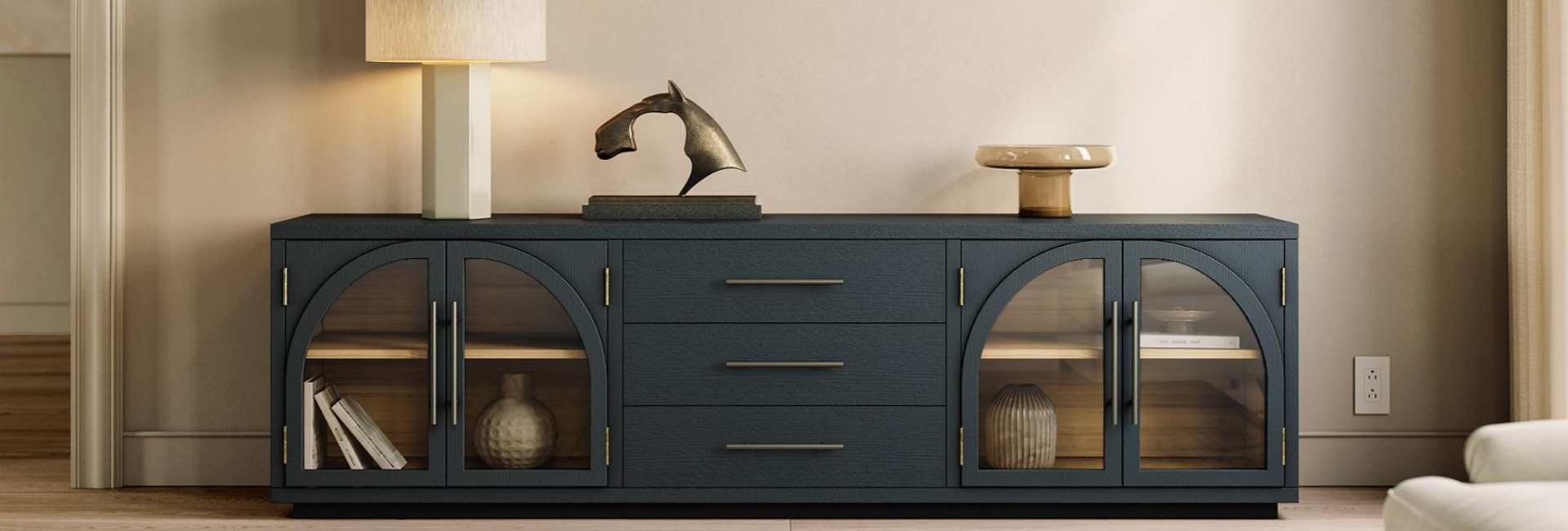
A TV stand with drawers offers more than a place for your television. It provides dedicated storage for everyday living room items, from remote controls and gaming controllers to cables, blankets, and board games. Unlike open shelves that leave belongings visible, drawers keep clutter out of sight and help maintain an organized space. This practical need is reflected in the market: according to Mordor Intelligence, the U.S. home organizers and storage market was valued at $12.05 billion in 2025.
However, not all TV stands with drawers offer the same quality or functionality. Shallow drawers may limit storage, while well-built designs feature sturdy drawer boxes and smooth-gliding hardware. Choosing the right one means considering what you need to store, the console's size, drawer construction, and how its layout fits your daily routine. This guide covers what to look for when selecting a TV stand with drawers for your space.
Table of Contents
- Why Choose a TV Stand with Drawers
- What to Store in a TV Stand with Drawers
- Sizing a TV Stand with Drawers for Your TV and Wall
- What to Look for in TV Stand with Drawers Construction
- TV Stand with Drawers Storage Layouts
- How to Organize TV Stand Drawers
- Airflow and Cable Management for TV Stand with Drawers
- Choosing Materials for a Durable TV Stand with Drawers
- Placement, Safety, and Care for Your TV Stand with Drawers
- The Trade-Offs of Choosing a TV Stand with Drawers
- Final Thoughts
- FAQs
- What size TV stand with drawers do I need for a 65-inch TV?
- How deep should TV stand drawers be?
- How much clearance do drawers need to open?
- What should I store in TV stand drawers versus cabinets?
- Can I put a gaming console inside a TV stand drawer?
- Why doesn't my remote work through the TV stand cabinet doors?
- How much weight can TV stand drawers hold?
- Should a TV stand with drawers be anchored to the wall?
Why Choose a TV Stand with Drawers
Drawers provide enclosed storage for small items that tend to accumulate around the television. They also make it easier to keep the living room looking organized without arranging every item on display.
Keep Everyday Clutter Out of Sight
Think about the items you use around your TV. You might have several remote controls, gaming controllers, charging cables, batteries, headphones, and game cases. These accessories are easy to leave on a tabletop or open shelf.
A TV stand with drawers gives these smaller items a dedicated place. You can close the drawers after use and keep the TV area looking less cluttered. This works especially well in family rooms where several people share the same entertainment space.
Open shelves serve a different purpose. They keep devices accessible, but they also leave everything visible. Drawers offer a simpler way to store items that you use frequently but do not want on display.
Compare Drawers, Cabinets, and Open Shelves
Each storage type works better for certain belongings. The best layout depends on what you own and how you use your entertainment area.
A media console with drawers works well for small items that you reach for every day. Cabinets provide room for larger belongings, while open shelves keep electronics accessible.
If you have several gaming devices or other electronics, look for a console that combines drawers with an open compartment. This layout gives you concealed storage without placing every device behind a closed panel.
What to Store in a TV Stand with Drawers
Make a list of the items you want to store before comparing different consoles. Sort them by size and how often you use them. This helps you decide how many drawers you need and whether you also need cabinets or open shelves.
Small, frequently used items usually belong in drawers. These include remote controls, controllers, charging cables, batteries, headphones, and instruction booklets. Shallow drawers can work well for these accessories because you can see and reach the contents easily.
Larger items need more space. Board games, folded blankets, baskets, and bulky accessories may require deeper drawers or enclosed cabinet compartments.
Avoid choosing a console based only on the number of drawers. Three deep drawers may offer less useful organization than several shallow drawers if most of your belongings are small. Consider the interior dimensions and usable storage space instead.
Also separate electronics that generate heat from items that can stay enclosed. Gaming consoles and AV receivers need suitable ventilation, so an open compartment or ventilated cabinet is usually a better choice than a closed drawer.
Sizing a TV Stand with Drawers for Your TV and Wall
The TV console should fit your television and leave enough room for everyday movement. Check its width, height, and depth before buying. Drawer clearance also matters because an open drawer takes up more floor space than the closed console.
Choose the Right Width for Your TV
A TV stand should generally be wider than the television. This creates a balanced appearance and gives the screen a more stable-looking base. You should also check the distance between your TV's feet if you plan to place it directly on the console.
Use the following measurements as a starting point:
These measurements are general recommendations rather than fixed requirements. Check your television's actual width and stand placement before choosing a console.
An 80- to 84-inch media console can work well with larger televisions, depending on the TV dimensions and available wall space. It may also provide room for a soundbar or a few decorative objects.
Check the TV Stand Height
Your seating position should determine the height of the console. When you sit on your sofa, your eyes should generally align with the center of the television screen.
A typical seated eye level is around 42 to 44 inches from the floor, although this varies with sofa height and individual posture. Measure your seating position and television dimensions before deciding on the console height.
TV stands with drawers can have different overall heights because drawer boxes require interior space. Do not rely on product photos alone. Check the listed dimensions and consider the combined height of the console and television.
Measure the Depth and Drawer Clearance
A media console with drawers needs enough space in front for the drawers to open fully. This measurement is easy to overlook when you only compare the console's closed dimensions.
Many TV consoles measure around 16 to 18 inches deep. A fully extended drawer may project another 12 to 15 inches into the room, depending on its design and slide mechanism.
Measure the distance between the console and your coffee table before buying. If the furniture is too close together, an open drawer may hit the table or block the walkway.
A clearance of around 36 inches provides more room for opening drawers and moving through the space. If your living room is smaller, check whether the console uses full-extension or partial-extension drawer slides and measure the actual projection.
Many of the drawer-equipped designs in Hernest's TV stands with drawers collection have an overall depth of around 17 to 18 inches, with drawer interiors measuring approximately 12 to 15 inches deep. Comparing these dimensions can help you estimate both the space the console occupies and the storage room available inside.
What to Look for in TV Stand with Drawers Construction
Drawer construction affects how smoothly a drawer opens, how much weight it can hold, and how well it handles everyday use. Pay attention to the joints, slides, and drawer capacity rather than judging quality by the exterior finish alone.
Check the Drawer Joints
Look at how the drawer sides connect at the corners. Dovetail joints use interlocking pieces of wood to hold the drawer box together. This construction helps resist the pulling forces created by repeated opening and closing.
Stapled or glued butt joints use a simpler connection. Their durability depends on the materials, workmanship, and overall construction.
When comparing furniture from different brands, check the product specifications or ask the manufacturer how the drawer boxes are assembled.
Compare Drawer Slides and Closing Mechanisms
Drawer slides affect how easily you can open and close a drawer.
Metal ball-bearing slides generally provide smooth movement and support regular use. Full-extension slides allow the drawer to open far enough for you to reach items at the back. Partial-extension slides leave part of the drawer inside the console.
Soft-close mechanisms slow the drawer near the end of its movement. They reduce noise and help prevent the drawer from slamming shut.
Choose the slide type based on your daily needs. Full-extension slides make it easier to access stored items, while soft-close hardware offers a quieter closing experience.
Check the Drawer Weight Capacity
Drawer capacity depends on the drawer bottom, joints, and slide hardware. A drawer filled with board games or other heavy belongings places more stress on these components than one holding remote controls and cables.
Some household drawer systems support around 15 to 30 pounds, but the actual limit varies by product. Check the manufacturer's specifications instead of assuming every drawer can hold the same weight.
Place heavier items in lower drawers when possible. Distribute the weight evenly and avoid putting excessive pressure on the front edge.
TV Stand with Drawers Storage Layouts
TV consoles use different combinations of drawers, cabinets, and open compartments. Choose a layout based on the items you need to store and the way you use your entertainment area.
Two to Four Drawers for Small Accessories
A console with two to four drawers provides separate storage areas for everyday accessories. You can assign one drawer to remote controls, another to gaming accessories, and another to cables or batteries.
This layout works well when most of your belongings are relatively small. It also creates a clean horizontal appearance without requiring multiple cabinet doors.
Drawers with Enclosed Cabinets for Mixed Storage
A TV stand with drawers and cabinets provides space for both small accessories and larger belongings. Drawers can hold controllers and cables, while cabinets can accommodate blankets, board games, and baskets.
The Valborg 80-Inch Oak Media Console combines three drawers with two enclosed cabinets. Its black oak finish and arched door fronts give the console a distinctive look, while the mixed storage layout accommodates different household items.
The product is designed for TVs up to 85 inches. Its rear cord cutouts also provide cable-routing options for compatible entertainment setups.
Drawers with an Open Compartment for Electronics
A media console with drawers and an open compartment works well for households with gaming consoles, routers, or streaming devices.
Place electronics that need ventilation in the open section. Use the drawers for controllers, cables, and other accessories. This arrangement keeps frequently used equipment accessible while concealing smaller items.
Check the shelf dimensions before buying. A fixed shelf may not accommodate a larger gaming console or soundbar, so an adjustable shelf can provide more flexibility.
All-Drawer Designs for Enclosed Storage
Some TV stands use drawers across the entire front and do not include cabinet doors or open compartments. These designs create a consistent appearance and provide enclosed storage for smaller belongings.
They work best when your storage needs mainly involve accessories, cables, and other compact items. However, they may not have enough room for tall electronics or bulky belongings.
How to Organize TV Stand Drawers
A well-designed storage layout only works if you organize the contents. Assign each drawer a purpose so you can find everyday items without searching through mixed piles.
Drawer organizers can separate small accessories and prevent them from becoming mixed together. Assign one category to each drawer and return items after use. This makes the storage system easier for everyone in the household to maintain.
Avoid filling every drawer to its maximum capacity. Leave some room for new accessories and make sure the drawer can open and close without catching on its contents.
Airflow and Cable Management for TV Stand with Drawers
A TV stand needs to accommodate more than the television. Gaming systems, routers, soundbars, and streaming devices may need ventilation, cable access, or a clear signal path.
Give Electronics Enough Ventilation
Gaming consoles and AV receivers generate heat during operation. Placing them in a tightly enclosed drawer can restrict airflow and cause temperatures to rise.
Use an open compartment or a properly ventilated cabinet for devices that produce significant heat. Follow the device manufacturer's clearance recommendations and avoid blocking ventilation openings.
The Astrid 84-Inch MCM Slatted Media Console uses slatted sliding doors that allow air to move through the front. It also features solid wood legs, and four rear cord cutouts. Its design combines enclosed storage with a front that allows ventilation.
Check the Rear Cable Openings
Rear cord openings help route power and HDMI cables between your devices and the wall. However, not every TV stand uses the same cable-management design.
Check the product photos and specifications to see whether the console has rear cutouts, removable panels, or another cable-routing solution.
Count the devices in your setup before choosing a console. Your television, soundbar, gaming console, and router may each need a separate cable route. Plan the cable arrangement so you can access plugs without moving the entire piece of furniture.
You can also attach a power strip to a suitable interior panel and use cable ties to group loose wires. Keep power cables and signal cables organized, and leave enough slack to move devices when needed.
Consider Remote Control Compatibility
Some remote controls use infrared signals, which generally require a clear line of sight between the remote and the device. A solid cabinet door can block these signals.
Bluetooth and Wi-Fi remotes work differently and may operate without a direct line of sight. Check how your devices communicate before placing them behind closed doors.
If an infrared remote cannot reach a device inside the console, place that device in an open compartment or use a compatible remote extender.
Choosing Materials for a Durable TV Stand with Drawers
The material affects the console's appearance, weight, durability, and maintenance requirements. Consider how often you use the furniture and what kind of wear it will experience.
Solid Oak for Long-Term Use
Oak is a hardwood known for its strength and visible grain. White oak has a Janka hardness rating of approximately 1,360, making it a durable option for furniture surfaces.
The quality of the construction also matters. Properly dried wood helps reduce movement caused by changes in indoor humidity. Check how the manufacturer describes the frame, panels, drawer boxes, and structural joints.
Engineered Wood with Real Wood Veneer
Engineered wood with a real wood veneer offers another option. Plywood and other engineered cores can provide dimensional stability and a consistent surface, while the veneer gives the furniture a natural wood appearance.
Check the material specifications rather than relying on product images. Look at the edge finishing, back panel, and drawer construction to understand how the console is built.
Choose a Finish That Fits Your Household
Different finishes show wear in different ways. High-gloss surfaces can make fingerprints and small scratches more noticeable. Textured or wire-brushed finishes may help disguise everyday marks.
Consider your household when choosing a finish. Homes with children or pets may benefit from surfaces that are easier to maintain and less likely to show minor wear.
Placement, Safety, and Care for Your TV Stand with Drawers
Measure the room before positioning the console. Leave enough space for the drawers to open, maintain clear walking paths, and make sure the television sits at a comfortable viewing height.
Leave Enough Space Around the Console
Keep the console centered under the television or aligned with the main TV wall. Measure the available wall width and consider nearby furniture, windows, doors, and electrical outlets.
Allow enough clearance in front of the console for the drawers to open. A walkway of around 30 inches may work in some layouts, but main traffic paths often need more space. Check the drawer projection as well as the space needed for people to walk past.
Secure the TV Stand Against Tipping
Use an anti-tip kit when the manufacturer provides one. Anchor the console to suitable wall studs, especially if you have children at home or plan to place a large television on top.
Avoid placing heavy items in upper drawers. Keep the weight distributed across the console and follow the manufacturer's loading recommendations.
Maintain the Finish and Drawer Hardware
Dust the console with a soft, dry cloth. Clean spills promptly and follow the care instructions for the specific finish. Avoid harsh cleaners unless the manufacturer confirms they are suitable.
Use felt pads under the legs to protect the floor. Check the drawer slides and anti-tip hardware periodically to make sure everything remains secure and works properly.
The Trade-Offs of Choosing a TV Stand with Drawers
Drawers provide useful enclosed storage, but they are not the right solution for every room or household.
A TV stand with drawers may cost more than a similar open-shelf design because it requires additional drawer boxes, joints, and hardware. Drawers also need space in front of the console, which can be a problem in narrow living rooms.
Enclosed storage can also make it easy to accumulate items you no longer use. Without basic organization, a drawer can quickly become a place for miscellaneous belongings.
Consider an open-shelf console if you mainly need space for a television, streaming device, and decorative objects. Choose a cabinet-based design if you need room for larger items but do not need several small storage compartments.
A TV stand with drawers is a practical choice when you regularly use small accessories and want to keep them out of sight. A mixed layout with drawers, cabinets, or open shelves can offer more flexibility if your entertainment setup includes different types of equipment.
Final Thoughts
The right TV stand with drawers should do more than match your living room decor. It should provide enough storage for your everyday essentials, fit comfortably into your space, and offer drawer construction that holds up to regular use. Before making a decision, consider what you plan to store, how much clearance the drawers need, and whether you need additional cabinets or open compartments for larger items and electronics
FAQs
What size TV stand with drawers do I need for a 65-inch TV?
A 65-inch television usually measures about 57 inches wide. A console between 63 and 71 inches wide can provide a balanced fit. Check the actual width of your TV and the distance between its feet before buying.
How deep should TV stand drawers be?
The right drawer depth depends on what you plan to store. Drawers with 4 to 6 inches of interior depth can hold remotes, controllers, and cables. Deeper drawers around 12 to 15 inches can accommodate larger accessories and folded throws. Always check the product's interior measurements.
How much clearance do drawers need to open?
A fully extended drawer may project around 12 to 15 inches beyond the front of the console. Measure the available floor space and account for nearby furniture. Around 36 inches of clearance can make it easier to open drawers and move around the TV area.
What should I store in TV stand drawers versus cabinets?
Use drawers for smaller everyday items such as remote controls, controllers, cables, and batteries. Cabinets are better suited to blankets, board games, baskets, and other bulky belongings. Place heat-generating electronics in an open or properly ventilated compartment.
Can I put a gaming console inside a TV stand drawer?
A closed drawer is generally not a suitable place for a gaming console during use. Gaming systems generate heat and need adequate airflow. Place the console in an open compartment or a properly ventilated section, following the manufacturer's clearance recommendations.
Why doesn't my remote work through the TV stand cabinet doors?
Infrared remotes generally need a clear line of sight to communicate with a device. A solid cabinet door can block the signal. Bluetooth and Wi-Fi remotes may work without direct visibility. You can also place the device in an open compartment or use a compatible remote extender.
How much weight can TV stand drawers hold?
Drawer weight capacity varies according to the slides, bottom panel, joints, and overall construction. Some household drawer systems support around 15 to 30 pounds, but you should check the product specifications for the actual limit. Place heavier belongings in lower drawers when possible.
Should a TV stand with drawers be anchored to the wall?
Wall anchoring can reduce the risk of furniture tipping over. Use the anti-tip hardware supplied by the manufacturer and follow the installation instructions. This is especially important when you have children or a large television on the console.