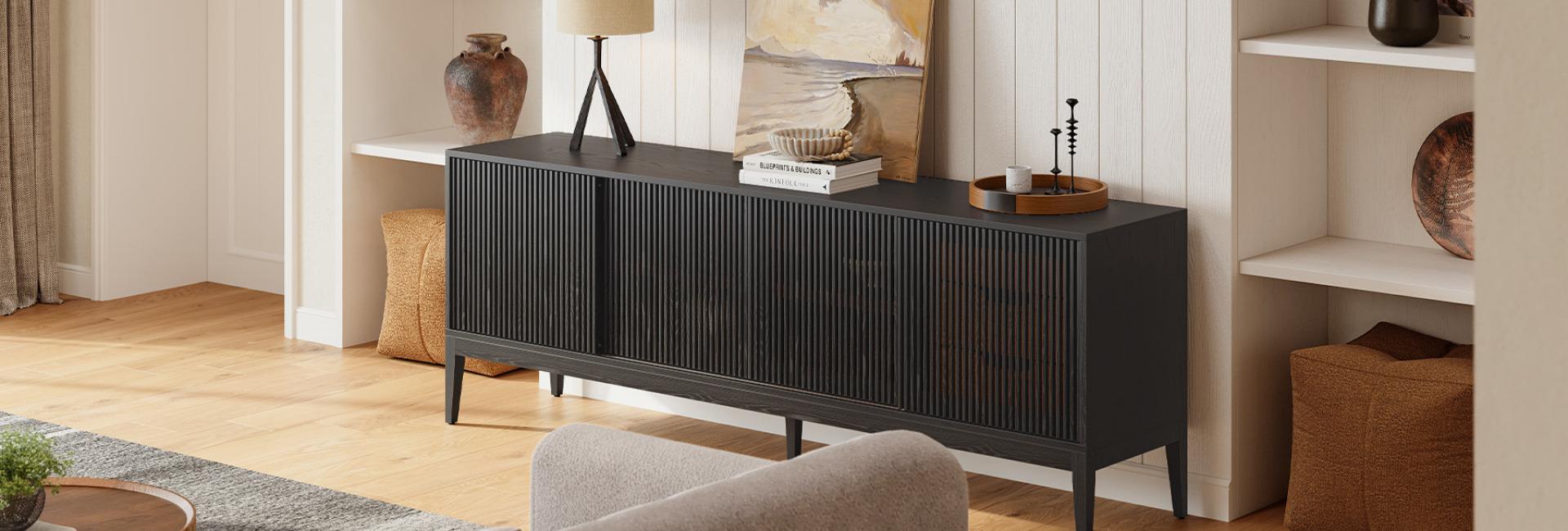
A cluttered TV area can make even a spacious living room feel cramped. Loose cables, gaming consoles, streaming devices, and everyday accessories often take over the space around your television. A Sliding Door Media Console offers a practical way to solve these problems. Its doors move along a track instead of swinging outward, leaving more clearance in front of the cabinet. Behind those doors, you can organize electronics, hide accessories, and keep cables out of sight. With the right storage layout and cable
management features, a sliding door media console can make your entertainment area look cleaner without taking up extra room for door clearance.
Table of Contents
- How Does a Sliding Door Media Console Save Space?
- How Does a Sliding Door Media Console Hide Wires and Clutter?
- How Can You Maximize Storage Behind Sliding Doors?
- Which Sliding Door Media Console Design Works Best for Your Space?
- What Should You Consider Before Storing Electronics in a Sliding Door Media Console?
- How Do You Choose the Right Sliding Door Media Console?
- How Do You Maintain a Sliding Door Media Console?
- Conclusion
- FAQs
- 1. Are sliding door media consoles better for small living rooms?
- 2. Can a sliding door media console hide all TV wires?
- 3. Do sliding door media consoles provide enough ventilation for gaming consoles?
- 4. What is the difference between a sliding door and a tambour door media console?
- 5. What should I look for when buying a sliding door media console?
How Does a Sliding Door Media Console Save Space?
A sliding door media console saves space by eliminating the clearance needed for traditional hinged doors. Instead of swinging into the room, its doors move horizontally along a track, making it easier to place the cabinet near sofas, coffee tables, or walkways.
The difference becomes noticeable in smaller living rooms. A conventional cabinet may need additional room in front of it for the doors to open fully. A sliding design keeps that area available for everyday movement.
No Extra Clearance for Opening Doors
Traditional cabinet doors extend outward when opened. Depending on their width, they can occupy a considerable amount of floor space and interfere with nearby furniture.
Sliding doors work differently. They move across the cabinet's front, so you do not need to leave an empty area for a door to swing open.
This arrangement works particularly well when:
Your sofa sits relatively close to the TV console.
A coffee table occupies the space directly in front of the cabinet.
The media console is positioned near a frequently used walkway.
You want to keep a narrow living room from feeling crowded.
Keep in mind that a sliding door media console still occupies its full footprint. Its advantage is the reduced opening clearance, not a smaller cabinet body.
Better for Small Living Rooms and Tight Layouts
In compact apartments, every section of floor space matters. A media console with sliding doors can make furniture placement easier because you have fewer restrictions around the cabinet's front.
For example, imagine a living room where the sofa sits 30 inches from the media console. A wide hinged door could interfere with movement when someone opens the cabinet. A sliding door moves sideways instead, keeping the walkway more accessible.
A shallow console can make this arrangement even more practical. Before buying, compare the cabinet's depth with the available space between your TV wall and seating area.
How Does a Sliding Door Media Console Hide Wires and Clutter?
A sliding door media console helps hide visual clutter by keeping electronics and accessories behind cabinet doors. Depending on the design, some models also include rear openings to help organize and route cables.
The doors cover the cabinet's contents when they are not in use. Cable cutouts provide a separate route for power cords and device connections, so you do not have to leave wires hanging around the TV area.
Keep TV Cables and Power Cords Out of Sight
Televisions, streaming devices, soundbars, and gaming consoles often require several connections. Without a clear cable arrangement, wires can hang behind the TV or collect on the floor.
A media console with built-in cable cutouts gives those wires a more organized path.
For a cleaner setup:
Route power cords through the cabinet's rear cutouts.
Group HDMI, Ethernet, and other connection cables by device.
Keep power strips in an accessible, ventilated area.
Use cable clips or ties to prevent loose wires from tangling.
Leave enough cable length to move equipment when necessary.
The number and placement of cable openings matter. Check whether the cutouts align with your devices and wall outlets before choosing a console.
The Astrid 84-inch MCM Slatted Media Console features four cord cutouts in its back panel, making it easier to route power cords and device cables out of sight. Whether you're connecting a TV, soundbar, or gaming console, these openings help keep wires organized while maintaining a cleaner look around your entertainment area.
Hide Gaming Consoles and Everyday Accessories
Cable clutter is only part of the problem. Game controllers, remote controls, spare batteries, headphones, and streaming accessories can also make a TV area look untidy.
Closed storage provides a place for these smaller items without leaving them scattered across the cabinet top.
A practical arrangement might look like this:
The goal is to give each item a regular place. You can then close the sliding doors and keep most of the visual clutter out of sight.
Create a Cleaner Entertainment Area
A television naturally attracts attention, so a crowded console can make the entire wall feel busy.
A sliding door media console helps create a cleaner visual arrangement by concealing smaller objects and reducing the number of items on display.
For a balanced setup, keep only a few frequently used or decorative items on the cabinet top. Store the rest inside. A wooden console with a simple finish can also bring warmth and texture to the entertainment area without adding unnecessary visual detail.
How Can You Maximize Storage Behind Sliding Doors?
The best way to maximize storage is to organize the cabinet according to device size, usage frequency, and connection requirements.
A large cabinet does not automatically provide useful storage. Internal shelf dimensions, compartment openings, and door movement determine how much equipment you can actually accommodate.
Separate Electronics by Function
Start by grouping your devices according to how you use them.
For example, gaming equipment can stay together, while streaming devices and TV accessories can occupy another section. This makes it easier to find connections and operate your equipment without moving everything around.
Place frequently used devices near the front of accessible compartments. Store less frequently used accessories in drawers or secondary storage areas.
Use Adjustable Shelves for Different Devices
Adjustable shelves make it easier to accommodate equipment with different heights.
A streaming box may need very little vertical space, while an AV receiver or gaming console requires more room. Being able to change shelf positions helps you avoid wasting space above smaller devices.
Before placing electronics inside, measure their actual dimensions, including any cables or connectors that extend from the back.
Combine Open and Closed Storage
Not every item needs to be hidden.
Speakers, decorative objects, and frequently accessed accessories may work better in open compartments. Smaller electronics, spare cables, and personal belongings can stay behind closed doors.
This combination keeps the entertainment area organized without making the cabinet difficult to use.
The Frode 84-inch MCM Media Console combines sliding wood doors, a large drawer, and side cabinets to accommodate different storage needs. You can keep frequently used accessories or decorative pieces within easy reach while tucking away cables, electronics, and other everyday items behind closed doors. This mix of open and concealed storage helps keep your entertainment area both practical and uncluttered.
Which Sliding Door Media Console Design Works Best for Your Space?
Not all sliding doors use the same mechanism. Traditional sliding panels, tambour doors, and slatted designs can look similar from a distance, but their construction affects how much cabinet space you can access.
Understanding these differences helps you choose a design that suits your storage habits.
Traditional Sliding Panels
Traditional sliding panels move horizontally along a straight track. One panel slides behind or in front of another, depending on the cabinet design.
This mechanism keeps the doors within the cabinet's front profile. However, opening one section may cover another section, so you might not be able to access the entire cabinet at once.
Check the opening width and door overlap before purchasing.
Tambour Doors
Tambour doors consist of connected wooden slats that move along a track, often following a curved path into the cabinet.
Unlike conventional flat sliding panels, some tambour designs allow the door to retract into a dedicated section of the cabinet. This can leave more of the storage area exposed when open.
The Valo 84-inch Oak Media Console uses a tambour door design. Its adjustable shelves and two rear cable cutouts provide additional flexibility for organizing media equipment.
Slatted Sliding Doors
Slatted sliding doors combine a movable door panel with a textured, linear appearance. The slats add visual interest while maintaining the practical benefits of a sliding mechanism.
The Astrid 84-inch MCM Slatted Media Console is one example. Its slatted sliding doors create a distinctive mid-century look, while its adjustable shelves provide flexible storage.
When comparing these designs, look beyond appearance. Consider how far the doors travel, how much storage remains accessible, and whether the mechanism feels smooth during everyday use.
What Should You Consider Before Storing Electronics in a Sliding Door Media Console?
A closed cabinet can make electronics look neater, but it must also provide enough room for ventilation, connections, and regular operation.
Some devices generate considerable heat during use. Placing them in a tightly enclosed compartment without adequate airflow can affect their performance and long-term reliability.
Allow Enough Ventilation for Electronic Devices
Gaming consoles, routers, and AV receivers need room for heat to escape.
Sony recommends leaving at least 10 cm of free space around the sides of a PlayStation 5 and avoiding narrow or enclosed spaces. Keep the console's air vents clear and clean away dust regularly to maintain proper airflow.
These recommendations apply to the console itself, not to every media cabinet. Always check the ventilation requirements for your specific equipment.
Before placing a device behind sliding doors:
Check where its air intake and exhaust vents are located.
Compare the device's dimensions with the cabinet's internal measurements.
Leave the clearance recommended by the manufacturer.
Avoid covering ventilation openings with cables or accessories.
Consider opening the cabinet during extended gaming or high-load use if airflow is limited.
A cabinet that hides equipment but traps heat is not a good long-term solution.
Check Remote Control and Device Accessibility
Some remote controls use infrared (IR) signals, which generally require a clear path to the device's sensor. A solid wooden cabinet door can block that signal.
If you plan to operate equipment while the doors are closed, check whether your devices use infrared, Bluetooth, Wi-Fi, or another control method.
You should also consider whether you can easily reach power buttons, USB ports, and other connections without moving multiple devices.
Choose the Right Internal Dimensions
External cabinet dimensions do not tell you everything about storage capacity.
Check the width, height, and depth of each internal compartment. Pay attention to shelf openings and the space needed for cables behind your equipment.
For instance, a console may be wide enough for a large television but still have compartments that are too shallow for a full-size AV receiver.
Measure your equipment before purchasing rather than relying on the cabinet's overall width.
How Do You Choose the Right Sliding Door Media Console?
The right sliding door media console should fit your room, support your television, accommodate your electronics, and provide enough storage for everyday accessories.
Once you understand the door mechanism and storage requirements, compare the practical specifications rather than choosing based on appearance alone.
Measure Your TV and Available Wall Space
Start with the actual width of your television, not just its diagonal screen size.
A console that extends beyond both sides of the TV often creates a more balanced appearance. You should also check the TV's stand dimensions if you plan to place it directly on the cabinet.
Measure the wall, nearby furniture, and available walking space. Include the console's depth in your measurements so it does not make the room feel cramped.
Compare Cable Cutouts and Internal Storage
The number of cable cutouts, shelf positions, and compartment dimensions can make a significant difference in everyday use.
Consider these questions before choosing:
Are there enough rear cutouts for all your devices?
Can the shelves accommodate your gaming console or AV receiver?
Is there enough room for cables behind the equipment?
Can you access frequently used devices without moving other items?
Does the door mechanism expose enough of the cabinet interior?
These details help determine whether the console works for your actual entertainment setup.
Compare Materials, Finishes, and Construction
Material and finish affect both appearance and maintenance.
Solid wood offers natural grain variation and a distinctive furniture look. Veneered surfaces can also provide an attractive wood finish, depending on the underlying construction and quality.
Pay attention to the sliding hardware as well. Doors should move smoothly without excessive resistance, rattling, or misalignment.
For a mid-century modern living room, the three Hernest designs offer different approaches:
The Astrid is worth considering if you want textured cabinet fronts and several cable routing points. Valo offers a tambour door design with adjustable shelving and a relatively shallow 17.3-inch depth. Frode provides a combination of sliding-door storage, a large drawer, and side cabinets.
Compare the actual internal dimensions and device requirements before making a final decision.
How Do You Maintain a Sliding Door Media Console?
Regular maintenance keeps the doors moving smoothly and prevents dust from collecting around the storage areas.
Sliding mechanisms have moving parts that need occasional attention, especially in homes where dust, pet hair, and everyday debris can accumulate.
Follow these simple practices:
Clean the tracks: Remove dust and debris with a soft brush or vacuum attachment.
Wipe the door panels: Use a soft, dry or slightly damp cloth, following the manufacturer's care instructions.
Check door alignment: Look for uneven movement, rubbing, or gaps that may indicate misalignment.
Avoid overloading shelves: Follow the manufacturer's weight limits to protect the cabinet structure.
Keep electronics dust-free: Check device ventilation openings regularly and clean them according to the manufacturer's instructions.
If a door becomes difficult to move, check for debris or misalignment before applying lubricant. Use only products recommended by the furniture manufacturer.
Conclusion
A sliding door media console can make a living room feel more organized by reducing the space needed for cabinet doors to open and keeping electronics, cables, and everyday accessories out of sight.
Its benefits depend on more than the door design. Internal storage, cable cutouts, ventilation, shelf dimensions, and track quality all affect how well the cabinet works in daily life.
Whether you prefer the slatted design of the Astrid, the tambour doors of the Valo, or the mixed storage layout of the Frode, choose a console that fits your room and your equipment. A well-planned entertainment area should look clean while keeping everything you need easy to access.
FAQs
1. Are sliding door media consoles better for small living rooms?
Yes. Sliding door media consoles are useful in small living rooms because their doors move sideways rather than swinging outward. They reduce the clearance needed in front of the cabinet, making it easier to arrange furniture around the TV area.
However, the cabinet still occupies its full floor footprint, so you should compare its width and depth with your available space.
2. Can a sliding door media console hide all TV wires?
A sliding door media console can hide most visible wires if it has rear cable cutouts and enough internal space for your equipment.
Route power and connection cables through the designated openings, then organize them inside the cabinet. You may still need separate cable management solutions for wires connecting wall-mounted TVs to the console.
3. Do sliding door media consoles provide enough ventilation for gaming consoles?
It depends on the cabinet's design and the gaming console's ventilation requirements.
Check the internal dimensions, airflow openings, and manufacturer's clearance recommendations. A closed compartment without adequate airflow may cause heat to build up, especially during extended gaming sessions.
4. What is the difference between a sliding door and a tambour door media console?
A traditional sliding door uses one or more relatively rigid panels that move horizontally along a track. A tambour door consists of connected slats that move along a track and can often retract into a curved storage section.
Both designs save the clearance needed for outward-opening doors, but their opening mechanisms and accessible storage areas differ.
5. What should I look for when buying a sliding door media console?
Focus on the cabinet's dimensions, internal storage, cable management, ventilation, and door mechanism.
Make sure the console supports your TV's size and weight, provides enough room for your electronics, and has a sliding mechanism that operates smoothly. The number and placement of cable cutouts should also match your entertainment setup.