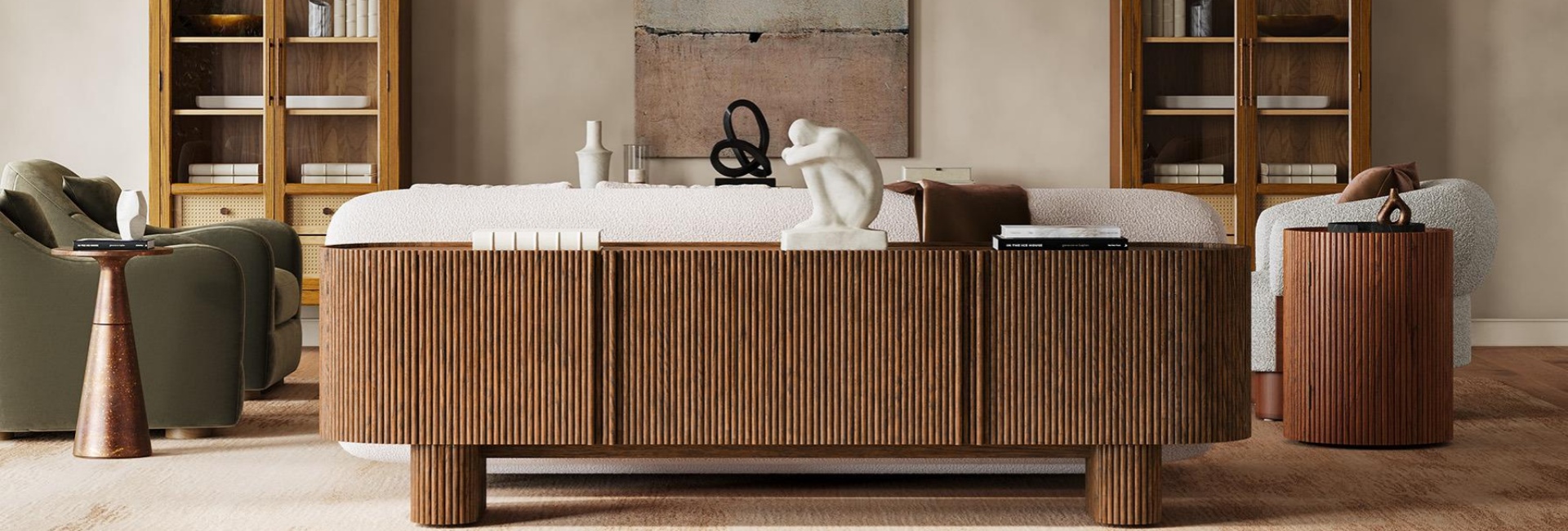
A long media console can make a large living room feel more balanced. It gives the TV a visual base, fills an otherwise empty stretch of wall, and provides storage without adding several smaller pieces of furniture. However, a longer media console also requires careful planning. Its top needs adequate support, its interior must accommodate your equipment, and its overall dimensions must suit the room.
Choosing one based on appearance alone can lead to problems. A cabinet may look right in a product photo but turn out to be too shallow for your receiver or too large to fit through the entryway. Consider the room layout, construction, storage, and design before settling on a style.
Table of Contents
- What Makes a Long Media Console Different?
- Popular Styles and Design Features of Long Media Consoles
- Materials and Structural Details That Hold Up at Length
- How to Coordinate a Long Media Console With Your TV Wall
- How to Style a Long Media Console in a Large Living Room
- Single-Piece vs. Modular Long Media Console Sets
- Mistakes That Make a Long Media Console Look Wrong
- Final Thoughts
- FAQs
What Makes a Long Media Console Different?
A long media console typically starts around 78 inches wide and can extend to 100 inches or more. At this size, the cabinet becomes a major part of the room's design. Its proportions, front details, and construction are more noticeable than they would be on a smaller TV stand.
Start With the Wall
Measure the available wall space before comparing cabinet dimensions. Look for the longest uninterrupted section and account for door swings, window trim, wall returns, heaters, and electrical outlets.
Check outlet locations carefully. A long cabinet may cover an outlet you need for your TV or equipment. See whether the back panel has suitable cord openings or enough clearance for cable routing.
Leave around 2 to 4 inches at each end when the cabinet sits between two corners or wall returns. If one end is next to a doorway, you may need to shift the console rather than center it on the entire wall.
Also measure the delivery route, including the front door, hallways, stairs, and tight turns. Available wall space does not help if the cabinet cannot get into the room.
The Visual Impact of a Long Media Console
A long console generally looks more balanced when it extends beyond both sides of the TV. Leaving about 6 to 12 inches of cabinet visible on each side creates a clear visual base. A cabinet that is only slightly wider than the TV may look cramped, while one that extends too far can dominate the arrangement.
Height also affects the overall appearance. A low-profile console leaves more open wall above it and can make a room feel more spacious. A taller design creates a more substantial look and may suit formal or traditional interiors.
The right height depends on the TV position, seating, and room proportions.
Popular Styles and Design Features of Long Media Consoles
The front design has a major influence on how a long cabinet looks. Repeated details become more noticeable across a wider surface, so choose a finish and pattern that complement the rest of the room.
Low-Profile vs. Elevated Designs
The best height depends on where the center of the TV screen lands when you are seated. Typical seated eye level is around 40 to 44 inches from the floor. A 65-inch TV is roughly 32 inches tall, so placing it on a 24-inch console puts its center at approximately 40 inches.
A long MCM media console often has a lower profile, with legs that lift the cabinet slightly off the floor. This design works particularly well with a wall-mounted TV and a relatively low sofa.
Leg clearance is worth checking, too. A gap of less than 4 inches may not accommodate some robot vacuums. Around 5 inches or more makes cleaning underneath easier and gives the cabinet a lighter appearance.
Fluted, Tambour, and Slatted Details
Fluted, tambour, and slatted fronts all add texture, but they create different effects.
Fluted: Repeated vertical grooves or raised ridges add depth and create subtle shadows across the cabinet front. Depending on the finish, the texture may also make fingerprints less noticeable.
Tambour: Connected slats move along a track, allowing the door to slide or roll away without requiring the front clearance of a hinged door. Check the track construction and movement before buying.
Slatted: Narrow gaps between individual pieces create a lighter appearance and may improve airflow. The openings can also help infrared signals reach compatible devices, although dust may collect between the slats.
Consider both appearance and maintenance when choosing between these designs.
Carved and Textured Finishes
Carved fronts give a long media console a distinctive look. Their patterns create changes in depth that become more noticeable as light moves across the surface.
The Kaisa 86-inch Carving Media Console combines geometric carved detailing with a clean, modern silhouette. Its textured front adds depth and visual interest, while the recessed plinth base gives the wide cabinet a more balanced, grounded appearance. Designed to accommodate TVs up to 90 inches, it also offers enclosed storage and built-in cord cutouts to keep media accessories neatly organized.
Integrated Tech Solutions
A long media console may need to accommodate a soundbar, receiver, streaming device, game console, and router. Check the interior layout before buying, especially if you plan to keep equipment behind closed doors.
Useful features include:
Cord cutouts: Help organize power and signal cables.
Adjustable shelves: Accommodate equipment of different sizes.
Soft-close hinges: Make frequently used doors easier to operate.
Ventilation openings: Help heat escape from enclosed compartments.
Open compartments: Provide access to devices that need remote signals.
An infrared repeater may be necessary if remote-controlled equipment sits behind solid doors. Check compatibility before relying on one.
Before ordering, measure your soundbar's height and depth against the console top. Make sure it will not interfere with cabinet doors or other components.
Materials and Structural Details That Hold Up at Length
A long cabinet needs more than an attractive finish. Its construction determines how well it supports a TV and other equipment over time. Pay attention to the top panel, internal supports, joints, and drawer hardware.
Rigidity Across the Span
A long cabinet top must support weight across a wider span. Without adequate support, the middle section may gradually bend, particularly when carrying a TV and other heavy equipment.
Engineered wood panels generally offer consistent dimensions and can be less affected by humidity than solid wood. However, performance depends on panel thickness, internal framing, and support. Solid wood is durable but naturally expands and contracts as humidity changes.
For cabinets wider than 84 inches, look for features such as a center leg, center divider, or mid-span support. These help distribute weight across the cabinet.
The back panel also contributes to stability. A securely fitted back can help keep the cabinet square, while a thin panel attached with only a few staples may provide less support.
Joinery and Drawer Hardware
Drawer construction affects how well a long media console holds up to regular use. Dovetail joints provide an interlocking connection commonly used in quality drawers. Simpler butt joints may be less durable, depending on the materials and assembly.
Check the drawer bottom and slide specifications, too. A thin bottom panel may not support heavier items, while properly rated under-mounted or side-mounted slides can both work well.
Consider what you plan to store. Remotes and cables require less support than books or heavier equipment. Look for a clearly stated weight capacity rather than assuming every drawer can handle the same load.
What 230 Pounds Actually Means
The Marisol 84-inch Oak Media Console combines a solid oak front with a case made from American solid oak and engineered wood with oak veneers. Its natural wood finish adds warmth, while the clean lines keep the overall look understated.
Beyond its appearance, the console supports up to 230 pounds on top and includes four cord cutouts to keep cables organized. Its adjustable levellers also help maintain stability on uneven floors, making it a practical choice for a large TV setup.
How to Coordinate a Long Media Console With Your TV Wall
A long console and the wall behind it should work as one composition. Wall panels, paint colors, and the space around the cabinet all affect how its length looks.
Pair With Accent Walls and Wall Panels
Wall panels add depth and texture behind a long console. Vertical slat panels are one option because their repeated lines contrast with the cabinet's horizontal shape.
Plan the panel depth and cabinet placement before installation. A wall panel may add around 0.8 to 1.2 inches to the surface, depending on its construction. If you plan to mount the TV on a paneled wall, make sure the mounting hardware accommodates the additional depth.
Wall color matters, too. A slightly darker or lighter wall can create subtle contrast. If the cabinet already has a detailed carved or fluted front, a simpler wall finish may help prevent the two elements from competing.
Coordinate Wood Tones and Wall Finishes
Choose wood finishes by undertone rather than trying to match the exact species. Warm oak often works well with warm white, cream, and greige walls. Walnut can create stronger contrast against charcoal or cooler gray.
Floor color is another consideration. A console that closely matches the floor may blend in, while a slightly different shade can look like an unsuccessful attempt to match.
If possible, order a finish sample before making the final decision. Compare it with the wall and floor in both natural and artificial light.
Balance the Space Around the Console
The space at each end of the cabinet affects how balanced the TV wall looks. If one side has more than 24 inches of open wall, consider adding a floor lamp, tall plant, or framed print.
If the console sits between two walls with less than 12 inches of space at each end, centering it is usually the simplest approach.
For a wall-mounted TV, a gap of around 6 to 10 inches between the screen and console top can keep the two elements visually connected without making the arrangement feel crowded.
Artwork around two-thirds to three-quarters of the cabinet's width usually creates a balanced arrangement. For a 96-inch console, that means artwork around 64 to 72 inches wide. You can also use two pieces with a small gap between them.
Center the artwork on the console rather than automatically aligning it with the TV, particularly when the screen sits slightly off-center to match the seating area.
How to Style a Long Media Console in a Large Living Room
A long surface gives you more room to decorate, but filling every inch can make the cabinet look cluttered. Divide the top into a few areas, vary the height of objects, and leave enough open space around the TV.
Build Outward From the Screen
Start by positioning the TV in relation to the main seating area. The screen should be comfortable to watch from the sofa, even if it does not sit exactly in the center of the wall.
Once the TV is in place, arrange decorative objects around it. A lamp, small stack of books, or ceramic piece can extend the visual arrangement toward each end.
A symmetrical layout is an easy starting point. For a more relaxed look, use objects with similar visual weight on both sides without matching every item exactly.
Break the Run Into Zones
Think of the console top as three sections instead of one continuous surface. This makes it easier to arrange decorations without spreading small objects everywhere.
A taller object at each end can frame the TV, while a relatively clear center keeps the screen as the main focus. You do not need to fill every section.
Add Vertical Punctuation
A long console creates a strong horizontal line. Adding taller elements nearby helps balance that shape.
Try placing a floor lamp at one end and a tall plant or leaning mirror at the other. A narrow bookcase can also work if the room has enough space.
Keep the scale of each object in proportion to the wall. A small table lamp may disappear beside an 8-foot cabinet, while an oversized floor lamp can make the arrangement feel crowded.
Coordinate With Sofas and Coffee Tables
The console should relate to the sofa as well as the TV. A cabinet around two-thirds of the sofa's length often creates a balanced arrangement. Matching the sofa's full length produces a more formal look, while a console much longer than the sofa may overwhelm a smaller seating area.
The coffee table should be sized around the sofa rather than the console. A common starting point is a table around half to two-thirds of the sofa's length, with approximately 18 inches between the table and sofa.
Leave around 30 to 36 inches between the coffee table and console as a starting point for comfortable movement.
Viewing distance matters, too. A 75-inch screen may work well at around 6 to 9 feet, depending on viewing preferences and resolution. Make sure the furniture layout feels comfortable before choosing the console length.
Single-Piece vs. Modular Long Media Console Sets
The wall space you want to fill and the cabinet you can actually deliver are two different considerations. A single cabinet creates a continuous look, while a modular media console set can cover a wider area in several smaller sections.
The Modular Advantage
Once you need a cabinet wider than roughly 96 inches, delivery and access become more important. A single large piece may be difficult to move through standard doorways, hallways, or stair turns.
An extra long media console made from several coordinated pieces can solve some of these problems. A central media cabinet paired with side cabinets or storage towers creates a wider arrangement while allowing each section to be moved separately.
Modular pieces also provide flexibility if you move or want to rearrange the room later.
When an Extra-Long Set Makes More Sense
The Valborg 174-inch Oak Storage Media Console Set shows how a modular arrangement can cover a particularly wide wall.
The set combines an 80.1-inch central console with two arched side cabinets, creating a 174.3-inch-wide arrangement. Designed for TVs up to 85 inches, it offers a mix of media storage and additional display space. Each side cabinet includes adjustable shelves and enclosed storage, making the set a practical option for filling a large TV wall. The three-piece design also makes delivery and placement easier than moving one oversized cabinet.
Delivery and Assembly Considerations
A multi-piece set can be easier to move into a room because each section travels separately. However, the number of boxes, assembly requirements, and total weight still matter.
The Valborg set ships fully assembled, with only the handles requiring installation, and includes anti-tip hardware. Other sets may require more assembly, so check the product details before ordering.
Measure the delivery route in sections, including the front door, stair turns, hallway corners, and living room entrance. For tall cabinets, install the supplied anti-tip hardware according to the manufacturer's instructions, particularly in homes with children or pets.
Mistakes That Make a Long Media Console Look Wrong
A long console can look out of proportion even when it technically fits the wall. Watch for these common mistakes:
Choosing a console that is too narrow: A cabinet that barely extends beyond the TV may make the screen look cramped.
Going too wide for the room: A console that leaves little space for other furniture can make the living room feel crowded.
Covering the entire top with decorations: Too many small objects compete with the TV and create visual clutter.
Ignoring outlet locations: A cabinet may cover an outlet or leave cables visible if connections are not planned in advance.
Leaving too much space behind the cabinet: A large gap can create a visible shadow line and make the console look disconnected from the wall.
Choosing a finish without considering the room: A dark cabinet against a dark wall may lack contrast, while a heavily textured front can compete with patterned wallpaper.
If cables prevent the cabinet from sitting close to the wall, check whether the back panel has suitable openings. Use designated cord cutouts where available rather than leaving a large gap behind the entire cabinet.
Final Thoughts
Choosing a long media console involves more than finding a cabinet that fills the wall. Start by measuring the available space and checking the delivery route. Then compare the console's height, depth, storage layout, and construction with your TV and equipment.
Once the practical details are covered, choose a front design and finish that complement the living room. A low-profile oak cabinet creates a clean, understated look, while carved or fluted fronts add visual detail. For especially wide walls, a modular set may provide the storage and overall length you need without relying on one oversized piece.
The right console should make the TV wall feel complete without making the room feel crowded.
FAQs
How wide should a long media console be compared to the TV?
A console that extends around 6 to 12 inches beyond each side of the TV is a useful starting point. A 75-inch television is approximately 65 inches wide, so an 80- to 90-inch console can create a balanced look. The best proportion also depends on the available wall space and room size.
What height should a long media console be?
Many media consoles fall between 18 and 26 inches high. Choose the height based on where the center of the TV screen will sit when viewed from the sofa. A low-profile design often works well with a wall-mounted TV, while a taller cabinet may suit a different seating arrangement.
Do fluted or slatted doors block remote signals?
It depends on the construction. Solid fluted or carved doors may block infrared signals, while open slatted fronts may allow signals to pass through the gaps. If you store remote-controlled equipment behind closed doors, check the cabinet design or consider an IR repeater.
Can a long media console float on the wall?
Only use a console specifically designed for wall mounting. The wall structure and mounting hardware must support the cabinet's weight and stored equipment. A standard freestanding console should not be mounted unless the manufacturer provides suitable instructions and hardware.
What should I put above a long media console?
Artwork around two-thirds to three-quarters of the console's width can create a balanced arrangement. Leave enough space between the artwork and cabinet, and avoid placing art directly behind a wall-mounted TV. If the TV sits off-center, consider aligning the artwork with the console instead.
How deep should a long media console be for a receiver?
An exterior depth of around 18 inches can be a useful starting point for some standard AV receivers. However, actual fit depends on the receiver's dimensions, interior depth, cable connections, and ventilation requirements. Check interior height as well if you have taller equipment.