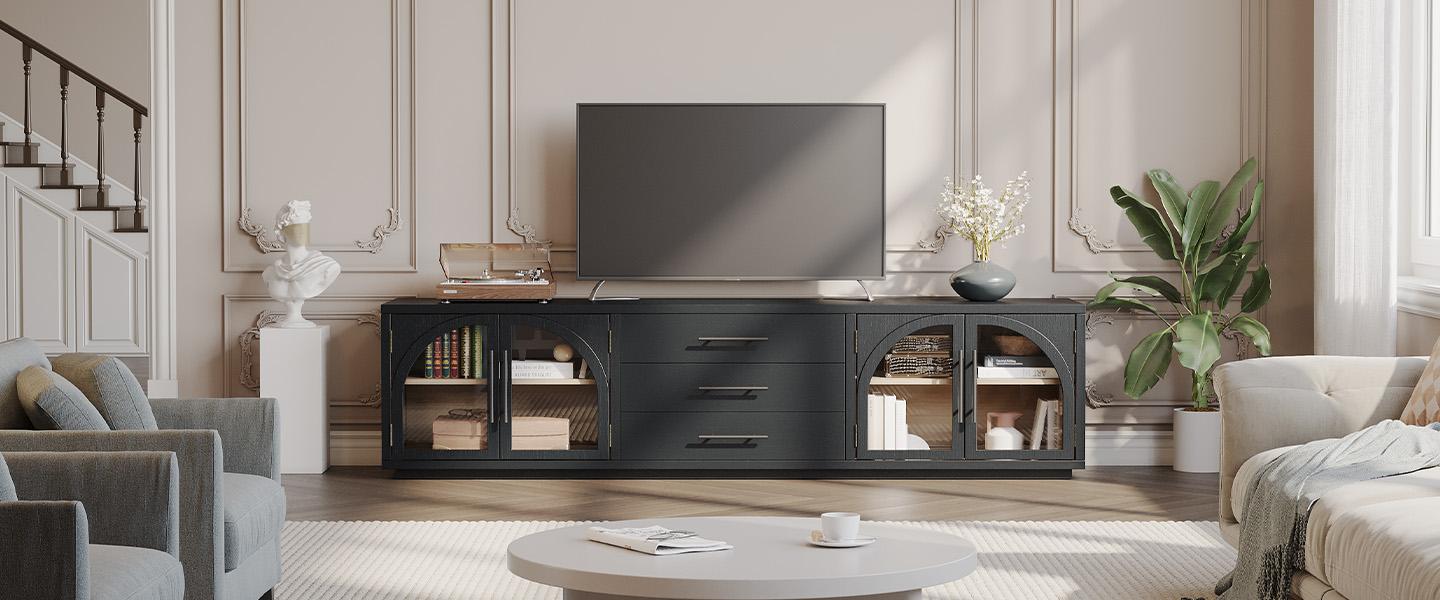
Choosing between a TV stand and a wall mount involves more than appearance. A TV stand provides a surface for your television, along with storage for connected devices and accessories. A wall mount frees the screen from the furniture and gives you more control over its position. Neither option suits every room. Your wall construction, furniture layout, viewing habits, and storage needs all affect which setup makes sense.
Some households also combine the two by mounting the TV above a media console. This keeps the screen at a separately chosen height while providing storage underneath.
Table of Contents
- TV Stand vs Wall Mount: Key Differences
- Pros and Cons of TV Stands and Wall Mounts
- Which Setup Works Best for Different Room Layouts?
- When Should You Choose a TV Stand, a Wall Mount, or Both?
- What to Check Before Installing a Wall Mount or Buying a TV Stand
- Comparing the Total Cost of Each Setup
- Planning for Future Changes
- Conclusion
- FAQs
- Is It Better to Put a TV on a Stand or Mount It on the Wall?
- Is a Wall-Mounted TV Better for a Small Living Room?
- Can You Put a TV Stand Under a Wall-Mounted TV?
- Does a Wall Mount Eliminate the Need for a TV Stand?
- Is It Cheaper to Use a TV Stand or a Wall Mount?
- Can Any TV Be Mounted on the Wall?
- Is a Wall-Mounted TV Safer Than a TV on a Stand?
- How High Should a Wall-Mounted TV Be?
TV Stand vs Wall Mount: Key Differences
A TV stand is a freestanding piece of furniture designed to support a television. Depending on its design, it may include cabinets, drawers, adjustable shelves, or open compartments for gaming consoles, streaming devices, soundbars, and other accessories. The TV rests on the furniture, usually on its own feet or a compatible tabletop base.
A wall mount secures the television directly to the wall with a bracket. The TV no longer needs a furniture surface for support, although you may still want a cabinet or shelf underneath for equipment and accessories.
The main difference is how the screen, storage, and connected devices are arranged. A TV stand combines screen support and storage in one piece of furniture. A wall mount separates those functions, allowing you to position the screen independently but requiring a separate plan for equipment and cables.
One detail worth considering is that wall mounting does not necessarily reduce the footprint of the entire entertainment area. If you still need a full-size media console for gaming equipment, speakers, and storage, the furniture will occupy much of the same floor area. The main difference is that the TV no longer needs to sit on top of it.
Pros and Cons of TV Stands and Wall Mounts
Both setups support a television, but they suit different household needs. Consider how much storage you need, how often you access connected devices, and whether you expect to rearrange the room.
Advantages and Disadvantages of a TV Stand
A TV stand is a practical choice when you want the television, media equipment, and storage to stay together.
Advantages
-
Built-in storage: Cabinets, drawers, and shelves can hold gaming consoles, streaming devices, remotes, controllers, and other living room accessories.
-
Straightforward setup: You generally need to assemble the furniture, position it, and place the TV on its base. There is no need to drill into a wall.
-
Easier access: The rear of the television and connected equipment is usually easier to reach when you need to change an HDMI cable or reconnect a device.
-
More flexibility when moving: A freestanding setup can be relocated or rearranged without reinstalling a wall bracket.
-
Furniture value: A TV stand contributes to the room's design through its finish, shape, storage layout, and materials.
Disadvantages
-
Takes up floor space: A wide or deep console can make a narrow living room feel crowded, especially when it sits close to a walkway.
-
Fixed screen height: The height of the furniture and the TV's feet determine where the screen sits. The furniture itself limits how much you can adjust its position.
-
Tip-over considerations: The TV and furniture need to be stable and secured appropriately, especially in homes with children or pets.
-
Limited positioning: A conventional TV stand does not let you move the screen independently of the furniture.
A stand is often a convenient option for renters, households that frequently rearrange furniture, and people who use several connected devices. Its main advantage is keeping the screen and equipment accessible in one place.
Advantages and Disadvantages of a Wall Mount
A wall mount is useful when you want to position the screen without relying on a cabinet underneath.
Advantages
-
Open floor area: The TV no longer needs a furniture surface to support it, leaving more visible space below the screen.
-
Independent screen placement: You can choose the screen height separately from the height of a media console or other furniture.
-
Multiple bracket options: Fixed mounts keep the TV close to the wall, tilting mounts allow the screen to angle downward, and full-motion mounts can extend or swivel toward different seating positions.
-
Streamlined appearance: A wall-mounted screen can create a cleaner visual arrangement, particularly when cables and connected devices are planned in advance.
-
Reduced TV tip-over risk: A properly installed wall mount removes the risk of the TV tipping off a furniture surface.
Disadvantages
-
Installation requirements: The wall, bracket, fasteners, and TV must be compatible. Some installations are better handled by a qualified professional.
-
Less convenient to relocate: Moving the screen may leave holes that need repair and repainting.
-
More planning for cables: Power and HDMI connections need to be considered before the TV goes up.
-
Separate storage may still be necessary: A wall mount does not provide space for a game console, receiver, remote controls, or other equipment.
-
Access can be restricted: A low-profile fixed mount may make it harder to reach rear ports after installation.
A wall mount is worth considering when screen position is your main priority and the wall can support the installation. It may be less convenient if you frequently change your entertainment equipment or need regular access to several connections.
Which Setup Works Best for Different Room Layouts?
Room size matters, but available floor area, wall position, furniture arrangement, and viewing distance are just as important. Consider how people use the room rather than choosing a setup based only on appearance.
For Small Living Rooms and Apartments
Wall mounting can make a small living room feel less crowded because the television no longer sits on a cabinet. This is useful when the area beneath the screen needs to remain open for circulation or when a doorway, window, or other furniture limits the available floor space.
However, a wall mount is not automatically the best choice for every small room. If you still need a cabinet for a gaming console, router, soundbar, and accessories, you may end up placing a media console below the screen anyway. In that case, the main benefit is separating the TV's position from the furniture's height rather than removing the furniture altogether.
A shallow freestanding console is another option. Measure the distance between the front edge of the furniture and the nearest walkway. A cabinet that fits against the wall may still interfere with movement if the room is narrow.
Before buying, mark the proposed console width and depth on the floor with painter's tape. Include the clearance needed for cabinet doors and drawers. This gives you a more realistic idea of how the furniture will affect circulation.
For Large Living Rooms and Open-Plan Spaces
A larger living room offers more flexibility. A substantial TV stand can help establish the entertainment area, especially when the sofa, television, and adjacent furniture are spread across an open-plan layout.
A wall mount can also work well in a large space. If the seating area faces the TV from an angle, a full-motion bracket may let you turn the screen toward the main sofa without moving a large cabinet.
Consider how the TV relates to nearby dining spaces, windows, and walkways. A wall-mounted screen may look visually lighter, but it still needs to be positioned where viewers can see it comfortably. A console below the screen can help define the entertainment zone without requiring a large entertainment center.
For Different Viewing Positions
A conventional TV stand usually gives you a fixed screen position. The television rests on its feet, so its height depends on the TV's design and the height of the furniture.
Wall mounts offer more positioning options:
-
Fixed mounts: Keep the TV in one position, often close to the wall.
-
Tilting mounts: Let you angle the screen downward or upward within the bracket's range.
-
Full-motion mounts: Allow the screen to swivel and extend, depending on the model.
These mounts are useful in rooms with multiple seating positions because they let you angle the screen toward different areas. For example, a TV facing the sofa may need to turn slightly toward a dining area or an adjacent chair.
Adjustable tabletop TV stands can also offer some height or angle flexibility, depending on the stand and TV compatibility. Whichever setup you choose, prioritize comfortable viewing from the seats used most often rather than positioning the screen based only on how it looks from across the room.
When Should You Choose a TV Stand, a Wall Mount, or Both?
Start by considering how you use the entertainment area: where the screen needs to sit, how much storage you need, and whether you may rearrange the room later.
Choose a TV Stand If You Need Storage and Easy Access
A TV stand is a good fit when the television is part of a larger entertainment setup. If you use a game console, streaming box, cable receiver, soundbar, and several accessories, built-in storage keeps these items close to the screen.
It is also a sensible option if you rent, expect to move, or regularly change your furniture arrangement. You can reposition the console without having to patch mounting holes or reinstall a bracket.
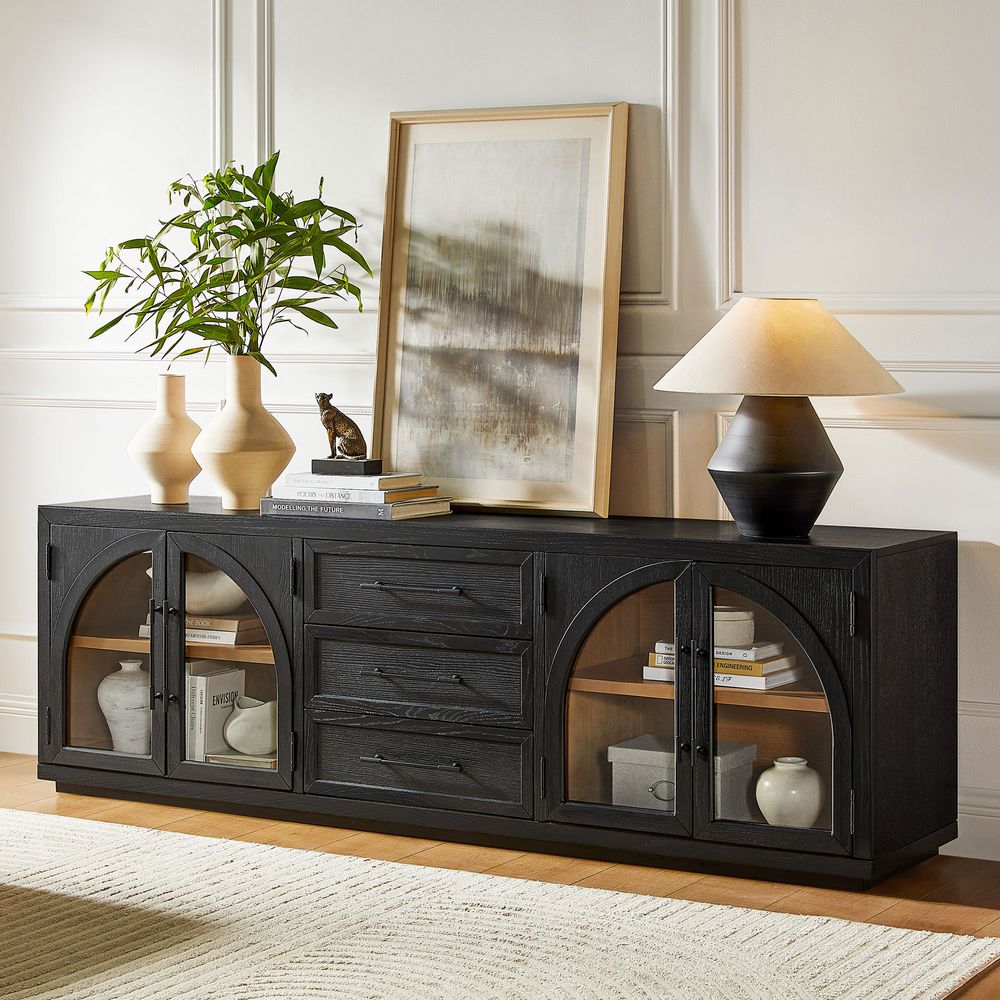
For a traditional furniture-based setup, consider the Valborg 80-Inch Oak Media Console. It measures 80.1 inches wide, 17.9 inches deep, and 25.9 inches high, and is designed for TVs up to 85 inches. Its American solid oak and engineered wood with oak veneers gives it a oak finish, while the arched glass doors add a distinctive detail to the front.
The console also has adjustable shelves, dovetail-jointed drawers, and two cord cutouts in the back panel. These features provide enclosed storage and openings for routing connected equipment cables. Before choosing it, compare the TV's feet or base dimensions with the usable top surface, and check the dimensions of your devices against the storage compartments.
Valborg 80-Inch Oak Media Console
View Product
Choose a Wall Mount If Floor Space and Screen Position Matter Most
A wall mount may be the better choice when you want the floor beneath the TV to remain open or when a freestanding cabinet would interfere with the room layout.
It is also useful when the ideal viewing position does not line up with the height of available furniture. You can plan the TV position around the sofa first, then decide whether storage is needed underneath.
This option makes sense when the wall construction and mounting hardware can safely support the television. Consider whether you are comfortable with a more permanent installation and whether the power outlet and cable connections are in convenient locations.
If the room has little storage furniture, remember that mounting the TV only solves the screen-placement problem. You may still need a cabinet or shelf for connected equipment.
Consider a Wall-Mounted TV With a Media Console If You Want Both
A wall-mounted TV with a media console combines two functions: the wall supports the screen, while the furniture below stores equipment and living room essentials.
This arrangement is useful when you want the screen to sit independently of the furniture but still need enclosed storage. It also gives you more freedom to choose a console based on its appearance, dimensions, and storage layout instead of using its height to determine the TV's position.
A freestanding console creates a furniture base beneath the screen. A floating media console keeps more of the floor visible, although its storage capacity and wall installation requirements depend on the design. The choice comes down to how much equipment you have and how much visible floor space you want to preserve.
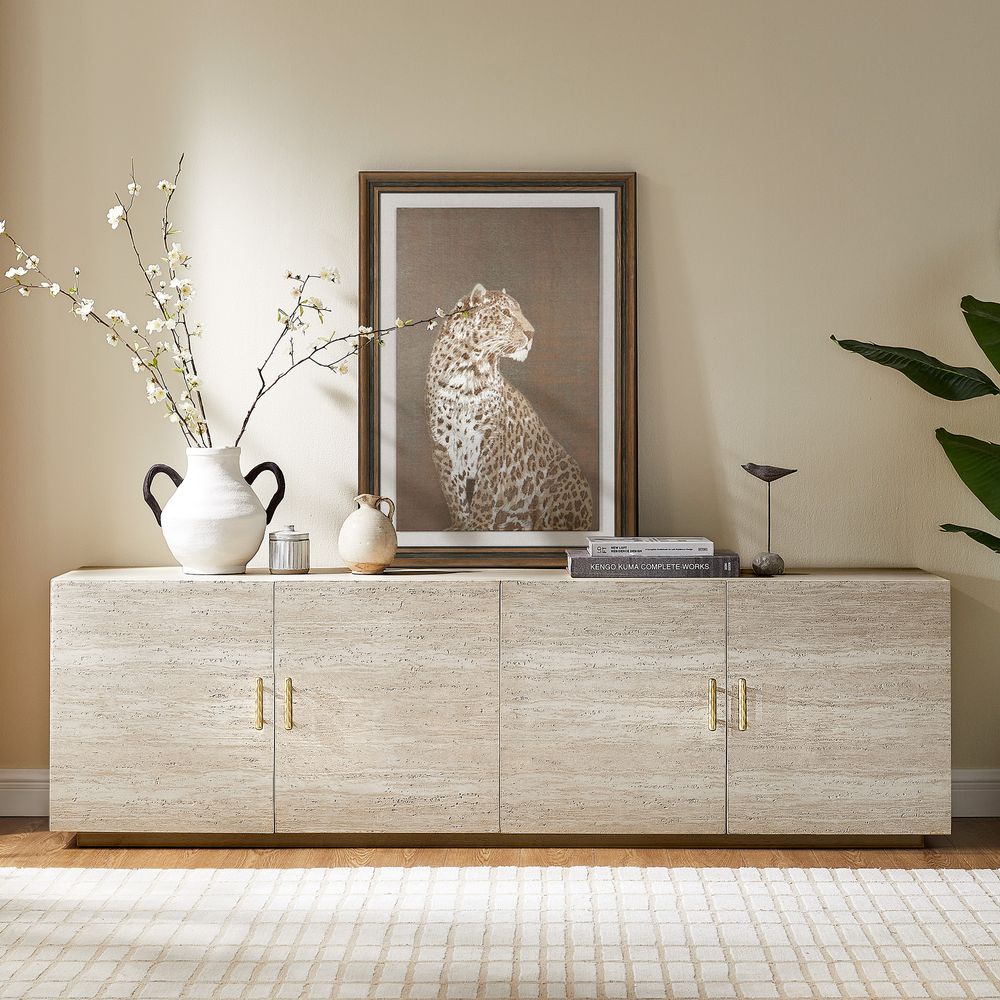
If you prefer a lighter, more decorative look, consider the Renata 84-Inch Travertine-Textured Media Console. It measures 84 inches wide, 17.7 inches deep, and 25 inches high. Its beige travertine-inspired surface and brass-toned hammered hardware create a different look from a traditional wood console.
Inside, adjustable shelves provide space for media equipment and accessories, while four rear cord cutouts allow cables to pass through the back panel. When placing it beneath a wall-mounted TV, plan the screen height and the gap between the TV and console together. Check that the furniture does not block outlets, cable plates, or access points you may need later.
Renata 84-Inch Travertine-Textured Media Console
View Product
What to Check Before Installing a Wall Mount or Buying a TV Stand
Once you have chosen a general setup, a few measurements and compatibility checks can prevent problems after installation.
Wall Compatibility and TV Mount Requirements
Start by identifying the wall construction. A drywall partition with wood studs, a masonry wall, and a concrete wall require different installation methods and hardware. Do not assume that a bracket's included screws are suitable for every wall.
Check the TV's weight without its original stand, the bracket's weight rating, and the VESA mounting pattern. VESA refers to the spacing of the mounting holes on the back of the television. The bracket must support the TV's pattern and weight, and the wall fastening method must be appropriate for the wall itself.
Follow the instructions supplied with the TV and bracket. Samsung's TV wall-mounting guidance recommends checking the wall's structural support, mount compatibility, and viewing position before installation. If the wall type or required support is unclear, have a qualified installer assess it rather than relying on an unverified anchor.
Viewing Height and Furniture Dimensions
Viewing comfort should guide the screen position. Sit in the main viewing seat and measure the height of your eyes from the floor. Use that measurement as a starting point when positioning the screen.
The center of the screen near seated eye level is a common reference, but the final position depends on screen size, sofa height, viewing distance, and the room's layout. A screen mounted too high may require viewers to tilt their heads upward for extended periods.
For a TV stand, measure the furniture height and the TV's overall height, including its feet. Also check the width and depth of the TV base. A TV may fit within the console's recommended screen-size range but still have feet that extend too close to the edge of the top surface.
For a wall-mounted TV with a console underneath, measure the gap between the furniture and the screen. Leave enough room for the console's doors to open and for devices or cables to be accessed.
Cable Management and Equipment Access
Cable planning is often overlooked until the TV is already in place. Before mounting, identify the location of power outlets, HDMI connections, cable outlets, and any other ports you expect to use.
Think about how often you connect or replace devices. If you frequently switch gaming systems or add new equipment, a full-motion mount may provide better access than a low-profile fixed bracket. You may also want to connect frequently used cables before lifting the TV onto the bracket.
A media console can help organize the cables that run between devices. Look for rear openings large enough for the cables you need to route. Also check the cabinet's internal dimensions, because the outside depth does not tell you exactly how much usable room is available inside.
Soundbars need a separate check. Their placement depends on their design and speaker orientation. A soundbar placed inside an enclosed cabinet may have its sound obstructed, so check the manufacturer's guidance before putting one behind a door. In many setups, placing it on the console beneath the screen is more practical.
Safety and Stability
Safety depends on the entire setup, not just the choice between a TV stand and a wall mount.
For a freestanding TV, use furniture designed to support a television and confirm that its weight capacity exceeds the TV's weight. Check that the TV base fits securely on the furniture surface, and anchor the TV and furniture according to the manufacturers' instructions.
The U.S. Consumer Product Safety Commission's Anchor It! safety guidance emphasizes that televisions not mounted to a wall should still be anchored. It also recommends securing furniture to help prevent tip-over incidents. This remains important when a wall-mounted TV sits above a separate media console: mounting the screen does not automatically secure the furniture below it.
For a wall-mounted screen, verify the bracket's load rating, wall compatibility, and fasteners. Follow the installation instructions carefully, and use professional help when the wall or mounting requirements are beyond your experience.
Comparing the Total Cost of Each Setup
There is no universal price winner because the cost depends on the complete setup rather than the price of one item.
A TV stand requires the cost of the furniture and, depending on the model, possible assembly or delivery expenses. A wall mount may have a lower initial hardware cost, but the final installation can involve additional expenses for suitable fasteners, professional labor, cable covers, or in-wall cable routing.
A wall-mounted TV may also need a separate media console or shelving for equipment. If you planned to buy storage furniture regardless, include that cost in the comparison.
Consider these potential expenses:
For a hybrid setup, include the cost of both the wall bracket and the media console. This arrangement may suit households that need both flexible screen placement and storage, but it is not necessarily the least expensive option.
List everything the entertainment area needs, then compare the total cost of each complete setup.
Planning for Future Changes
Before committing to a setup, consider whether you may move, upgrade your TV, or add more connected devices in the next few years.
If you expect to move, a freestanding stand is easier to relocate. A wall mount can be removed, but the original wall may need repair, and the new home may require a different bracket or installation position.
TV upgrades also deserve attention. A larger screen may have a different weight, width, foot placement, or VESA pattern. Do not assume that a bracket that works with your current TV will fit a future model. Check the specifications again before reusing it.
Storage needs can change as well. A household may add a gaming console, soundbar, streaming box, or other equipment over time. Adjustable shelves and accessible cable openings can make a media console easier to adapt, but the usable compartment dimensions still need to match the devices.
Think about routine maintenance, too. You may need to unplug a device, clean behind the console, or reach a cable connection. A setup that looks neat but makes routine access difficult can become frustrating.
Before buying furniture or drilling into the wall:
-
Measure the TV, the available wall area, and the main viewing distance.
-
Mark the proposed furniture footprint and check nearby walkways.
-
List the devices that need storage, power, and cable connections.
-
Confirm the wall, bracket, TV, and furniture specifications.
-
Decide whether you want the screen and storage to move together or work independently.
Conclusion
A TV stand is a practical choice when you want built-in storage, easier equipment access, and flexibility when rearranging furniture. A wall mount is useful when you want to keep the floor beneath the screen open or position the TV independently of the furniture.
You can also combine the two by mounting the TV above a media console. This keeps the screen at a separately chosen height while providing space for equipment and accessories. Consider how you use the room, what needs to be stored, and whether the installation will remain practical as your needs change.
FAQs
Is It Better to Put a TV on a Stand or Mount It on the Wall?
A TV stand is usually more practical when you need storage, easy access to cables, and flexibility when moving or rearranging furniture. A wall mount is useful when you want to free up the floor beneath the TV or position the screen independently. The better choice depends on your room and how you use your entertainment equipment.
Is a Wall-Mounted TV Better for a Small Living Room?
It can be, especially when removing the TV stand leaves useful floor space open. However, if you still need a media console for equipment and storage, the room may not gain as much space as expected. Compare the actual footprint of the furniture you plan to keep, not just the position of the screen.
Can You Put a TV Stand Under a Wall-Mounted TV?
Yes. A media console can sit beneath a wall-mounted TV and provide storage for gaming consoles, streaming devices, remotes, and other accessories. Make sure the screen is positioned at a comfortable viewing height and leaves enough clearance for the console's doors, drawers, and cable connections.
Does a Wall Mount Eliminate the Need for a TV Stand?
No. A wall mount supports the TV but does not provide storage for gaming consoles, streaming devices, soundbars, or other accessories. If you use several connected devices, you may still need a media console, cabinet, or shelf underneath.
Is It Cheaper to Use a TV Stand or a Wall Mount?
A basic wall bracket may cost less than a media console, but installation, suitable hardware, cable management, and separate storage can increase the total cost. A TV stand may have a higher initial purchase price but include the storage you need. Compare the full cost of each setup rather than the bracket and furniture prices alone.
Can Any TV Be Mounted on the Wall?
Not every TV and wall bracket combination is compatible. Check the television's weight, VESA mounting pattern, and model-specific instructions, then compare them with the bracket's supported sizes and weight rating. The wall and fasteners must also be suitable for the installation.
Is a Wall-Mounted TV Safer Than a TV on a Stand?
A correctly installed wall mount prevents the TV from tipping off a furniture surface. However, a freestanding TV can also be used safely when it sits on suitable furniture and is properly anchored. The CPSC recommends securing TVs and furniture to help prevent tip-over incidents. If you use a wall-mounted TV above a console, remember to anchor the console separately.
How High Should a Wall-Mounted TV Be?
Start by measuring eye level from your usual seated viewing position. The center of the screen near seated eye level is a useful general reference, but the right height depends on the TV's size, sofa height, viewing distance, and room layout. Avoid mounting the screen higher simply to create more space above the console if doing so makes viewing uncomfortable.