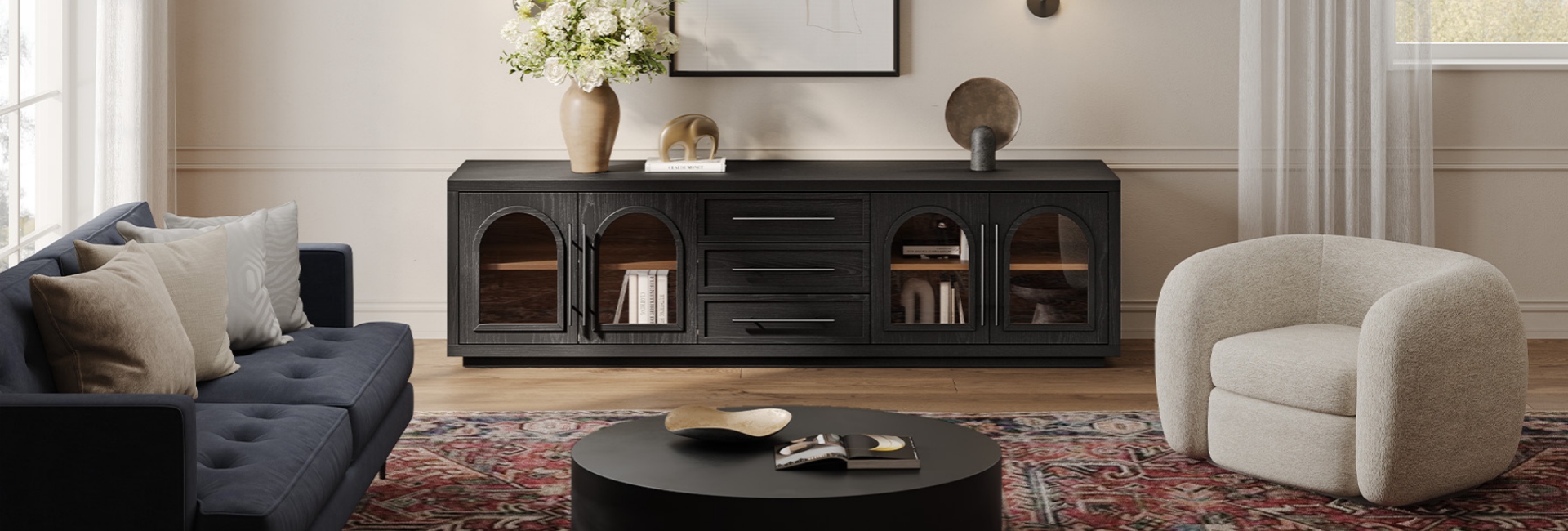
Most living rooms collect the same pile of clutter: remotes with no home, game controllers, a tangle of HDMI cables, and a stack of discs nobody admits to owning. Good media console storage helps solve all of that in one piece of furniture. The right mix of closed cabinets, drawers, and cable cutouts can turn the busiest wall in your living room into a much more organized space.
The key is to choose storage based on what you actually need to keep nearby. Below, we'll look at how to size a media console, decide between cabinets and drawers, organize the interior, manage cables, and choose a setup that fits your room.
Table of Contents
- What Media Console Storage Really Means
- How to Size Your Storage Before You Buy
- Media Console Cabinet vs. Drawers: What Each One Hides
- The Three-Zone System That Keeps a Console Tidy
- Cable Management the Right Way
- Living Room Storage When Square Footage Is Tight
- Materials That Hold Up in a Busy Living Room
- Three Hernest Media Consoles Worth a Look
- How to Style the Top So the Storage Vanishes
- DIY or Buy? A Quick Decision Guide
- FAQs
- What is a media console with storage?
- How much storage do I need for a media console?
- What should I store inside a media console cabinet?
- How do I hide cables with a media console?
- What size media console do I need for a 65-inch TV?
- Are drawers or cabinets better for a media console?
- How do I organize a media console with kids' toys and games?
- What material is best for a media console in a living room?
- How tall should a media console be?
- Can a media console work as living room storage for things other than media?
What Media Console Storage Really Means
A plain TV stand mainly provides a surface for your television. A media console with storage does more: it gives the equipment and everyday items around your TV a designated place.
Think of the storage in four parts.
Closed cabinets are useful for bulky or visually messy items. A cable box, game console, router, power strip, or board game collection can all benefit from being behind a door. The main advantage is simple: you don't have to look at everything when you're sitting in the room.
Drawers work better for smaller items you reach for regularly. Remotes, batteries, HDMI adapters, controllers, chargers, and manuals are easier to keep together in a drawer than in a deep cabinet.
Open shelving is best reserved for things you actually want to display. Books, a speaker, a plant, or a few decorative pieces can make the console feel more personal, while closed storage handles the less attractive stuff.
Cable management is the part that's easy to overlook. Rear cord cutouts or cable pass-throughs let power and HDMI cables move through the console without hanging over the back or across the floor.
If you're comparing different storage layouts, explore Hernest's media consoles for designs with combinations of cabinets, drawers, shelving, and cable-management features.
How to Size Your Storage Before You Buy
Sizing is where many media console mistakes begin. Before choosing a finish or style, measure the space and make a list of what needs to fit inside.
Measure the Wall, Not the Wish
Start with the usable width of the wall where the console will sit. Check for doors, windows, vents, outlets, and other furniture that could limit the available space.
A console doesn't necessarily need to be the same width as the wall or exactly match the width of your TV. What matters is how the console, television, and surrounding furniture work together visually and physically.
Depth deserves attention, too. Many media consoles fall somewhere around the mid-teens to roughly 20 inches deep, but the right depth depends on the room and what you're storing. If a walkway runs behind the sofa, a deeper console can reduce the usable clearance. In a smaller room, a shallower design may leave more room to move.
Count the Categories You Need to Hide
Before shopping, make a quick list of what has to disappear.
A typical setup might include:
-
A streaming device or two
-
A game console and controllers
-
Several remotes
-
HDMI cables and adapters
-
Chargers and batteries
-
DVDs or games
-
Manuals and miscellaneous accessories
That's more storage than it may seem.
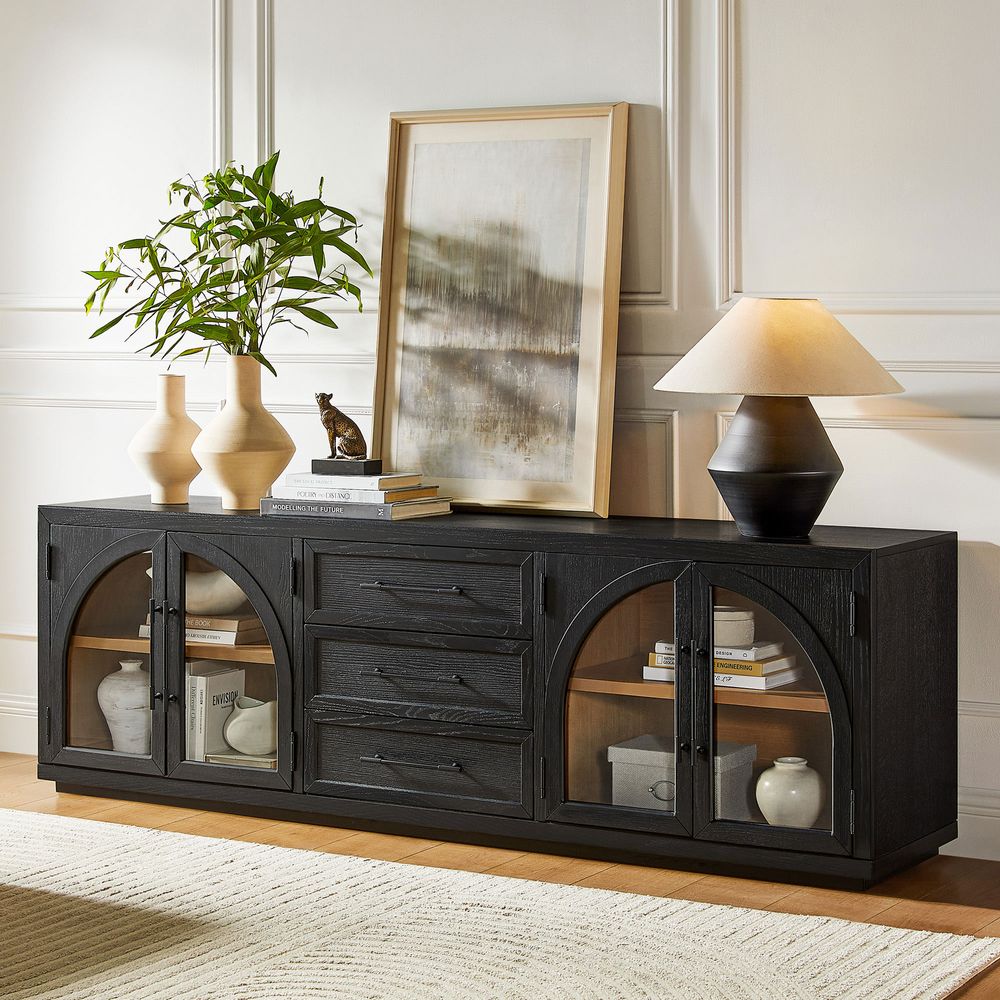
A console such as the Valborg 80-inch oak media console, with two cabinets and three drawers, provides separate places for larger electronics and smaller accessories without requiring an especially wide piece.
For a larger setup, an 84-inch console can give you enough room to separate electronics, games, and everyday items instead of stacking everything into one crowded compartment.
Valborg 80-Inch Oak Media Console
View Product
Media Console Cabinet vs. Drawers: What Each One Hides
The choice between cabinets and drawers isn't really about which one is better. Each solves a different storage problem.
When a Cabinet Makes More Sense
A cabinet is useful when the item is bulky, awkwardly shaped, or better kept out of sight.
Think game consoles, routers, power strips, board games, or larger accessories. Doors also make it easier to hide visual clutter when you don't have time to organize everything perfectly.
If you have several pieces of equipment, check the internal dimensions rather than judging storage capacity from the outside. Make sure the shelves can accommodate the height and depth of the equipment you plan to store.
When Drawers Work Better
Drawers are more convenient for small, frequently used items.
Remotes, batteries, controllers, adapters, and small accessories are easier to find when they have a dedicated drawer. If a console uses multiple drawers, you can give each one a simple purpose instead of putting everything into a single catch-all compartment.
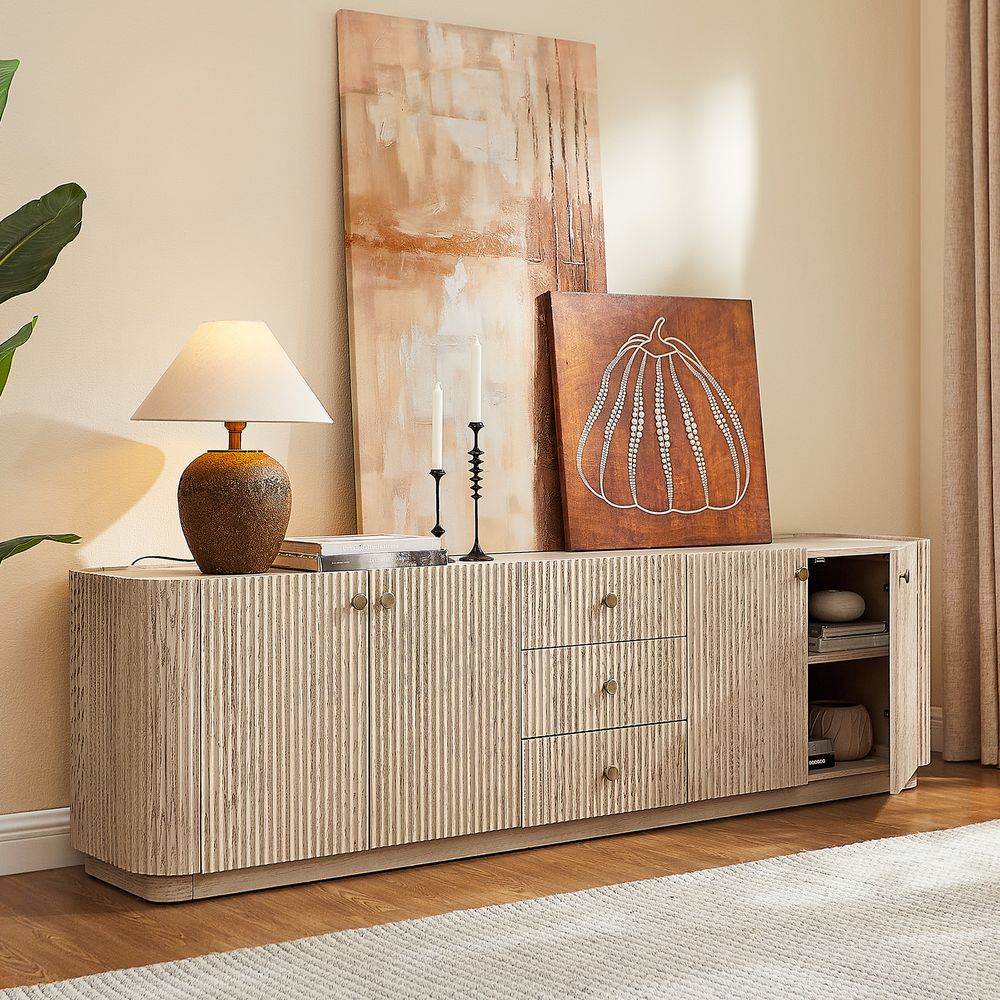
The Skimra 84-inch oak media console, for example, combines drawers with cabinet storage, giving larger and smaller items separate places to live.
Dovetail drawer construction can also be a useful detail to check when comparing furniture, but the overall construction, hardware, materials, and finish all matter when evaluating build quality.
Skimra 84-Inch Oak Media Console
View Product
The Three-Zone System That Keeps a Console Tidy
Good media console storage should be organized around how often you use something, not just what the item is.
A simple three-zone system can make the setup easier to maintain.
Zone 1: Games and Controllers
Put game consoles and controllers in the cabinet or drawer that's easiest to reach.
A small tray or controller stand can keep accessories from becoming a tangle of cables. If children regularly use the system, keep this storage easy to access so putting things away doesn't become a chore.
Zone 2: Discs and Manuals
Discs can take up more room than expected, especially when they're kept in their original cases.
If you still use DVDs or physical games, slim sleeves or a small storage bin can reduce the amount of shelf space they require. Manuals, warranty information, and other paperwork can go in the same area so they're available when needed without taking over a drawer.
Zone 3: The Catch-All Drawer
Almost every living room needs one place for miscellaneous items.
Use one drawer for batteries, chargers, adapters, spare cables, and other small things that don't have another obvious home. The important part is keeping the catch-all limited to one drawer. Otherwise, every drawer eventually becomes a catch-all.
A cable organizer attached inside a cabinet door can also keep frequently used cords from spreading throughout the storage space.
Cable Management the Right Way
Cables are often what make an otherwise organized media area look messy. The best time to solve the problem is before everything is plugged in.
Cord Cutouts and Cable Pass-Throughs
Look for a console with openings in the rear panel for power and signal cables.
Four well-positioned cord cutouts, such as those included on the Marisol and Skimra consoles, can make it easier to route cables from the equipment through the back of the cabinet and toward the wall outlet.
If your console doesn't have built-in openings, a cable grommet or professionally drilled pass-through can provide another solution. Measure carefully before modifying furniture, especially if the back panel contains structural components.
For cables running from the console to an outlet, a wall-mounted raceway can keep the visible section contained. A raceway that matches the wall color can be much less noticeable than loose cables.
Where to Put the Power Strip
The power strip is often the least attractive part of an entertainment setup.
If the console has enough ventilation and clearance, mounting the power strip inside a cabinet can keep it off the floor. Route the necessary cables through the rear openings and avoid packing the compartment so tightly that electronics or adapters have no room to dissipate heat.
Always follow the ventilation and clearance requirements provided by the manufacturer of your electronics and power equipment.
Living Room Storage When Square Footage Is Tight
In a small room, the wrong media console storage choice becomes obvious very quickly. The goal is to add useful storage without making the room feel crowded.
Wall-Mount the TV to Free the Floor
If floor space is limited, wall-mounting the TV can change how the entire setup works.
With the television off the console, the furniture underneath can focus on storage rather than supporting the screen. A lower, longer console can create a cleaner horizontal line while leaving the area around the TV more open.
Just make sure the wall, mounting hardware, and TV are suitable for the installation, and plan the cable route before mounting the television.
Use the Space Above the Console Carefully
The wall above a console is another opportunity to add visual interest without using floor space.
A single floating shelf, a pair of framed pieces, or one larger artwork can balance the furniture below. Avoid filling every available inch. The console already provides visual weight, so a smaller number of carefully chosen objects usually feels more intentional.
For a compact room with character, the Valborg 80-inck black oak media console combines two cabinets with three drawers in a 70-inch-wide design. Its arched frame can also complement rooms with mid-century-inspired furniture. If you're looking for more furniture in this design direction, browse Hernest's Mid-Century Modern TV Stands.
Materials That Hold Up in a Busy Living Room
A media console gets regular use. The top may hold a television, speakers, decor, or everyday objects, while the drawers and doors may be opened several times a day.
The construction and finish matter as much as the material itself.
Why Oak Is a Popular Choice
Oak is a durable hardwood commonly used for furniture and can work well for a media console that needs to handle everyday use.
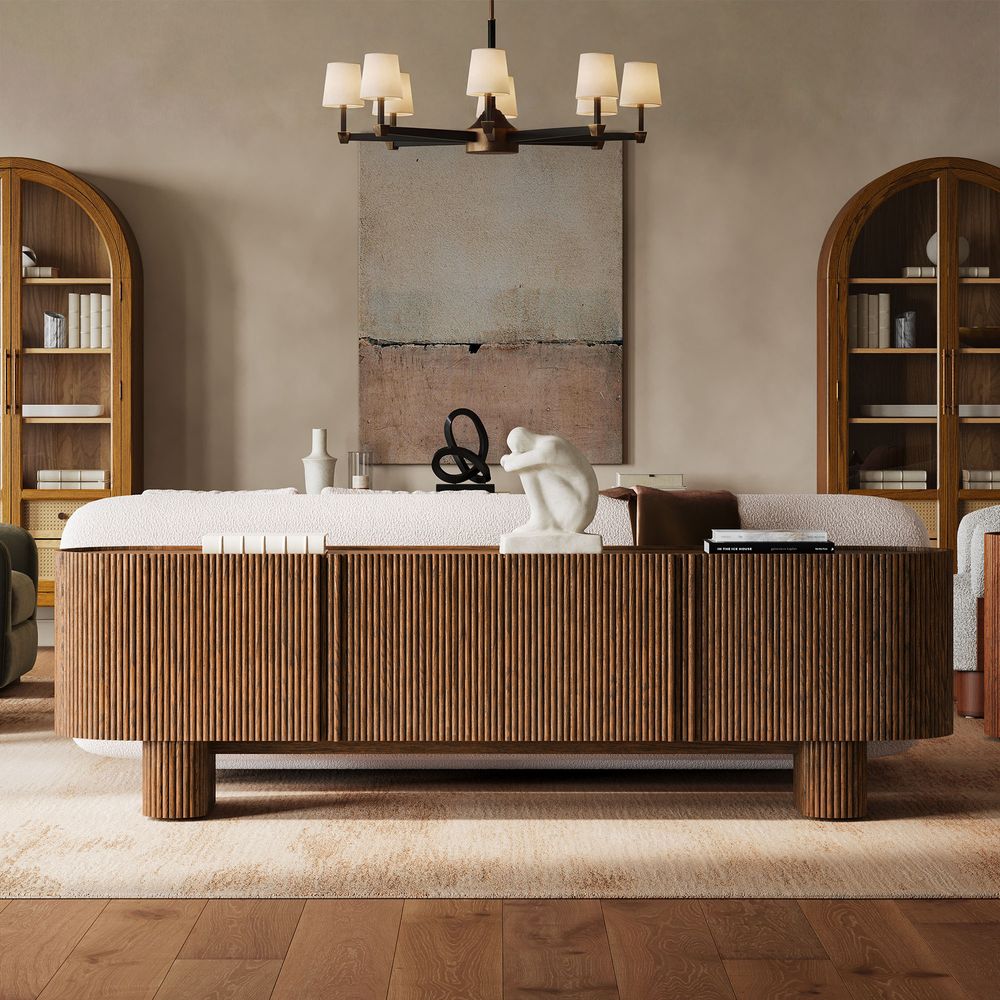
The Marisol 84-inch oak media console combines solid oak, engineered wood, and oak veneer. Its kiln-dried construction and oak surface are designed for furniture use, while the fluted front adds texture to the large cabinet.
It also accommodates TVs up to 85 inches, making it an option for larger entertainment setups.
Veneer and Engineered Wood
Oak veneer is different from a solid-oak construction, but that doesn't automatically make it a lower-quality choice.
A well-made veneer surface can provide the appearance and texture of natural oak while engineered wood provides a stable core. What matters is the quality of the materials, joinery, finish, and overall construction.
The Skimra 84-inch Oak Media Console combines solid oak, engineered wood, and oak veneer with a whitewashed finish and fluted wave front. It offers a lighter visual option while maintaining a substantial storage footprint.
Marisol 84-Inch Oak Media Console
View Product
Three Hernest Media Consoles Worth a Look
If you want media console storage that's already configured for everyday use, these three Hernest designs offer different proportions and visual directions.
The Valborg 80" Black Oak Arch TV Stand is a compact option when you want a mix of closed storage and drawers without moving to an extra-wide console.
The Marisol 84" Oak Media Console provides a larger storage footprint with a warm brown oak finish and four rear cord cutouts.
The Skimra 84" Oak Media Console offers a lighter whitewashed finish and fluted wave detailing, along with drawers, cabinet storage, and four cord cutouts.
Before ordering, check the product page for current dimensions, weight capacity, materials, warranty information, lead times, and return terms.
How to Style the Top So the Storage Vanishes
Even well-organized media console storage can look messy if the top becomes a dumping ground.
A simple approach is to limit the surface to a few purposeful objects.
Try one taller object, such as a lamp or vase, one lower object, such as a stack of books or a tray, and one plant or other natural element. The exact combination doesn't matter as much as leaving enough open surface around the TV.
Keep frequently used remotes in a drawer instead of leaving them beside the television. That small change can make the entire setup look more finished.
For the whitewashed Skimra, lighter accessories can complement the finish without competing with the fluted front. With the darker Marisol, warmer wood or metal accents can work well with the oak surface.
DIY or Buy? A Quick Decision Guide
Building your own media console can make sense if you already have woodworking experience, own the necessary tools, and need a very specific size.
The biggest advantages are customization and control over the dimensions. You can design every cabinet and drawer around your equipment.
The tradeoff is time. Material sourcing, joinery, finishing, and troubleshooting can turn a simple furniture project into several weekends of work.
Buying a finished console makes more sense when you want the storage ready to use, need a warranty, or don't want to take on a furniture-building project. For a media area that needs a combination of cabinets, drawers, cable access, and a finished exterior, a ready-made console can simplify the process.
FAQs
What is a media console with storage?
It's a low piece of furniture designed to hold a TV and the equipment and everyday items around it. Unlike a basic TV stand, a media console with storage may combine cabinets, drawers, shelves, and cable-management features to keep electronics and accessories organized.
How much storage do I need for a media console?
Start by listing everything you want to store, including streaming devices, game consoles, controllers, remotes, cables, chargers, discs, and batteries. A smaller setup may work with a 70-inch console that combines cabinets and drawers, while a larger collection may benefit from the additional width of an 84-inch design.
What should I store inside a media console cabinet?
Use cabinets for bulky or awkward items such as game consoles, routers, cable equipment, power strips, and board games. Drawers are generally more convenient for smaller items such as remotes, batteries, HDMI adapters, and controllers.
How do I hide cables with a media console?
Choose a console with rear cord cutouts or cable pass-throughs. Route power and HDMI cables through the openings toward the wall outlet, and use a cable raceway for any visible section between the console and outlet. Keep enough ventilation around electronics and follow their manufacturer requirements.
What size media console do I need for a 65-inch TV?
Start by measuring the TV's actual width rather than relying only on its advertised screen size. A console that's at least roughly as wide as the TV can create a balanced look, while a wider console provides additional surface area and storage on either side. Also check the TV's stand width and depth if it will sit directly on the console.
Are drawers or cabinets better for a media console?
They solve different storage problems. Cabinets are useful for bulky electronics and items you want completely out of sight. Drawers are better for smaller, frequently used accessories. A console that combines both can accommodate a wider range of living room items.
How do I organize a media console with kids' toys and games?
Give the most frequently used items an easy-to-reach cabinet or drawer. Keep games and controllers together, store smaller accessories in a separate drawer, and reserve one catch-all drawer for batteries, chargers, and miscellaneous items. Keeping each category simple makes it easier for everyone to put things back.
What material is best for a media console in a living room?
Solid oak is a durable hardwood option for furniture that receives regular use. Oak veneer over engineered wood can also be practical when the construction and finish are well made. When comparing consoles, look at the complete construction rather than judging quality from the material name alone.
How tall should a media console be?
There isn't one standard height for every setup, but many media consoles are designed to sit relatively low. If the TV sits on the console, consider the TV's stand height and your seated viewing position. For a wall-mounted TV, consider the console and screen together so the overall arrangement feels comfortable from your usual seating position.
Can a media console work as living room storage for things other than media?
Yes. Cabinets and drawers can hold board games, books, accessories, small household items, or other living room essentials. A well-proportioned console can function as general storage even when the television is wall-mounted.