A TV stand that rocks when you walk past it, shifts when you open a drawer, or never seems to sit square can put your television and other equipment at risk. Many wobbly TV stands can be stabilized by addressing uneven floors, loose hardware, or poor weight distribution. Start by identifying the source of the movement before attempting a repair. The right solution depends on whether the problem comes from the floor, the stand's feet, its connections, or damaged cabinet panels.
Before inspecting the stand, remove the TV and equipment with help. Check the base, back panel, and joints, and keep children and pets away while you work.
Table of Contents
- Why Is Your TV Stand Wobbling?
- How to Fix a Wobbly TV Stand
- How to Stabilize a TV Stand on Different Floors
- Why Does a TV Stand Wobble When Drawers or Doors Are Open?
- How to Prevent Your TV Stand from Wobbling
- When Should You Repair or Replace a Wobbly TV Stand?
- FAQs
- Why Is My TV Stand Wobbling?
- How Do I Stop My TV Stand from Wobbling?
- How Do I Level a TV Stand on an Uneven Floor?
- How Can I Stabilize a TV Stand on Carpet?
- Can I Put Shims Under TV Stand Legs?
- Why Does My TV Stand Wobble When the Drawers Are Open?
- What Should I Do If the Screws Won't Tighten?
- How Much Weight Can a TV Stand Hold?
- When Should I Replace a Wobbly TV Stand?
Why Is Your TV Stand Wobbling?
The direction of the movement can help identify the problem. Rocking at one corner often points to uneven floor contact, while side-to-side movement may indicate loose joints or a frame that is out of square. If the stand shifts when a drawer opens, the problem may involve weight distribution or a tipping risk.
Uneven Floors or Uneven Legs
A slightly sloped floor, uneven tile, or compressed carpet padding can prevent all four legs from making firm contact with the ground. Adjustable feet that have not been properly set can cause the same problem.
With the stand empty, gently press each top corner and check whether any foot lifts. You can also use a bubble level across the top to check its alignment in both directions. If the stand becomes stable on another flat surface, the original floor may be contributing to the problem.
Loose Screws and Furniture Joints
Screws and bolts can loosen over time, especially after frequent use, moving, or incomplete assembly. Check the leg plates, side-panel connections, cross supports, and corner brackets for loose fasteners or visible gaps.
A screw that spins without gripping may indicate a stripped hole or damaged material. Avoid tightening it repeatedly, as this can make the damage worse.
Uneven Weight Distribution
A heavy speaker on one side, several devices on an upper shelf, or an off-center TV can affect the stand's balance. Check that the television's feet are fully supported and that its size and weight fall within the stand's stated limits.
Heavy equipment should generally sit on lower shelves when the cabinet is designed to support it. Also check individual shelf limits rather than relying only on the stand's total weight capacity.
Weak Shelves or Damaged Cabinet Panels
A bowed shelf, cracked side panel, or detached back panel can reduce the cabinet's stability. Some media consoles rely on the back panel to help prevent side-to-side movement.
Look for gaps along the back, loose shelf pins, swollen particleboard, cracked corners, or a bottom panel that has shifted. Adding screws will not fix material that is swollen or crumbling. Damaged structural panels may need replacement.
Improper Assembly
A reversed panel, loose cam lock, missing connector, or frame assembled out of square can make a TV stand unstable from the beginning.
Compare the cabinet with its assembly guide, paying attention to panel orientation, connector placement, and back-panel attachment. Use the specified hardware and avoid guessing at screw lengths, as an oversized fastener can damage the finished surface.
How to Fix a Wobbly TV Stand
Once you identify the cause, start with simple adjustments such as leveling the feet or tightening loose screws. Keep the TV and accessories off the stand until it is stable.
Before starting, prepare the correct screwdriver or Allen key, a small bubble level, and the original assembly guide. Avoid taking apart more of the cabinet than the repair requires.
Adjust the Feet and Level the TV Stand
If the TV stand has adjustable levelers, turn them in small increments until all feet make firm contact with the floor. Recheck the top from side to side and front to back.
For stands with fixed feet, use a firm, non-slip furniture leveler rated for the cabinet's weight. Felt pads can protect hardwood floors and fill very small gaps, but they may compress under a heavy unit. Avoid using loose paper, coins, or stacked scraps as permanent supports.
A simple way to locate an uneven foot is to slide a thin strip of paper underneath each leg. If the paper moves freely under one foot but not the others, that corner may need adjustment. Never put your fingers underneath a loaded cabinet or force a thick shim into a narrow gap.
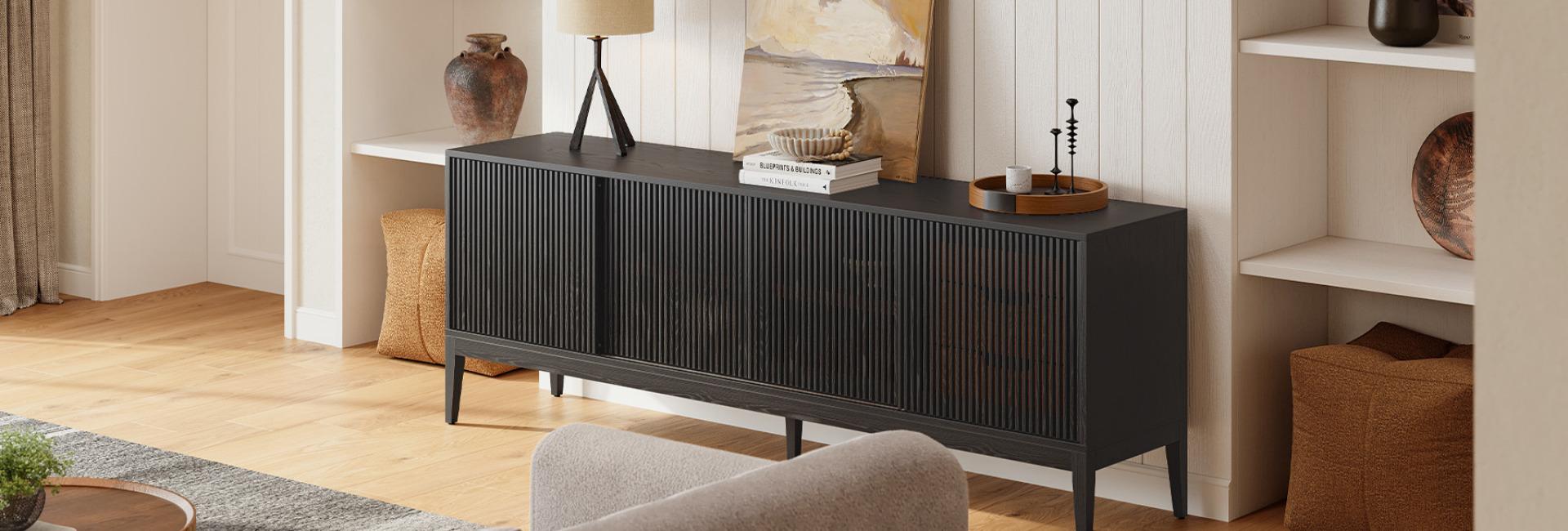
The Astrid 84-inch MCM Slatted Media Console features solid wood legs and an oak-and-engineered-wood construction. When assembling the console, make sure the legs are securely attached and all connection points are properly tightened.

Astrid 84-inch MCM Slatted Media Console
View ProductTighten Loose Screws and Hardware
Use the correct screwdriver bit or wrench to tighten accessible screws and bolts until the connections feel snug. Work around the frame gradually to keep the cabinet aligned.
Avoid using a high-speed drill or applying excessive force. Overtightening can strip screw holes, crush engineered wood, or split a panel.
If a screw spins without gripping, stop turning it. The appropriate repair depends on the material and the extent of the damage. A solid-wood hole may be repairable with a fitted wood plug and a new pilot hole, while damaged engineered wood may require an approved insert or panel replacement.
Reinforce Loose Furniture Joints
If tightening the hardware does not solve the problem, inspect the joint itself. Identify whether it uses bolts, cam locks, dowels, corner blocks, or adhesive before attempting a repair.
A separated solid-wood joint may need to be cleaned, realigned, and reassembled with suitable adhesive and clamps. Follow the adhesive manufacturer's instructions and allow the recommended curing time.
L-brackets can reinforce some connections, but they should only be installed when the surrounding panel is strong enough to hold the screws. If a load-bearing joint has pulled apart or the material is damaged, professional furniture repair may be safer than adding more fasteners.
Check and Repair Internal Shelves
Remove everything from the shelves and inspect the boards, support pins, and rails. A bowed shelf may be overloaded or damaged by moisture. Replace boards that are cracked, permanently bent, or swollen.
If the shelf is still in good condition, check whether its pins or supports have shifted and reseat them according to the assembly guide. Keep equipment within the shelf's individual weight limit and leave enough space for ventilation.
Rebalance the Weight Inside the Cabinet
After the stand is stable, return equipment gradually. Place heavier devices on lower shelves, distribute the load across supported areas, and keep the TV centered with its base fully supported.
Avoid blocking ventilation openings or allowing tight cables to pull on devices or catch in drawers.
When choosing a TV stand, check its dimensions, construction, and stated weight capacity. The Valborg 80-inch Oak Media Console has a recommended total weight capacity of 230 pounds and provides storage through its cabinet compartments and drawers.
Test the TV Stand Before Reloading It
After making the adjustments, check the empty stand again. Place a level on the top in both directions, press gently at each corner, and look for feet that lift or joints that separate.
Open and close the drawers and doors without leaning on them. The stand should remain stable without noticeable rocking or corner lift.
Once the empty cabinet is steady, return the equipment one item at a time. If the stand starts wobbling again, remove the most recently added item and check its weight, position, and the shelf's condition. Never use the TV itself as a test weight.
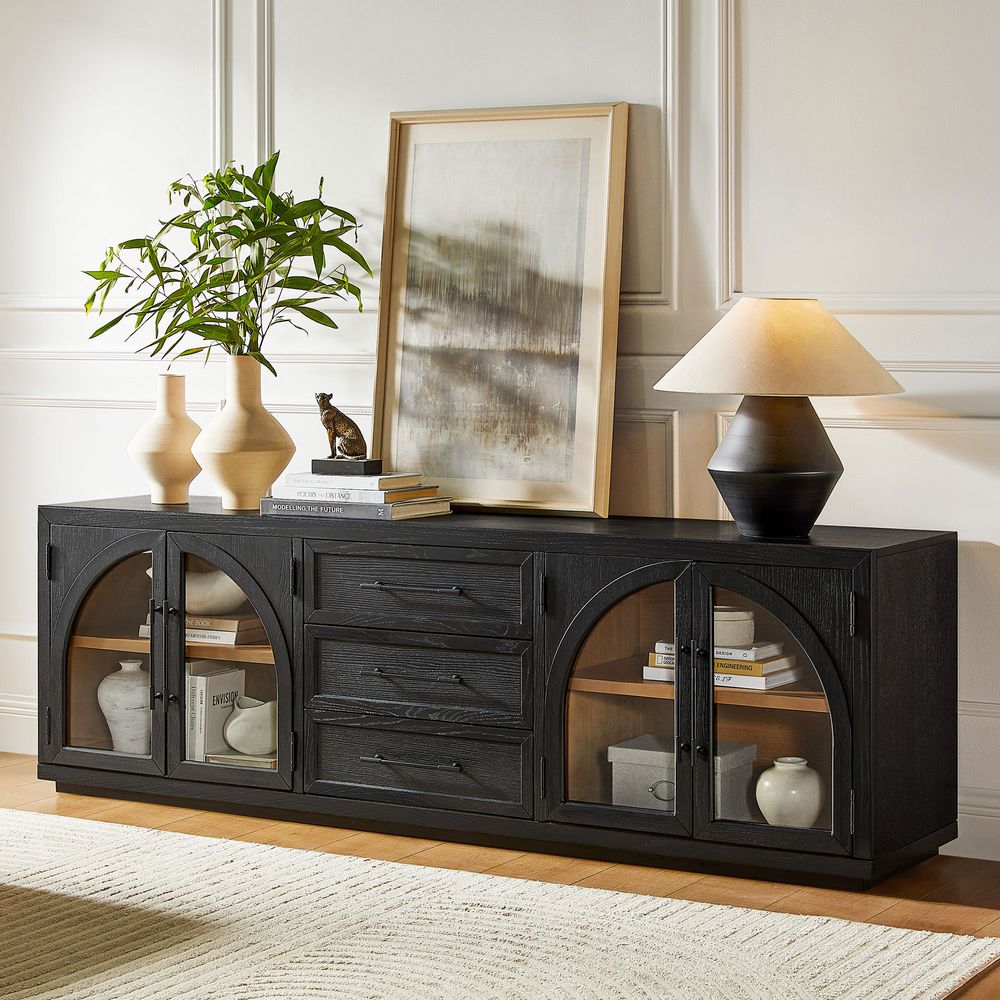
Valborg 80-inch Oak Media Console
View Product
How to Stabilize a TV Stand on Different Floors
The type of flooring can affect how well a TV stand sits. Choose a leveler or support that stays in place, protects the floor, and distributes the cabinet's weight evenly.
Hardwood Floors
Use non-marking furniture levelers or protective pads to prevent scratches. Felt pads can work for minor adjustments, but check them periodically because they may compress or collect grit.
Avoid dragging a loaded TV stand across hardwood. Lift it with help and support the base when moving it.
Carpet
Carpet pile and padding can compress unevenly under a heavy cabinet. Check whether the feet have settled into the carpet and adjust the levelers if needed.
For thick carpet, firm furniture levelers or a properly sized support platform may provide more consistent contact than small shims. Avoid loose pieces of cardboard or wood that can shift under the weight.
Tile Floors
Grout lines, uneven tile edges, and an uneven subfloor can leave one foot unsupported. Position the legs on stable tile areas when possible and use non-slip levelers to correct small height differences.
Avoid hard metal shims that could scratch or chip the tile. If a tile is loose or raised, address the flooring problem rather than trying to compensate with excessive furniture adjustments.
Why Does a TV Stand Wobble When Drawers or Doors Are Open?
An open drawer shifts some of its weight toward the front of the cabinet. A deep or heavily loaded drawer can make an already unstable TV stand rock or lift at one corner.
Start by removing heavy items from the drawer and checking the slides and mounting screws. Bent slides, loose fasteners, or a drawer installed at an uneven height can cause it to pull against the cabinet frame.
Doors can create similar problems if loose hinges pull against the side panels. Check the hinge screws and alignment, and avoid forcing a drawer or door that does not move smoothly.
If the cabinet twists or lifts when a drawer opens, stop using it and remove the TV and stored items. Keep children away until the stability problem is corrected.
How to Prevent Your TV Stand from Wobbling
A few checks after assembly, moving, or rearranging can help prevent small stability problems from becoming more serious.
Distribute Weight Thoughtfully
Keep the TV centered and fully supported. Place heavier devices on lower shelves and spread equipment across the cabinet. Follow the stated weight limits for the top, shelves, and drawers.
Check Hardware After Assembly and Moving
Make sure all connectors are installed correctly during assembly. After moving the stand, check that the legs, brackets, and other accessible fasteners remain secure. If the same connection keeps loosening, inspect it for damage instead of repeatedly tightening it.
Use Anti-Tip Hardware Where Needed
A level TV stand can still tip forward. Use the recommended anti-tip hardware, particularly in homes with children or pets. The CPSC advises securing both furniture and televisions, so check the installation requirements for each separately.
Keep Drawers and Shelves Within Their Limits
Avoid overloading drawers or placing heavy equipment on shelves that are not designed to support it. Remove weight from any shelf that begins to sag and inspect its supports before the board becomes damaged.
Protect the Floor and Keep the Base Clear
Keep small objects, loose rug edges, and cables away from the legs. Even a small object trapped under one corner can make the stand rock. Replace compressed or damaged furniture pads when necessary.
When Should You Repair or Replace a Wobbly TV Stand?
Some stability problems only require a small adjustment, while others indicate structural damage. The following table can help you decide what to do next.
When a DIY Repair Makes Sense
DIY repairs are reasonable when the cabinet is structurally sound and the problem involves an adjustable foot, an undamaged fastener, or a support that has shifted.
Follow the assembly instructions, use the correct tools, and test the empty stand before putting the TV and equipment back.
When to Contact a Professional or Manufacturer
Get professional help if a load-bearing panel is cracked, a leg has split, water has swollen the cabinet, or a connector has pulled out of the material.
You can also contact the manufacturer for warranty support and model-specific replacement parts, including feet, shelves, panels, and fasteners. Drilling new holes without understanding the cabinet's construction can cause further damage.
When Replacement Is the Safer Choice
Replacement may be safer when multiple structural panels have failed, the stand remains unstable after appropriate repairs, compatible replacement parts are unavailable, or the cabinet cannot safely support your TV and equipment.
FAQs
Why Is My TV Stand Wobbling?
Common causes include an uneven floor, feet that do not make equal contact, loose fasteners, weak joints, damaged panels, and uneven weight distribution. Check the base and frame before choosing a repair.
How Do I Stop My TV Stand from Wobbling?
Remove the TV and equipment first. Check whether the floor or the cabinet is causing the movement, then adjust the feet and tighten accessible hardware. If a screw hole, panel, or structural joint is damaged, repair or replace the affected part before using the stand again.
How Do I Level a TV Stand on an Uneven Floor?
Use a level across the top in both directions, then adjust the built-in levelers until all feet make firm contact. If the stand has fixed feet, use stable, non-slip furniture levelers rated for its weight.
How Can I Stabilize a TV Stand on Carpet?
Carpet pile and padding can compress unevenly beneath the legs. Check the feet after the stand has settled, then use purpose-made furniture levelers or a firm support platform designed for the load.
Can I Put Shims Under TV Stand Legs?
Yes. A firm, stable furniture shim can correct a small height difference when the cabinet is otherwise in good condition. Avoid loose stacks of paper or cardboard, and never use a shim to compensate for a cracked leg or damaged frame.
Why Does My TV Stand Wobble When the Drawers Are Open?
An open drawer shifts weight toward the front and can expose problems with the floor, frame, drawer slides, or weight distribution. Remove heavy contents and inspect the slides and mounting screws. If a corner lifts or the stand tips, stop using the drawer until the issue is corrected.
What Should I Do If the Screws Won't Tighten?
Stop turning the screw. The hole may be stripped or the surrounding material may be damaged. The right repair depends on whether the panel is solid wood or engineered wood. Use an appropriate repair method or contact a furniture repair professional.
How Much Weight Can a TV Stand Hold?
Check the product's stated weight capacity and any separate limits for the top, shelves, and drawers. The total capacity does not necessarily apply to a single shelf. Keep heavy equipment low and distribute it across supported areas.
When Should I Replace a Wobbly TV Stand?
Consider replacement when the frame or multiple load-bearing panels are cracked, swollen, or unable to hold fasteners, or when the stand remains unstable after appropriate repairs. If the issue is only a loose leveler or an undamaged fastener, repair may be sufficient.