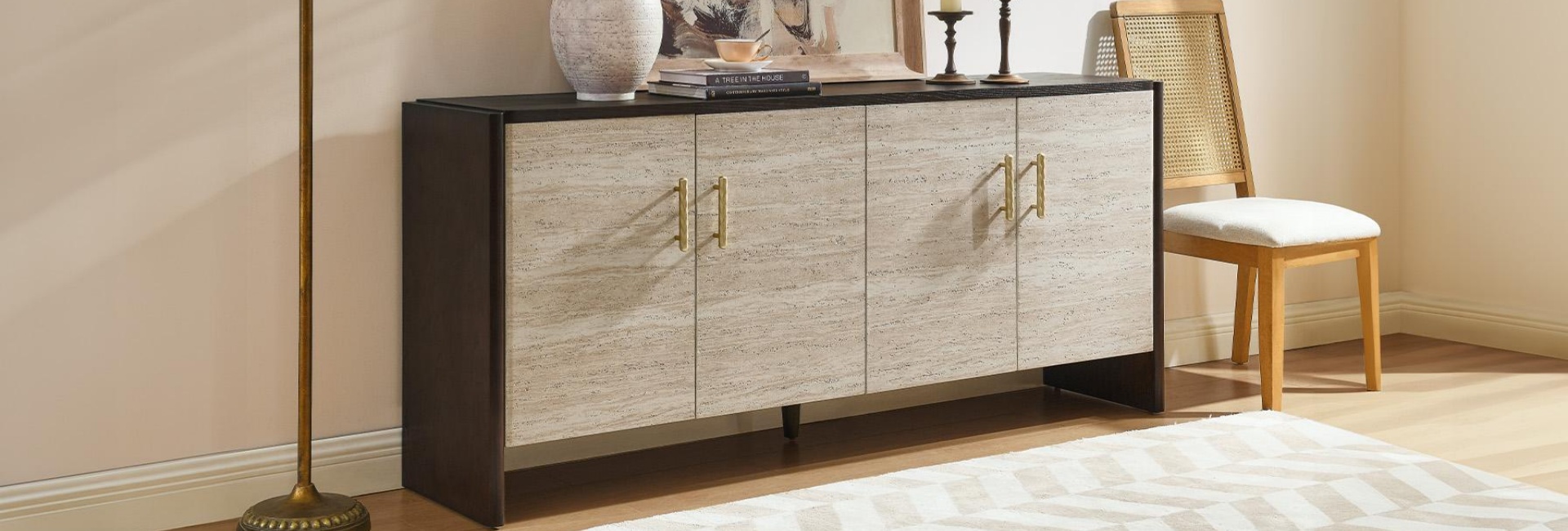
Yes, you can use a sideboard as a media console if its dimensions, construction, and storage layout suit your TV and electronic equipment. A sideboard can provide enclosed storage for media accessories while complementing your living room furniture. However, not every model is designed to support a television directly or provide adequate ventilation for electronics. Before choosing one, consider whether the TV will sit on the cabinet or be wall-mounted, then check the available surface, viewing height, weight capacity, and interior space.
Table of Contents
- How Does a Sideboard Work as a Media Console?
- Why Use a Sideboard Instead of a Traditional Media Console?
- Two Ways to Use a Sideboard as a Media Console
- What to Consider Before Using a Sideboard as a Media Console
- When a Sideboard May Not Work as a Media Console
- Sideboard vs. Traditional Media Console: Which Should You Choose?
- Conclusion
- FAQs
- Can You Put a TV on Top of a Sideboard?
- Can You Use a Sideboard Under a Wall-Mounted TV?
- Is a Sideboard Too Tall to Use as a TV Stand?
- How Wide Should a Sideboard Be for a TV?
- Can You Store a Game Console Inside a Sideboard?
- Will a TV Remote Work Through Sideboard Doors?
- Can You Drill Cable Holes in a Sideboard?
- Is a Sideboard Better Than a Traditional Media Console?
How Does a Sideboard Work as a Media Console?
A sideboard can serve as a media console in two different ways. You can place a television directly on its top or position the sideboard beneath a wall-mounted TV. The second arrangement offers more flexibility because the wall mount supports the screen, while the sideboard provides storage for media equipment and living room essentials.
The main difference between a sideboard and a traditional media console is their intended function. Sideboards are commonly designed for general storage, tableware, and decorative displays. Media consoles are made with television placement and electronic equipment in mind, so their dimensions, cable openings, and storage compartments may be better suited to entertainment setups.
That distinction does not mean a sideboard cannot work. A wide, stable cabinet with suitable interior compartments can store streaming devices, game consoles, remotes, cables, and accessories. It can also provide a surface for a lamp, framed photos, or other decor.
What matters is whether the individual cabinet fits your TV and equipment. A sideboard that works well beneath a wall-mounted TV may not be suitable for supporting a large television. Likewise, a cabinet with spacious storage may still be unsuitable for electronics if it does not provide adequate ventilation.
For direct TV placement, safety deserves particular attention. The U.S. Consumer Product Safety Commission's Anchor It guidance recommends placing televisions on furniture designed to hold them and securing TVs and furniture according to the manufacturer's instructions. Do not assume that a sideboard is suitable simply because it looks sturdy or has a large top.
Why Use a Sideboard Instead of a Traditional Media Console?
A sideboard can be a practical alternative when you want your living room furniture to provide more than a place for the TV. Its enclosed storage, varied designs, and flexible uses make it useful in different living spaces.
More Storage for Electronics and Everyday Items
Many sideboards have cabinet sections, drawers, and adjustable shelves. These features provide room for items that may not fit comfortably in a compact media console.
Depending on the cabinet layout, you can use the interior to organize:
-
Streaming devices, cable boxes, and game accessories
-
Remote controls, HDMI cables, and charging equipment
-
Board games, books, and magazines
-
Headphones, controllers, and spare batteries
-
Household items that you prefer to keep out of sight
Closed storage is useful when the living room also serves as a family room or entertaining space. Smaller accessories can stay behind cabinet doors, while drawers keep frequently used items organized.
However, storage capacity alone does not determine whether a sideboard is suitable for electronics. Measure each device and allow room for plugs, cables, and ventilation. A large cabinet compartment can still be unsuitable if it restricts airflow around heat-producing equipment.
More Furniture Styles to Match Your Living Room
A traditional media console often prioritizes screen placement and device storage. A sideboard gives you more flexibility when choosing furniture that complements the rest of the room.
You can find designs with wood-grain finishes, textured cabinet fronts, sculptural bases, decorative hardware, and different colors. These details can help the media area blend with your existing living room furniture.
For example, the Vera 72-Inch Sideboard features a black or brown oak finish, four arched cabinet doors, and two drawers. Measuring 72 inches wide, it provides enclosed storage for living room accessories while offering a distinctive look beneath a wall-mounted TV.
When choosing a finish, consider the other large pieces in the room, including the sofa, coffee table, and shelving, so the sideboard fits naturally into the overall arrangement.
A Practical Option for Small or Multi-Use Spaces
A sideboard can serve several purposes in an open-plan living and dining area. It can hold media accessories, store table linens, and provide a surface for decorative objects without requiring separate furniture for each function.
For example, a sideboard beneath a wall-mounted TV could store gaming accessories in one section and household items in another. In a combined living and dining room, it can also help connect the two areas through a consistent furniture finish.
However, a sideboard is not automatically a space-saving option. Some models are deeper or taller than traditional media consoles. Check the actual footprint and allow enough room for cabinet doors and drawers to open without blocking a walkway.
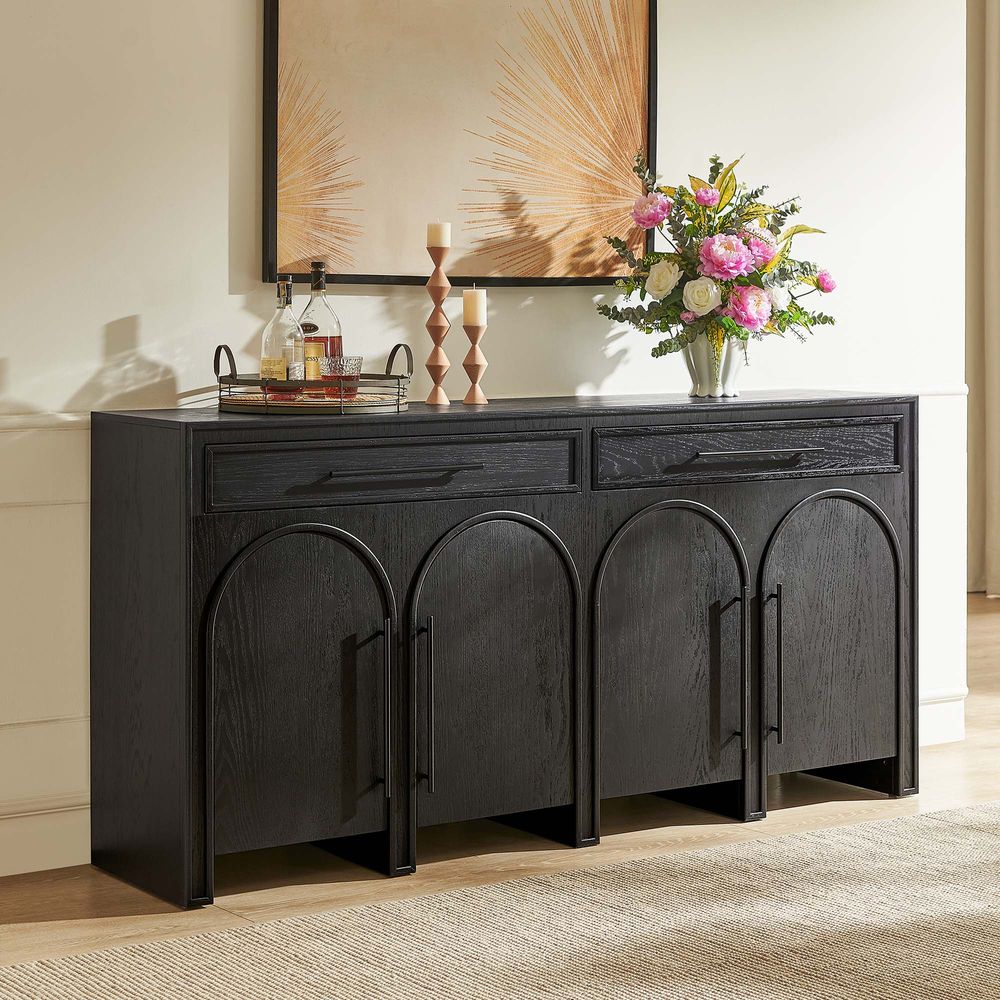
Vera 72-Inch Sideboard
View Product
Two Ways to Use a Sideboard as a Media Console
Before choosing a sideboard, decide whether the TV will stand on the furniture or be mounted on the wall. These arrangements have different requirements for support, height, and available space.
Place the TV Directly on the Sideboard
When using a sideboard as a TV stand, the cabinet becomes the television's supporting base. This arrangement creates a straightforward setup, but the furniture must be suitable for the television.
Start with the TV manufacturer's specifications. Check the assembled width, depth, weight, and position of the feet or central stand. Then compare those measurements with the sideboard's usable top surface, not just its overall dimensions.
Both TV feet should sit securely on the surface without extending beyond an unsupported edge. A decorative lip, raised border, or narrow top can reduce the usable area. A 72-inch-wide cabinet, for example, is not automatically suitable for every 72-inch TV. Screen size is measured diagonally, while the base footprint depends on the television's design.
Also consider the combined height of the sideboard and TV to avoid positioning the screen too high.
Most importantly, confirm that the sideboard is designed to support a television of the relevant size and weight. Follow the TV and furniture manufacturers' instructions for securing the screen and anchoring the cabinet. If the product listing does not specify TV support, ask the manufacturer before placing a television on top.
Place the Sideboard Under a Wall-Mounted TV
A wall-mounted TV gives you more flexibility when using a sideboard as a media console. The wall mount supports the screen, while the cabinet below provides space for electronic equipment, accessories, and decor.
This arrangement can work particularly well with taller sideboards because the TV's position is not determined by the cabinet height. You can set the screen at a comfortable viewing level and choose a sideboard that fits underneath.
Measure the gap between the top of the furniture and the bottom of the TV. Leave enough room for a soundbar if you use one, and make sure the space looks balanced rather than cramped.
You should also consider where the wall outlet and cable connections are located. If the sideboard sits close to the wall, check whether its back panel leaves enough room for plugs and cables. Avoid pushing the cabinet so tightly against the wall that it bends cords or prevents access to connections.
This arrangement is also useful if you already own a sideboard that is not rated to support a TV. The screen remains supported by the wall mount, and the sideboard can provide storage as long as it is stable and positioned safely.
What to Consider Before Using a Sideboard as a Media Console
A few practical details can help you determine whether a sideboard will work with your TV and equipment. Pay attention to viewing height, construction, dimensions, ventilation, and cable access before choosing a cabinet.
TV Viewing Height
A comfortable viewing position depends on where you sit, the height of the sofa, and the size of the television. The center of the screen is often most comfortable when it is near your seated eye level, reducing the need to tilt your head upward throughout a movie or show.
Sit in your usual viewing position and measure the height of your eyes from the floor. Then estimate where the center of the TV screen would sit after accounting for the sideboard and the TV's stand.
For a television placed directly on the furniture, use this calculation:
Screen center height = sideboard height + distance from the TV's supporting surface to the bottom of the screen + half the screen height.
Use the manufacturer's actual screen and stand measurements rather than relying only on the diagonal screen size. If the result places the screen noticeably above your normal line of sight, consider a shorter sideboard or a wall-mounted TV positioned lower.
For a wall-mounted arrangement, the sideboard height does not determine the screen's viewing height, but it does affect the visual spacing beneath the TV. Leave enough room for a soundbar and avoid placing the screen so high that the furniture and TV feel disconnected.
Weight Capacity and Stability
The sideboard must be stable enough for its intended use. If the TV will sit on top, check the manufacturer's stated TV support or load information. Do not rely on appearance, material thickness, or the cabinet's overall weight as proof that it can carry a television.
Pay attention to the construction of the top, side panels, internal supports, joints, and base. A cabinet should sit level on the floor without rocking. Adjustable levelers can help compensate for minor floor differences, but they do not make an unsuitable cabinet safe for a heavy TV.
Also check what a published weight-capacity figure actually refers to. A product page may list a recommended weight capacity without identifying whether it applies to the top surface, internal shelves, or the entire unit. That number should not automatically be treated as a TV-top rating.
For safety, secure the television and furniture according to their respective instructions. The CPSC's Anchor It campaign advises anchoring televisions that are not wall-mounted and securing top-heavy furniture to help prevent tip-overs. This is particularly important in homes with children or pets.
Width, Depth, and TV Stand Compatibility
The sideboard's overall dimensions do not tell you exactly how much space is available for a TV. Measure the usable top surface and compare it with the television's actual base footprint.
Width matters because the TV feet need enough space to sit securely. Depth matters because the feet must fit from front to back without extending beyond the surface. If the television has two separate feet, measure the distance between them as well as their individual dimensions.
The cabinet should also leave enough room for a soundbar and other media equipment.
Hernest's Renata 71-Inch Sideboard measures 71 inches wide, 15.7 inches deep, and 31.7 inches high. At 15.7 inches deep, it has a relatively shallow profile. Compare its interior depth with your devices and allow additional room for plugs and cables before using it for media storage.
Do not choose based only on a rule such as matching the TV's diagonal size to the cabinet width. Compare the actual measurements of the furniture, television, and accessories before deciding.
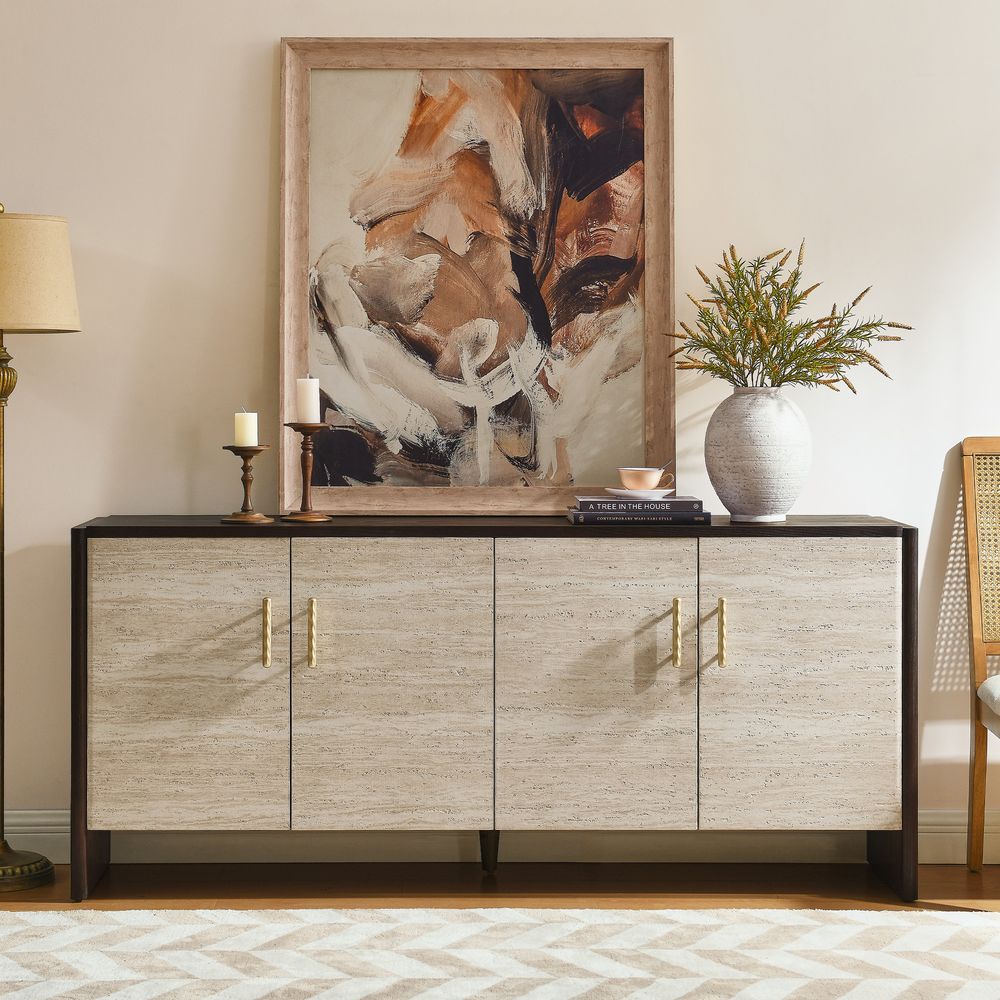
Renata 71-Inch Travertine-Textured Sideboard
View Product
Material and Construction
Material affects the sideboard's appearance, weight, and construction, but the material name alone does not establish whether it can support a TV.
Solid wood, engineered wood, veneers, and mixed-material designs can all be used in well-constructed furniture. What matters for this purpose is the complete structure: the thickness and support of the top, the way the cabinet is joined, the stability of the base, and the manufacturer's load guidance.
Veneer and solid wood construction can both be used in durable furniture. The cabinet's overall structure and manufacturer-rated load capacity matter more than the material label alone.
Construction also matters if you are considering modifications. Drilling through a back panel or removing part of the cabinet may affect its stability, appearance, or warranty. Check with the manufacturer before making changes.
Ventilation and Device Clearance
Electronic equipment needs sufficient airflow to prevent heat from building up. This is particularly important for game consoles, receivers, and other devices that may run for extended periods.
A sideboard with solid cabinet doors can keep equipment out of sight, but a closed compartment may restrict airflow. Before placing a powered device inside, check the manufacturer's ventilation instructions and compare the required clearance with the available interior space.
For example, PlayStation's PS5 ventilation guidance says to keep the console's side and rear vents unobstructed, allow at least 10 cm of free space around each side, and avoid narrow or cramped spaces. These instructions apply to the PS5 specifically; other devices may have different requirements.
Measure the equipment with its cables and plugs connected. A compartment that fits the device body may not leave enough room for connections or airflow. Adjustable shelves can help accommodate different equipment heights, but they do not replace the ventilation space required by the manufacturer.
If the sideboard does not provide enough airflow, use an open shelf or another suitable location for the device. Avoid placing a heat-producing console inside a closed drawer or tightly enclosed cabinet.
Cable Management and Remote Access
TVs and media devices often require several power, HDMI, network, and audio connections. Without a plan, cables can become visible around the sideboard or get trapped between the furniture and the wall.
Check whether the cabinet has pre-drilled cable openings. If it does, confirm that they are positioned where your equipment will sit. You may need more than one route if the TV, soundbar, and streaming devices connect in different areas.
If there are no cable openings, consider a surface-mounted cable raceway or cable clips to route wires neatly along the wall or behind the furniture. This avoids modifying the cabinet. Do not drill through a sideboard unless the manufacturer confirms that the proposed location will not affect its structure or warranty.
Remote access is another detail to consider. Some remote controls use infrared signals, which may not pass through solid or opaque cabinet doors. If a streaming box or other device sits behind a closed door, test whether the remote works from your usual seat.
If the signal is blocked, possible alternatives include placing the device on an open shelf or using a compatible infrared repeater. Keep power outlets and connections accessible so you can unplug or reset equipment without emptying the cabinet.
Storage and Soundbar Placement
The internal layout should match the equipment you intend to store. Measure the width, depth, and height of each device, then compare these measurements with the usable dimensions of the shelves and compartments. Remember to allow space for plugs and ventilation, not just the device itself.
Adjustable shelves can make a sideboard more flexible. They allow you to change the available compartment height for a receiver, game console, or other equipment. Drawers are better suited to smaller accessories such as remotes, controllers, spare cables, and manuals.
The Renata 71-Inch Sideboard features adjustable interior shelves, allowing you to accommodate devices of different heights. Check the interior compartment measurements against your equipment, including the clearance needed for cables and ventilation.
A soundbar needs its own placement plan. If it sits in front of the TV, check that it does not obstruct the screen or extend too far into the room. If it sits inside a cabinet, confirm that the design allows sound to travel freely and that the manufacturer's placement instructions are followed. A closed cabinet door may reduce sound output or affect the performance of some audio equipment.
When a Sideboard May Not Work as a Media Console
A sideboard is not the right choice for every media setup. A purpose-built media console may be more practical if the cabinet cannot meet the basic requirements for TV placement and electronic equipment.
Consider another option when:
-
The TV cannot sit securely on the top. The usable surface may be too narrow or shallow, or the manufacturer may not confirm that the cabinet is designed to support a television.
-
The screen would sit too high. A tall sideboard can make direct TV placement uncomfortable, particularly when paired with a high sofa or a large screen.
-
The cabinet is unstable. A sideboard that rocks, has weak supports, or cannot be properly secured is not a suitable base for a television.
-
There is not enough ventilation. A closed compartment without suitable airflow may not be appropriate for a game console, receiver, or other heat-producing equipment.
-
The interior cannot accommodate your devices. A large exterior cabinet may still have shallow shelves, fixed dividers, or narrow compartments.
-
Cable routing would require risky modifications. If the cabinet needs extensive drilling or structural changes, the work may not be worthwhile.
-
You need frequent access to equipment. A cabinet with difficult-to-open doors or poorly placed compartments can make everyday use inconvenient.
A traditional media console may be a better fit when you need a lower profile, built-in cable openings, open equipment shelves, or a layout designed around a television and audio components. If you prefer the appearance of a sideboard, look for a piece specifically described as suitable for media use rather than assuming any storage cabinet will work.
Sideboard vs. Traditional Media Console: Which Should You Choose?
The choice depends on whether you prioritize general storage and furniture styling or a dedicated entertainment setup. A sideboard can offer more enclosed storage and a wider range of designs, while a traditional media console may be more convenient for organizing TV equipment.
Choose a sideboard if you want a piece that complements the rest of your furniture, provides enclosed storage, and accommodates your media equipment. It can be particularly useful when the TV is wall-mounted and the cabinet mainly serves as a storage base.
A traditional media console is often the more straightforward option if you need built-in cable management, open ventilation, and a lower TV-supporting surface. It may also be preferable when the television will sit directly on the furniture and you want a product with clearly stated TV support.
Your decision should come down to the dimensions, construction, storage layout, and equipment requirements rather than the furniture category alone.
Conclusion
A sideboard can work well as a media console when its dimensions, storage, and construction match your entertainment needs. Wall-mounted TVs offer more flexibility in choosing a cabinet, while TVs placed directly on a sideboard require verified weight support and a stable surface. Compare the furniture dimensions with your TV and equipment before making your choice.
FAQs
Can You Put a TV on Top of a Sideboard?
Only if the sideboard is designed to support a television of that size and weight. Check the manufacturer's TV support information, compare the TV's base footprint with the usable top surface, and secure the television as instructed. A general furniture weight-capacity figure is not necessarily a TV-top rating.
Can You Use a Sideboard Under a Wall-Mounted TV?
Yes. When the TV is secured to the wall, the sideboard can provide storage for media equipment, remotes, cables, and accessories. Check the cabinet's height, stability, and interior layout, and leave enough space for a soundbar if you use one.
Is a Sideboard Too Tall to Use as a TV Stand?
Not necessarily, but its height can place the screen above a comfortable viewing position. Sit in your usual viewing spot and estimate where the center of the screen will sit after adding the TV and its stand. If the screen feels too high, consider a shorter cabinet or a wall-mounted TV positioned closer to seated eye level.
How Wide Should a Sideboard Be for a TV?
There is no single width that suits every television. Measure the distance between the TV's feet and check the full footprint of its stand. The feet should sit securely on the usable surface. Also consider how the cabinet's width looks against the TV and the available wall space.
Can You Store a Game Console Inside a Sideboard?
You can, but only if the compartment provides enough room and ventilation for the console. Check the device manufacturer's clearance requirements, including space around the vents and connections. Avoid placing a heat-producing console in a cramped, unventilated cabinet or closed drawer.
Will a TV Remote Work Through Sideboard Doors?
It depends on the remote and the cabinet door material. Infrared remotes may not work through solid or opaque doors because the signal can be blocked. You can keep the device on an open shelf or use a compatible infrared repeater if the equipment supports one.
Can You Drill Cable Holes in a Sideboard?
Do not drill without checking with the furniture manufacturer first. A back panel may contribute to the cabinet's stability, and drilling could affect its structure or warranty. Surface-mounted cable raceways and clips are alternatives when you want to avoid modifying the furniture.
Is a Sideboard Better Than a Traditional Media Console?
A sideboard may be better when you want enclosed storage, versatile furniture styling, and a cabinet that can serve more than one purpose. A traditional media console may be more convenient when you need built-in cable management, open ventilation, and a lower TV-supporting surface. Choose based on your equipment and room layout.